

Brilliant Living is a gorgeous digital kit by Nitwit Collections and I was thrilled to collaborate with them for the March 2026 Silhouette Secrets+ newsletter. Newsletter subscribers had the chance to grab the Brilliant Living Knick Knack kit for free exclusive to them in March. Throughout the month I created several different projects using the kit to show it’s versatility from layered cards to tags and even sublimation projects too! Find all the details below.
Affiliate links may be present in the following blog post and as an Amazon Associate, I earn from qualifying purchases.

Crafting Creativity with Nitwit Collections – Brilliant Living Digital Kit
What a bold, beautiful kit! Check out the full Brilliant Living collection on the Nitwit Collections shop HERE.
Project #1 – Layered Card Designs
This card has 4 layers of the elements stacked on top of each other with foam tape to give it dimension.

Here is a look at the print and cut page printed out ready to cut around each of the layers.

There are so many options with a digital kit and you can mix and match, add more layers, decrease the layers, or only print one layer for a project as well.
If you are mailing the card, you may need to keep the thickness of the layers in mind when creating it.
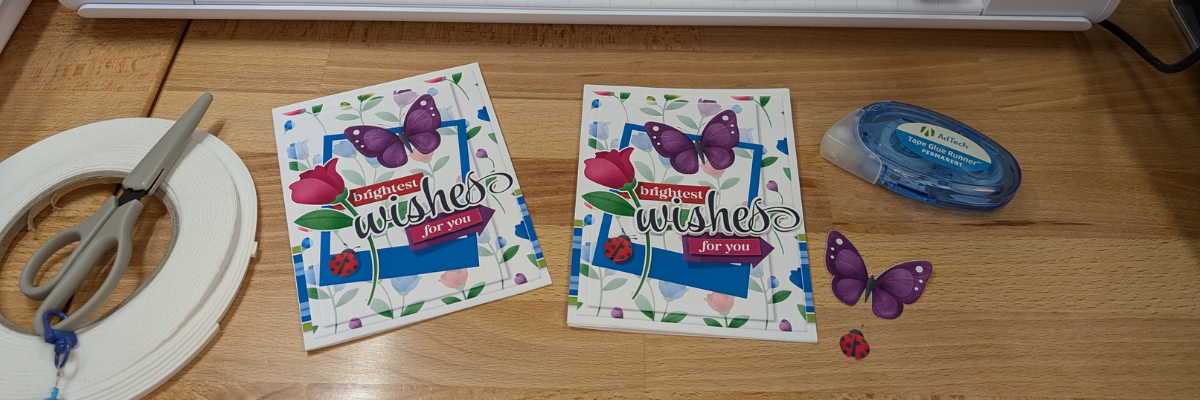
So for the next cards, I stacked elements together and then was able to print 2 card fronts on one sheet of paper. Each of these designs have different elements that can be layered together.

Here is a look at the final results from this printed page.

The card on the left side only has the “for you” and the “ladybug layered”, while the card on the right has the “wishes, for you, and the ladybug layered”.

There were a couple intricate areas that may not cut well for all users. I was able to get these ladybugs with their antennae’s to cut, but had to be extremely careful removing them off the cutting mat.
However the butterfly antennae’s were just too delicate, which is another reason you may want to add that layer directly to the card background instead of trying to add it as a 3-D layer.
But you never know until you try. The Silhouette machine might amaze you in the cut it can get.

Watch how I created these layered card designs with Silhouette in this video on the Silhouette Secrets+ YouTube channel – Layered Card Design with Brilliant Living Digital Kit – Step-by-step Silhouette tutorial

Supplies Used:
- Silhouette Studio® Software
- Brilliant Living Knick Knack
- Epson Presentation Paper – Matte
- Canon TS9521C printer
- Neenah 110 lb cardstock
- Silhouette Cameo 5 alpha
- Silhouette Autoblade
- Silhouette Cutting Mat
- Brilliant Living Collection by Nitwit Collections – Coordinating Collection
- Double sided foam tape
- Adtech Tape Runner
- Silhouette Tool Kit
- Detail scissors
Additional Resources:
- Master Print and Cut with Silhouette step-by-step class
- Print and Cut Resources
- A to Z Silhouette Resources
Project #2 – Layered Tag Designs with Brilliant Living Digital Kit
Being able to create your own designs means that you can make them any size you want and create as many as you need in the moment. I started with the idea to create only 2 tags, but it ended up being 4 complete designs.

I used 2 sheets of paper to print and created 1 layered tag and one simple print and cut tag on each sheet.

Here is a look at one of the layered tags using the foam tape to pop up the dimension.
The great part about creating your own tags is there are no rules. Flower hangs off the edge, no problem! Want the design to be flush on the edges – no problem! Or mix and match. And using a digital kit allows you to mock it up first in the Silhouette software before you even cut the elements out.
Watch the video tutorial for these designs on the Silhouette Secrets+ YouTube channel HERE.

Supplies Used:
- Silhouette Studio® Software
- Brilliant Living Knick Knack
- Epson Presentation Paper – Matte
- Canon TS9521C printer
- Neenah 110 lb cardstock
- Silhouette Cameo 5 alpha
- Silhouette Autoblade
- Silhouette Cutting Mat
- Brilliant Living Collection by Nitwit Collections – Coordinating Collection
- Double sided foam tape
- Adtech Tape Runner
- Silhouette Tool Kit
- Detail scissors
Project #3 – Quick Print and Cut Cards with Brilliant Living Digital Kit
I used the same techniques I shared in the step-by-step video tutorial – Layered Card Design on the Silhouette Secrets+ YouTube channel and created a little bit different layout for two 5″ x 7″ cards.

Here is a look at the card designs in Silhouette Studio.

And then I simply chose letter size paper and rotated the designs 90 degrees so I could print 2 on a page.

A few slices with my paper trimmer and my card front were ready to attach to a base.
Quick and easy cards in minutes with the Brilliant Living Knick Knack kit by Nitwit Collections.
Supplies Used:
- Silhouette Studio® Software
- Brilliant Living Knick Knack
- Epson Presentation Paper – Matte
- Canon TS9521C printer
- Neenah 110 lb cardstock
- Silhouette Cameo 5 alpha
- Silhouette Autoblade
- Silhouette Cutting Mat
- Brilliant Living Collection by Nitwit Collections – Coordinating Collection
- Adtech Tape Runner
- Silhouette Tool Kit
- Detail scissors
Project #4 – Sublimation Projects with Brilliant Living Digital Kit
Digital designs worked perfectly for sublimation projects! I created 4 sublimation project designs on 1 sheet of sublimation paper.

I made a decorative panel, cover for a compact mirror case, a bookmark, and a coaster.
The colors are so bright and brilliant with these projects, except the center of the coaster turned out a bit washed out. This can happen with hardboard at times and moisture affecting the outcome.

Watch how I created these sublimation projects with Silhouette and sublimation blanks on the Silhouette Secrets+ YouTube channel HERE.

Supplies Used:
- Silhouette Studio® Software
- Brilliant Living Knick Knack
- Epson F170 Sublimation Printer
- Trex Sublimation paper
- Artesprix Protective Paper
- Artesprix Heat Tape
- Artesprix Sublimation Panel
- Artesprix Sublimation Bookmark
- Sublimation coaster
- Sublimation compact mirror
- Artesprix Protective Mat
- Silhouette cloChe heat press
- Brilliant Living Collection by Nitwit Collections – Coordinating Collection
Additional Resources:
- Sublimation with Silhouette
- Pattern Fill
- How to Use Digital Stamps in Silhouette – tips for Troubleshooting
- A to Z Resources for Silhouette
Featured Designer – Nitwit Collections
A great big THANK YOU to Nitwit Collections for collaborating for the Silhouette Secrets+ newsletter!
Make sure to follow Nitwit Collections for more amazing designs:
- Nitwit Collections Shop
- Nitwit Collections Facebook Page
- Nitwit Collections Pinterest
- Nitwit Collections YouTube channel
Sign up for the Silhouette Secrets+ newsletter HERE so you don’t miss out on future collaborations.

Silhouette Secrets+ Newsletter
Never miss out on the news, tips, “secrets”, deals, classes, and more that I share on Silhouette Secrets+. Sign up for the newsletter and get information delivered to your inbox every Friday.
Unsubscribe at anytime.
Did this spark some new creative ideas for you? It’s always inspiring to see how a single flower and greenery design can bloom into so many completely different projects! I had so much fun reimagining this one design across five unique creations and showing just how versatile a single file can be. If you’re looking for even more inspiration, tips, and creative project ideas, be sure to browse the Crafting Creativity section on the Silhouette Secrets+ website — click HERE to explore!
Save this for future reference by pinning the image below.

Enjoy !
THANK YOU for your support! How can you help? Click HERE & buy a coffee.
Every little bit helps with the cost of running the site.

Silhouette Classes
Never stop learning! Let me help you take the anxiety out of learning with Silhouette and get to creating faster! My Silhouette classes are heavily focused on software, so you can take the skills & techniques taught and apply them to many future projects!


**This post may contain affiliate links. What that means is that I may receive compensation if you purchase through the links I have provided. The price you pay for the product or service is not higher but I may get compensated for sharing.
Discover more from Silhouette Secrets-Swift Creek Customs
Subscribe to get the latest posts sent to your email.












why can’t Silhouette offer more, we all know how to make cards, stickers little boxes, why not someone offer Appliques, quilt blocks, small sewing, and 3-D something you can create with, there is another machine that offer so much more, I have my silhouette machine, and love it, but I never see any thing about it, no marking, just saying, Please put something up that will draw a crowd, the best designs I have are when you first started, not interested in paint blotches
I have no control over what Silhouette does or what their designers put into the Silhouette Design Store. I teach others how they can use their Silhouette machines with and without designs from the Store.
Please direct all your requests and feedback directly to Silhouette at support@silhouetteamerica.com and media@silhouetteamerica.com