
Emerald Creek Design Team – July 2026
Today I’m sharing a card design where I combined a stamp from Emerald Creek and used it with an easel card cut file from Lori Whitlock. I cut all of the pieces for the easel card and then added special touches to it with stamping, watercolors, and a little bit of sketching with a pen. One easel card cut file can be used to create so many different kinds of cards. Or scale the card file up and use it as home decor too!

Affiliate links may be present in the following blog post and as an Amazon Associate, I earn from qualifying purchases.
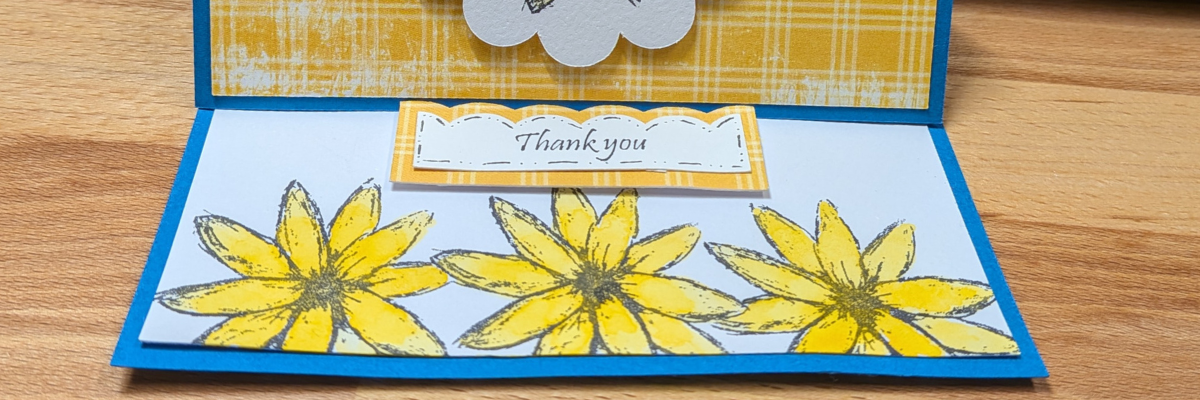
Rather than keep the base of the card plain white, I chose to use the same flower stamp and stamp a few more along the bottom edge. I first stamped onto a sticky note and then cut around the stamped image to use it as a mask over top of the center flower, so the side flowers look like they are behind the middle image.

Then I used a small Thank You stamp from Emerald Creek on the sentiment cut piece and then did a little bit of pen work around the edges to make it stand out. It is matted onto the same background paper as the top card piece and then popped up with foam tape. This little piece gives the card the support to create the easel part.

Change it up with different flowers or focal designs and mix and match sentiments. One card cut file can open up a world of possibilities.

It is great to have the option to be able to print and cut sentiments, but often times if I’m only making up a card or two, I know it will take me longer to find more designs to fill the page. Having a few key sentiment stamps can be very handy to finish up the card quickly.
This easel card style is one that you could easily have all the pieces cut and customize it as needed whenever you need a quick card to send out too!
The original file has holes around the scalloped edges, and I didn’t want those for this design. It was an easy modification to do by selecting the scallop piece, right clicking on it, and choosing release compound path. It may also need to be ungrouped too. Then I could move the large scallop piece away and deleted the small circles.
Supplies Used for Easel Card:
- Silhouette Cameo, Autoblade, Cutting Mat
- A2 Easel Card Thank You Butterfly by Lori Whitlock – Design #117494
- Cardstock
- Mixed Media Paper
- Thank You Stamp by Emerald Creek
- Sketchy Wildflowers stamp by Lori Warren
- Ranger Archival Ink – Black
- Lemoncello Paper by Pam Bray
- Watercolors by Emerald Creek
- Adtech adhesive tape runner
- Foam tape
- Le Pen – Black
Save this for future reference by pinning the image below.

Enjoy !
THANK YOU for your support! How can you help? Click HERE & buy a coffee.
Every little bit helps with the cost of running the site.

Silhouette Classes
Never stop learning! Let me help you take the anxiety out of learning with Silhouette and get to creating faster! My Silhouette classes are heavily focused on software, so you can take the skills & techniques taught and apply them to many future projects!


**This post may contain affiliate links. What that means is that I may receive compensation if you purchase through the links I have provided. The price you pay for the product or service is not higher, but I may get compensated for sharing.
Discover more from Silhouette Secrets-Swift Creek Customs
Subscribe to get the latest posts sent to your email.