
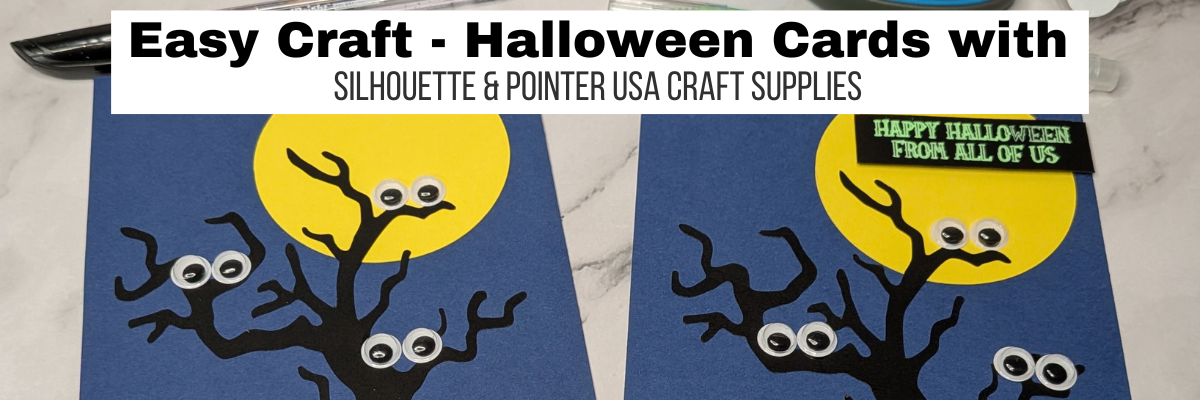

I love creating for Halloween! These Halloween cards are a few cut outs of cardstock, a sketched sentiment, googly eyes, and some glue. When I received the package with googly eyes in it, I knew I wanted to use them.

Googly eyes hold special memories for me. Years ago, when I first started scrapbooking and going to crops with friends, I somehow ended up collecting googly eyes. It became a little joke when we’d go out shopping, and the topic was always brought up on whether I needed more googly eyes in my stash. Fast forward almost 20 years later and I still have some of those googly eyes. Good thing googly eyes don’t spoil. And now I have a few more to play with.

Want a giggle? Check out what I did this month in our house with the googly eyes HERE.
Full disclosure: I have received products from Pointer USA for testing and was paid for the Instagram reel created (October 2026). My opinions are my own and I was not paid to promote with this blog post.
Affiliate links may be present in the following blog post and as an Amazon Associate, I earn from qualifying purchases.
I have been creating with craft supplies from Pointer USA and love when things turn out better than the original idea in my head. Check out my previous fall cards blog post HERE.
I am sharing the Instagram reel that I created that shows the process. This is a very quick glimpse at my creation process, as reels are designed for short form & it takes longer than 50 seconds to complete the project. Find more details, a supply list, and screenshots of my design in Silhouette Studio below the reel.
Supplies Used for Halloween Cards with Silhouette
- Silhouette Studio software
- Silhouette Cameo or any model cutting machine
- Silhouette Pen Holder – Type B
- Spooky tree design by Sweet Afton
- LW Spooky font by Lori Whitlock
- Cardstock
- Pens of choice
- Paper Trimmer
- Googly Eyes
- Scissors
- Adhesive: Glue Stick, Tacky Glue, Adhesive Foam Tape
Halloween Cards Created with Silhouette
I started by creating the Halloween card design in the Silhouette software and testing out the layout and different fonts for the sentiment.

Once I had the card layout put together, I started cutting out the pieces. The original tree I had picked was a little too intricate for this cut. After several tests with that design, I switched to a different tree design and it worked beautifully.

As you can see, these cards are very simple with just a few cuts. You could make up a bunch in no time at all.
Once the tree and moon were cut, I set up for the sentiment to be sketched. I started with a black glitter pen.

And then one thing led to another, and I grabbed a set of Neon pens and sketched neon green onto black cardstock for a second card design.

I love how these Halloween cards turned out! Simple and fun!

Find more Silhouette Resources HERE.
Save this for future reference by pinning the image below.

Enjoy !
THANK YOU for your support! How can you help? Click HERE & buy a coffee.
Every little bit helps with the cost of running the site.

Silhouette Classes
Never stop learning! Let me help you take the anxiety out of learning with Silhouette and get to creating faster! My Silhouette classes are heavily focused on software, so you can take the skills & techniques taught and apply them to many future projects!


**This post may contain affiliate links. What that means is that I may receive compensation if you purchase through the links I have provided. The price you pay for the product or service is not higher, but I may get compensated for sharing.
Discover more from Silhouette Secrets-Swift Creek Customs
Subscribe to get the latest posts sent to your email.






Cute cards! I too have a fondness/obsession for googly eyes. LOVE how you used some to give the birds an eyelift. 😀