Posted on — Leave a comment

DIY 3D Halloween Busted Canvas with Silhouette

Silhouette Secrets+ with EllyMae

I absolutely love papercrafting — and this project reminded me just how much! While creating this DIY 3D Halloween Graveyard Busted Canvas with Silhouette, I honestly thought, maybe I should give up everything else and just be a paper craft artist! That’s how much fun this was to make. Using designs by Paper Beats Dynamite, I built a spooky graveyard scene complete with a 3D tombstone and a skeleton coffin. The dimensional layers, textures, and eerie details came together perfectly, making this one of my favorite Halloween projects yet.

Photo shows a DIY Halloween home decor project of a busted canvas with a 3D skeleton coffin and tombstone created entirely out of cardstock.

Affiliate links may be present in the following blog post and as an Amazon Associate, I earn from qualifying purchases.

Last year I created several busted canvas projects and it has been on my mind ever since. I had a 16″ x 20″ black canvas that had a hole in it and I’ve kept it around for the perfect project. When I started creating a class for the 2025 Scrapbook Fun Summit and thought I’d share the technique for a card, this Halloween themed canvas started taking form in my head too.

If you have never made a busted canvas before and want to see the process, check out this blog post – DIY Busted Canvas Art: Transform Your Wall Decor with This Trendy Technique where I shared step-by-step instructions and video too!

I started by gathering some supplies in the Halloween decor isles. This was one of those projects that was not a set plan and came together as I went along. I wasn’t sure exactly on what I wanted to use, so I just grabbed things that I thought might work.

A variety of crafting supplies for a Halloween canvas project, including a black canvas, decorative items like skeletons and chains, and adhesive materials, arranged on a wooden tabletop.

Supplies Used for the Halloween Graveyard Busted Canvas:

I took a lot of photos along the way of the entire process, I’ll share a few below, but make sure to check out the video where I share more on the creative process!

Creative Process – Halloween Busted Canvas with Silhouette

Here is a look at the front pattern I used for this busted canvas. It is a large canvas design so I had to piece 3 sheets of paper together to cover it. Since it will be cut up, it won’t be as noticeable that the pattern is not continuous.
Of course, during the project creation my supervisor, Goldy, had to be right there helping too.

A crafting workspace featuring a skeleton figure & chain on a table, a cat sitting in the background, and various tools such as scissors, a ruler, and a bottle of Mod Podge. A patterned sheet with trees and tombstones is centered on the table.

Once the glue was dry, I could add the pattern paper to the backside of the canvas and when everything was good and dry, then I could cut the busted canvas design and start to curl the edges back. I have found after making several of these that if you “train” the curls back and let them rest, they will stay better than if you try to immediately glue them down.

An overhead view of a crafting workspace featuring a decorative frame with gold and black patterned pieces arranged in an oval shape, surrounded by crafting tools such as scissors, a foam brush, a glue gun, and a ruler on a blue cutting mat. Halloween Canvas Creation

Next up was to secure the plastic chains to the back of the canvas before adding the background layer.

A decorative Halloween Canvas frame featuring a chain design with yellow and black patterned accents, set against a gray wall.

Before proceeding, I had to test it to make sure that the skeleton would be able to sit in the frame.

A decorative Halloween Canvas frame featuring a skeleton holding up arms, surrounded by yellow patterned paper and a chain, set against a gray background.

For this project, I actually made up 3 different backgrounds until I found the one that I settled on, so you will see that the final background is different from the beginning to the final results.

And then came the construction of the elements to add onto the front of the canvas. I started with the Skeleton Coffin by Paper Beats Dynamite. At the time of this project, I was testing the brand new Silhouette Cameo 5 alpha and was impressed with how the cuts came out with this detailed design.

A workspace featuring a Silhouette cutting machine, assorted cardstock pieces, including brown coffin shapes and skeleton designs, alongside crafting tools and a laptop.

I do not recommend starting with such a detailed, intricate design when testing a new machine model, especially for a beginner. This was quite a test for a new out of the box machine and while it turned out well, that may not always be the results.

I followed the instructions from the designer for assembly and it turned out AMAZING! Yes, there was a happy dance and a bit of gloating that happened. And let me tell you, YOU SHOULD! If you create an amazing project that you love, cheer for yourself!

A handcrafted 3D skeleton coffin model created with cardstock, featuring a skull inside, adorned with chains and painted in earthy tones. Various art supplies are visible in the background.

Here is a close up at the top of the coffin that shows all the details

A creatively designed 3D skeleton coffin made with cardstock with a skull visible through an open window, featuring skeletal hands and a rusty lock, set against a crafting machine.

And the bottom of the coffin – look at those details! I doubted myself and didn’t think it would turn out like the designer’s original design. I’m so glad I was wrong. I followed the instructions and it turned out fantastic.

A detailed close-up of a 3D faux wooden box model featuring a chain and lock, with several wooden planks arranged nearby on a clear surface.

I do have years of paper crafting experience, however, I do believe that any Silhouette user can create this with a bit of practice, following the instructions, and the time to invest in creating it. The biggest factor into projects like this is TIME. It takes time for all of it to come together from the cutting, assembly, and dry time.

This element was ready and then on to the next piece.

A small skeleton figure stands next to a decorative 3D faux wooden coffin made from cardstock with a skeleton inside, on a crafting table.

Next up was a 3D Tombstone by Paper Beats Dynamite. I did not take many photos of the cutting process, but here’s a look after I started folding the pieces for assembly.

A gray paper tombstone craft with 'R.I.P.' printed on it, surrounded by crafting tools like glue and markers on a wooden table. Halloween Canvas Creation

I again followed the instructions provided by the designer to assemble and paint the tombstone.

Supplies for a DIY project including a mini tombstone marked 'R.I.P.', a bottle of Mod Podge, a set of paintbrushes, and several bottles of DecoArt acrylic paint in various colors.

The hardest part about these projects was waiting for things to dry before I could move on to the next step. I often get involved in multiple projects at once because I’m waiting for things to dry on one and I can’t just sit idle.

A decorative 3D tombstone made from cardstock for a Halloween canvas, marked 'R.I.P.' surrounded by various paint bottles and a paintbrush on a crafting table.

Once everything was dry, it was time to put it all together.

A decorative Halloween canvas featuring a skeleton, a coffin, a tombstone marked 'R.I.P.', and various skeleton and bone accents, set against a patterned background.

My husband mentioned that the skeleton was too clean, so I had to dirty it up a bit with some Distress spray.

A tabletop scene featuring a skeleton model surrounded by dirt and crafting tools, including a paintbrush and a bottle, on a cutting mat.

Here is the first final test hanging on the wall.

A decorative Halloween canvas featuring a skeleton, chains, faux cobwebs, a small tombstone marked 'R.I.P.', and other spooky elements, all set against a patterned background.

After letting it sit a bit, we decided that the background was too similar to the front. Back to the studio I went to make a new background. I definitely like the spooky graveyard background for the final-final result even better than the first option.

A whimsical Halloween canvas featuring a skeleton seated among dark webbing, bones, a faux coffin, and a gravestone inscribed 'R.I.P.' with a spooky background of a barren tree and mist.

Here are a couple close ups of the 3D skeleton coffin and tombstone in place on the canvas.

A decorative display featuring a 3D faux wooden coffin created with cardstock with chains and a skeleton hand, alongside a tombstone marked 'R.I.P.' and other Halloween-themed decorations like skulls and cobwebs.

I added in some skulls, bones, and fabrics to add more texture and elements to the entire piece.

A decorative 3D tombstone created out of cardstock with the letters R.I.P. surrounded by fake skeleton limbs and cobwebs, set against a dark background.

I had so much fun creating this piece of art that will be displayed year after year. The entire process took several weeks to complete but was so worth the end result.

Do you create 3D designs? It’s one of my favorite things to do and I really should make more time for it.

Save this for future reference by pinning the image below.

A 3D Halloween canvas featuring a skeleton sitting among tombstones and a spooky background with trees and fog, decorated with orange and black elements.

Enjoy !

THANK YOU for your support! How can you help? Click HERE & buy a coffee.
Every little bit helps with the cost of running the site.

Silhouette Classes

Never stop learning! Let me help you take the anxiety out of learning with Silhouette and get to creating faster! My Silhouette classes are heavily focused on software, so you can take the skills & techniques taught and apply them to many future projects!

Silhouette step-by-step Classes by Silhouette Secrets+

Silhouette Secrets+ with EllyMae
**This post may contain affiliate links. What that means is that I may receive compensation if you purchase through the links I have provided. The price you pay for the product or service is not higher but I may get compensated for sharing.

Posted on — Leave a comment

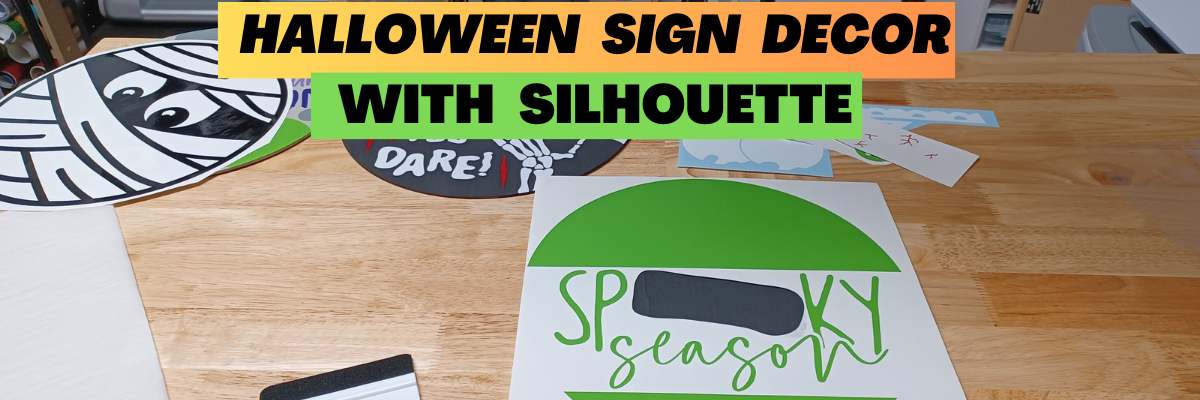
Halloween Sign Decor with Silhouette

Affiliate links may be present in the following blog post and as an Amazon Associate, I earn from qualifying purchases.

Just popping in to share a couple Halloween signs I finished up this week. I mean, there is nothing like decorating 2 days before Halloween right?

I have been collecting round door hangers designs by Diva Watts Designs for a long time and finally just told myself to stop everything else and get it done! She has so many different design styles available, make sure you go check out her store HERE. I’ve already got a list started for Fall and Christmas.

Here are the first 3 I made.

Supply list

I started by painting the boards. I painted both sides and let it dry overnight.

While the boards were drying, I cut all of the Oracal adhesive vinyl for each sign with the Silhouette Cameo 5 and organized them into piles. This way it was ready for when the boards were completely dry.

And then I started adding each piece to transfer tape and applying to each sign. It went pretty quick, since I had it all cut and organized by sign.

I thought this one was appropriate for my son’s room.

I just loved the look of this one with the eyeballs.

But this one I think is my favorite. I think it just may be because it has so many pieces to puzzle together and it wasn’t that hard.

And this one was just dying to come out….

Hinge Method

Have you ever used the hinge method?

This allows you to apply a small section of the design and get it placed without committing everything at once.

I removed all of the backing off of the vinyl and then cut the backing into sections.
Then removed only the top section and lined it up.

This allowed for easier positioning and I didn’t have to commit the entire design all at one time.

Then I removed each section and smoothed it down to the wood round.

So fun! Can’t wait to make more! I may need to buy another package of wood rounds as I keep seeing more doors in my house that need a sign.

Save this for future reference by pinning the image below.

Enjoy !

THANK YOU for your support! How can you help? Click HERE & buy a coffee.
Every little bit helps with the cost of running the site.

Silhouette Classes

Never stop learning! Let me help you take the anxiety out of learning with Silhouette and get to creating faster! My Silhouette classes are heavily focused on software, so you can take the skills & techniques taught and apply them to many future projects!

Silhouette step-by-step Classes by Silhouette Secrets+

**This post may contain affiliate links. What that means is that I may receive compensation if you purchase through the links I have provided. The price you pay for the product or service is not higher but I may get compensated for sharing.
Posted on — Leave a comment

Siser Glow HTV – Part 2- Loving it more!

I’ve had so much fun with the Siser Glow HTV! If you missed Part 1 – check it out HERE. Siser Glow HTV can be cut with any cutting machine and I was swapping back and forth in my creations between Silhouette and Siser machines. Sometimes I had both going at the same time.

Affiliate links may be present in the following blog post and as an Amazon Associate I earn from qualifying purchases.

I had Siser Juliet set up in one room cutting away, while my Silhouette Cameo was cutting next to my computer (shown in Siser Glow HTV Part 1). With the Siser Juliet connected through WIFI, I regularly cut from one room to the next. The Juliet roll holder came in handy for these projects and my rolls of Siser Glow HTV.

One of the most important steps you can do is – test cut, test cut, test cut. It seems like such a basic step, but it can save you!!! Siser machines make it so easy to perform this simple action directly on the touchscreen and it will save you so much in time, materials, and frustration.

For more tips on getting your Siser machine and blade set up for perfect cuts, check out these videos on the Swift Creek Customs YouTube channel.
– Siser Blade Depth & Installation
– Siser Test Cut & Force Test
– Siser Cut Settings & Presets
– Siser Area Test – a material saver, just like test cut!!!

I think I found my new favorite shirt for awhile. I’ve been collecting these designs by Sophie Gallo just waiting for the perfect projects. Find this design HERE.
Here is a look at the back of the shirt.

I don’t know why I have never really decorated the back of my shirts and I hadn’t ever though about it until I started following MammaBearKay and watching her post her shirts. She runs an awesome business with adult humor shirts.

Here is a look at the Siser Glow HTV in the dark.

And the same shirt under the blacklight.

I’ve already several compliments on it when I have worn it out. Everyone gets a good laugh.

Here is a look at the front. I just took the little guy out of the original design and cut him smaller for the front. If I did this over, I think I’d put him on the other side, but it’s done now and I can always make another.

Let’s light him up!

After dark

And under the blacklight.

But I didn’t stop there…..

My son loves games, so this design from Leonardo Design Studio was perfect!

What kid doesn’t like a glow-in-the-dark shirt? Unless they are playing hide-and-seek or kick the can of course!

I was having so much fun creating. Little green men should glow right?

And I couldn’t leave Siser Romeo out of the fun! As soon as I had the Siser Glow HTV in my hands I had a BIG idea. It was only after I created the design that I realized I didn’t have Siser Glow HTV in the size I needed. So I called in a special request at The Vinyl Spectrum and ordered larger sizes.

I grabbed 16″ x 20″ Black Canvas frame at Michaels and had it ready to go when my Siser Glow HTV order arrived.

I created the design in the Siser Leonardo Design Studio software using basic drawing tools and the ES Neon Light font by Erik Studio.

I love how it has a different look depending on the blacklight or in the dark.

I’ll be sharing more about this project in the future so stay tuned on the blog and the Swift Creek Customs YouTube channel too!

Grab some Siser Glow HTV and I would love to see what you create with it no matter what cutting machine you have!

Supply list:
– Siser Easy Glow HTV from any authorized retailer
– Cutting machine of choice – Silhouette, Siser
– Heat press
– Don’t Make Me Go Voodoo on You by Sophie Gallo – Design #421322
– Level Up Design in Siser Leonardo Design Studio Library
– Alien design created with free image from pixabay and text
– ES Neon Light font by Erik Studio
– Blacklight

Save this for future reference by pinning the image below.

If you missed Part 1 of the Siser Glow HTV – check it out HERE.

Enjoy !

THANK YOU for your support! How can you help? Click HERE & buy a coffee.
Every little bit helps with the cost of running the site.

Silhouette Classes

Never stop learning! Let me help you take the anxiety out of learning with Silhouette and get to creating faster! My Silhouette classes are heavily focused on software, so you can take the skills & techniques taught and apply them to many future projects!
Silhouette step-by-step Classes by Silhouette Secrets+

**This post may contain affiliate links. What that means is that I may receive compensation if you purchase through the links I have provided. The price you pay for the product or service is not higher but I may get compensated for sharing.
Posted on — 2 Comments

Siser Glow HTV – Love it! Part 1

I have been having a lot of fun…. maybe too much, but once I get started, it’s hard to stop.

Here is a little behind-the-scenes look at what my studio looked like a few weeks back when I was in the middle of all my creations.

Affiliate links may be present in the following blog post and as an Amazon Associate I earn from qualifying purchases.

Siser Easy Glow HTV arrived and I went creative crazy! So many ideas came to mind and I just started designing and cutting. I have lots I want to share with you, but I’ll have to split it into 2 parts to share it all. I may have also made myself my new favorite shirt too! (see Siser Glow Part 2)

Siser Easy Glow HTV can be cut with any cutting machine. I used both Silhouette and Siser cutting machines and it cut beautifully!

The first thing to do is test cut! Let me say it again so it sinks in – test cut, test cut, test cut. I started with the recommended settings on the Siser website for Easy Glow and did my test cuts. Your machine, blade life, and many other factors go into what cut settings will work for you in that moment.

For tips more tips that will save you time and frustration check out this post on Test Cuts and also Perfect Cut Settings.

And then I was off and cutting once I knew I wouldn’t waste materials. My kids are getting older and Trick or Treating is still big in our area, no matter their age. But the little cute plastic buckets aren’t doing it anymore.

Siser Easy Glow + Black Canvas Tote Bags = FUN!!!!
I wanted each bag to be different and used the following designs:
– Trick or Treat by Echo Park – Design #226065
– Trick or Treat by Megan Hardy Designs – Design #223278
– Trick or Treat by Jamie Lane Designs – Design #386658

Siser Easy Glow HTV when charged works in the dark or with a blacklight. The photo above is after dark.

And blacklight makes it pop too! Who knew I’d be adding a blacklight to my crafting tools.

Then I asked each one to pick out a design for the other side that they wanted.
They picked out the following designs:
– Skeleton by Erica Digital Designs – Design #447512
– Pumpkin by FoxSister – Design #273879
– Pumpkin by FoxSister – Design #273881

A look at the dancing skeleton after dark with his pumpkin friends.

And playing in the blacklight.

And this little dancing skeleton is not alone.

Check out this awesome video from Siser North America – I love it!

Grab some Siser Glow HTV and see what creative ideas you can come up with! It is currently available in 5 colors. I’ve included my supply list below for these new trick or treat bags.

Supply list:
– Siser Easy Glow HTV from any authorized retailer
– Black Canvas Tote
– Cutting machine of choice – Silhouette, Siser
– Heat press
– Trick or Treat by Echo Park – Design #226065
– Trick or Treat by Megan Hardy Designs – Design #223278
– Trick or Treat by Jamie Lane Designs – Design #386658
– Pumpkin by FoxSister – Design #273879
– Pumpkin by FoxSister – Design #273881
– Skeleton by Erica Digital Designs – Design #447512
– Blacklight

Check out Part 2 of the Siser Glow HTV HERE when it goes live.

Save this for future reference by pinning the image below.

Want more tips, projects, and tutorials delivered right to your inbox? Never miss out of information by signing up for the Silhouette Secrets+ Newsletter.
Every Friday (or that’s my goal), I will have a new newsletter released sharing Silhouette information that can help you in your projects and learning more!
Sign up below and make sure to confirm your subscription to get the newsletter!

Silhouette Secrets+ Newsletter

Never miss out on the news, tips, “secrets”, deals, classes, and more that I share on Silhouette Secrets+. Sign up for the newsletter and get information delivered to your inbox every Friday.
Unsubscribe at anytime.

Enjoy !

THANK YOU for your support! How can you help? Click HERE & buy a coffee.
Every little bit helps with the cost of running the site.

Silhouette Classes

Never stop learning! Let me help you take the anxiety out of learning with Silhouette and get to creating faster! My Silhouette classes are heavily focused on software, so you can take the skills & techniques taught and apply them to many future projects!

Silhouette step-by-step Classes by Silhouette Secrets+

**This post may contain affiliate links. What that means is that I may receive compensation if you purchase through the links I have provided. The price you pay for the product or service is not higher but I may get compensated for sharing.