Posted on Leave a comment

February Featured Class & Silhouette “Secrets”

Silhouette “Secrets” – February 2023

February Featured Class and Coupon Code

This month’s features class is

Glass Etching with Your Silhouette

This is a great technique to use for personalized gifts!

In this class, we use the Silhouette software to create stencils for glass etched projects.

I chose to use several different shaped objects in the class to show tips for them all. You do not have to etch the same objects, but it’s good to know tips for multiple shapes. Not all glass objects can be etched. Tempered glass and some types of cookware cannot be etched due to the composition of it. The only real way to know is to test it or learn from others.

We will use the Silhouette Studio software to size the stencils, cut stencils with the Silhouette machine from both Oracal 651 & Oramask 813, transfer the stencils to get a good seal, and then etch with etching cream.

Glass etching is a great way to create unique projects that can be used for home décor, gifts, and more!

Check out the full class description, supply list, and class content HERE.

And use coupon code GLASS2023 to save $5 off this class.
Good through 2/28/23.
There are now 2 purchase options.
A 60-day access and a lifetime access. This is also NEW for 2023!

New Silhouette Curio Class Released

I have updated and released a new Beginner Acrylic Etching Curio Class.
This new class is updated to include information on the Silhouette Studio v4.5+ changes, tips on working with acrylics.

In this step-by-step class we will discuss the supplies for etching acrylics with the Silhouette Curio and the entire process to get set up etching acrylics. I will share all of my tips & tricks for getting a good etch on acrylics. This class is designed to give you the tools and resources so you can test and etch on any acrylics that you might be able to source.

Check out the full class description and supply list HERE.

Silhouette “Secrets”
– Because some things are just too good not to share! –

Silhouette “Secret” #1

If you are a paper crafter, you may have heard of the Dreaming Tree website. They have some awesome files!
This past month I shared a way that can save you time when working with their files, especially if they have many pieces to the file.
That is the SVG Merge program.

Check out more details on that HERE

Silhouette “Secret” #2

Troubleshooting cut issues is one of the top searches on both my website and the Silhouette Secrets+ YouTube channel.
This month I wanted to share the Troubleshooting Silhouette Cut Issues with EllyMae video. These steps can solve 98%+ of any cutting issues that we see posted.

Whether you are experiencing cutting issues currently or just want to tuck this away for future reference, it has already helped many users get back to cutting faster!

Make sure to Like and Subscribe if you want to be notified of future content released on YouTube!

Silhouette “Secret” #3

I just released a new blog post on Silhouette Library Issues & Troubleshooting Tips.
I have been seeing more posts on social media of the library not syncing or missing files, which means some of you may also be experiencing the same thing.

Check out this new post HERE
I am sharing quite a bit of information in it. Once I started to write it all out more and more just kept flowing and like my tagline says
– Because some things are just too good not to share! –
I have a hard time not sharing it all for you!

I hope this month’s “secrets” help you to be more successful with your Silhouette!

Silhouette Secrets+ Sponsor

CrafterCuts, a Silhouette Authorized reseller is a sponsor for my Silhouette Secrets+ Teachable site.

And I have a coupon code to save 10% on your order
Use code SECRETS at CrafterCuts
Get free shipping with a $35 order
I always recommend having extra blades and mats on hand for your projects this year!
You will also find this information under the NEW “Sponsor” tab at the top of the Silhouette Secrets+ Teachable site HERE.

Also check out the latest blog post on all of the Recommended Retailers and Font sites HERE.
Thank you for your support! Each time you use an affiliate link to make a purchase, it supports me and what I do. You do not pay any more for that product, but I may get credit for the referral.

I also have a “Buy Me a Coffee” option as well on Ko-Fi because I know not everyone buys new supplies each month, but many still asked for a way to support Silhouette Secrets+.
Thank you all for your continued support of my small business!

Watch for more from me on the Silhouette Secrets+ blog and YouTube channel this month!

Find all the current Silhouette classes on my Teachable site HERE.

Find me online at: Silhouette Secrets+ Blog – https://bit.ly/3CnLZ8s
Silhouette Secrets+ FB Page – https://www.facebook.com/SilhouetteSecretsplus
Silhouette Secrets+ FB Group – https://www.facebook.com/groups/silhouettesecretsplus
Silhouette Secrets+ Instagram – https://www.instagram.com/silhouettesecretsplus/
Swift Creek Customs FB Page – https://www.facebook.com/swiftcreekcustoms
Swift Creek Customs FB Group – https://www.facebook.com/groups/swiftcreekcustoms

SS Logo snip it

**This post may contain affiliate links. What that means is that I may receive compensation if you purchase through the links I have provided. The price you pay for the product or service is not higher but I may get compensated for sharing.
Posted on Leave a comment

Silhouette Classes

I have been teaching Silhouette classes since September 2016. I originally had not planned to teach when I signed up for the instructor course. I just wanted to learn more and boy did I!

I have been teaching ever since through the Silhouette Secrets+ blog, in-person classes, at Silhouette events, Zoom lessons, online classes, and even from Silhouette headquarters in November 2021. Taking the Instructor Licensing was definitely a life changing event for me and now I can share that with many more Silhouette users.

I’ll share a little secret too! The best part about teaching Silhouette is all the people I have connected from all over the world! Whether it is in person at an event or only online! I’ve met some amazing people!

Why take a Silhouette class?

The most common reason to take a Silhouette class is to get started faster. Rather than you spending hours testing and searching for an accurate video on YouTube on how to do it, skip the testing and get set up and cutting.

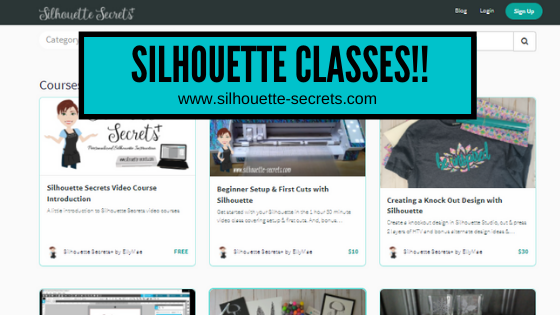
I have 21 Silhouette classes available on my Teachable website.
The classes are all step-by-step classes that are the same as I teach in person.
The best part is that after you register for a class, it is available to you at any time that is convenient to you. And you can watch them over and over if needed.
I find this is even better for Curio users as there is no need for me to watch your machine etch if we were doing a live Zoom call.

Find all the classes HERE

Developing classes takes time and testing. Let me do that for you!
These classes can help take the anxiety out of working with your Silhouette machine and the Silhouette software.

Still on the fence? I understand completely.
Check out the testimonies from past students who have taken classes HERE.

Here are a few of the classes available

Curio Classes

Other Classes Include:
Creating a Vinyl Decal and Layering Vinyl using the Silhouette Studio Software
Cutting & Layering HTV in Silhouette Studio
Glass Etching with Silhouette
Heat Transfer Paper Print & Cut Lesson with Silhouette
Creating a Knockout Design with HTV & Bonus HTV & Subtract
Creating a Rhinestone Design in Silhouette Studio

As well as: 
Cameo Pro DIY Stand/Table instructions & tips
Cutting Like a Pro with the Cameo Pro Tips & Troubleshooting printable

As a Terri Johnson Creates Licensed Silhouette Instructor, it is my goal to help others learn the Silhouette Studio software & how to use their Silhouette machines to get the most out of it.

Find all of my online Silhouette classes on my Teachable site HERE.

I would love to see what you are creating with your Silhouette software or machines!
Or if you have any questions, feel free to post photos or questions on my Facebook group at 
Silhouette Secrets with EllyMae.

Save this for future reference by pinning the image below.

Enjoy !

This image has an empty alt attribute; its file name is logo.jpg

THANK YOU for your support! How can you help? Click HERE & buy a coffee.
Every little bit helps with the cost of running the site & developing more classes.

Or if you are looking for more in-depth, step-by-step classes, check out all of my online Silhouette classes on my Teachable site HERE.

SS Logo snip it
**This post may contain affiliate links. What that means is that I may receive compensation if you purchase through the links I have provided. The price you pay for the product or service is not higher but I may get compensated for sharing.
Posted on Leave a comment

New Silhouette Class Released

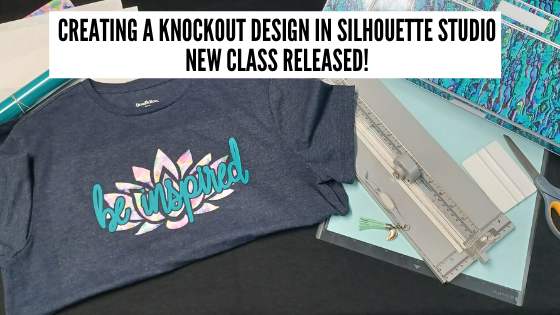
Come join me in learning about your Silhouette software and cutting HTV to create a knock out design. We will use several tools in the Silhouette Studio software to create this design.

Check out the full class HERE.

This is a step-by-step class from creating the knockout design, cutting patterned & solid HTV, pressing 2 layers of HTV, and bonus design tips for alternate designs ideas.

Class Supplies list

Affiliate links are present in the following supply list and as an Amazon Associate, I earn from qualifying purchases
 The cost to you is no different, but I may earn a commission by you using the links provided.

– Silhouette machine – any model will work
– Silhouette blade
– Silhouette cutting mat
Sparkleberry patterned HTV or pattern/color of your choice
Use code SILSECRETS to save 10% at Sparkleberry Ink
Heat Transfer Mask for patterned HTV (required if using Sparkleberry patterns or other types of patterned HTV without a carrier sheet)
*Note: patterned HTV and glitter HTV require 2 different masks – glitter requires a High Tack mask in case you decide to go with that
Siser Easyweed HTV solid
– Blank to put the design on – I am using a T-shirt
– Weeding tool – EK Tools Reverse Tweezers are my tool
Vinyl Squeegee
Scissors
– Heat Press – I am using a Craft Pro 15″ x 15″ heat press from Heat Press Nation
Teflon Sheet or Parchment Paper
Paper trimmer (optional – but handy)
T-shirt Ruler Placement Guide – (optional)
Heat Press Pads or Pillows – (optional) this helps with the seams on a blank if it cannot be placed off the press area

Find all the class details HERE on my Teachable site.

Find all of my Silhouette classes on the Teachable site HERE.

I would love to see what you are creating with your Silhouette software or machines!
Or if you have any questions, feel free to post photos or questions on my Facebook group at 
Silhouette Secrets with EllyMae.

Save this for future reference by pinning the image below.

Enjoy !

This image has an empty alt attribute; its file name is logo.jpg

THANK YOU for your support! How can you help? Click HERE & buy a coffee.
Every little bit helps with the cost of running the site.

Or if you are looking for more in-depth, step-by-step classes, check out all of my online Silhouette classes on my Teachable site HERE.

SS Logo snip it
**This post may contain affiliate links. What that means is that I may receive compensation if you purchase through the links I have provided. The price you pay for the product or service is not higher but I may get compensated for sharing.