
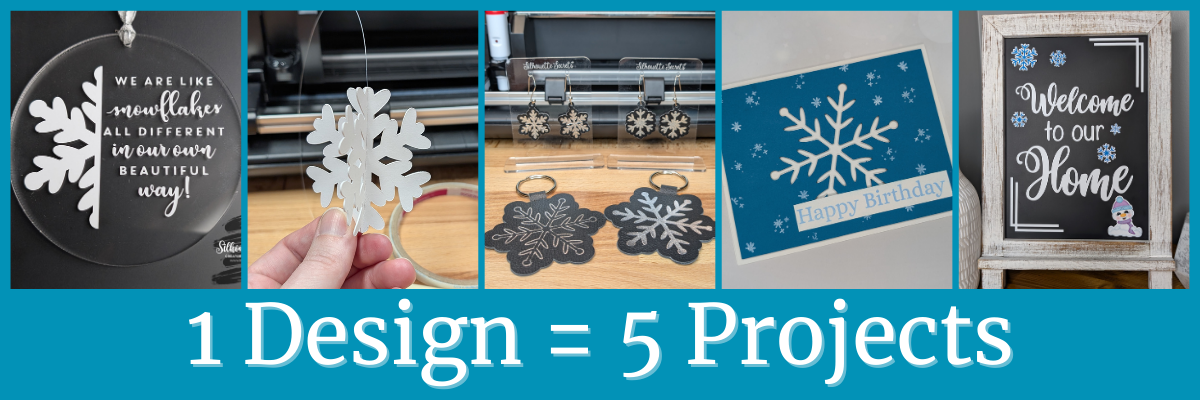

Each month in the Silhouette Secrets+ newsletters, there is a free file offer. I then use that file to create multiple projects, showcasing the endless possibilities you can achieve with just one design. In this blog post I am sharing a variety of creative projects made using snowflakes designs that I created in the Silhouette Studio software. There are so many possibilities when working with just one design and I hope it sparks your creativity to look at your designs differently and think about the possibilities for multiple projects with one file.
Affiliate links may be present in the following blog post and as an Amazon Associate, I earn from qualifying purchases.
The January newsletter files were several snowflake designs that I created in the Silhouette Studio software. This is a great way to learn more about using the tools in the Silhouette Studio software and every single user could create these themselves. Check out the tutorial on the tools I used HERE.

Make sure to sign up for the Silhouette Secrets+ newsletter HERE for future free files & project inspiration.
Crafting Creativity with One Design
Project #1 – Acrylic Ornament

I drew a 3″ circle in the Silhouette Studio software as my template to create within for placement and getting an idea of what the design would look like. Using one of the snowflake designs, I added an offset and then used the Knife tool in Silhouette to cut the snowflake design in half. Next, I opened a snowflake saying, adjusted it at bit, and added that to the design. Then cut everything from Oracal 651 and applied it to the front of a 3″ acrylic circle.

I used the Silhouette Autoblade for these cuts and it did beautifully.

Using the Line Drawing Tools to add weeding lines can help so much when you have intricate designs to weed. This allows you to weed smaller sections of the design and not have the material stick back to itself.
Additional Resources:
- Creating Templates in Silhouette Studio
- Offset in Silhouette Studio
- Knife Tool in Silhouette Studio
- Ultimate Guide to Cutting Small Fonts & Designs with Silhouette
- Adhesive Vinyl – Tutorials and Projects
- Weeding Lines
- Weeding Tips
Supplies Used:
- Snowflake design created in Silhouette – design tutorial HERE
- Silhouette Cameo 5 – Crafter Cuts or Silhouette America
or Silhouette Curio 2 – Crafter Cuts or Silhouette America - Silhouette Autoblade – Crafter Cuts or Silhouette America
- Beautiful Snowflakes Quote by Hero Arts – Design #311329
- Oracal 651 adhesive vinyl
- 3″ acrylic circle
- Ribbon or Twine
Project #2 – 3-D Snowflakes

Using one of the snowflake designs, I added a score line down the center and cut 3 for each 3-D snowflake out of cardstock. Then assembled them together to make the 3-D ornaments. The score line helped to fold each of the snowflake sides directly in half for assembly.
I shared how I did this in a new video on the Silhouette Secrets+ YouTube channel found HERE.

Additional Resources:
Supplies Used:
- Snowflake design created in Silhouette – design tutorial HERE
- Silhouette Cameo 5 – Crafter Cuts or Silhouette America
or Silhouette Curio 2 – Crafter Cuts or Silhouette America - Silhouette Autoblade – Crafter Cuts or Silhouette America
- Neenah White Cardstock
- Supertite Precision Craft Glue
- Double sided tape 1/4″
- Silicone Tool holder
- Bone folder
- Spatula tool
- Fishing line or other clear string
Project #3 – Keychains/Bag Tags and Earrings with Heat Foil on Silhouette Leatherette

This silver foil looks amazing on the Silhouette black leatherette. I highly recommend the Silhouette leatherette for anyone who wants to get started with cutting faux leathers. Create many different projects with the Silhouette heat pen and Silhouette leatherette.
Additional Resources:
- 5 Simple Steps for Mastering Stunning Heat Foil Projects with Silhouette
- Crafting with Silhouette: Leatherette, Faux Leather & Heat Foiling Tips
- Silhouette LIVE tutorial: Silhouette Heat Pen on Leatherette – DIY Faux Leather Gifts & Projects
- Silhouette Heat Pen Setup & Foiling tutorial
- Specialty Tools – Heat Pen Panel
- Quick Foil Card Design video
- Beginner Foil Quill tutorial
- Line Effects/Sketch Panel
- Print and Cut Foil Embellishments
- Cutting Faux Leather Tips & Tutorial
- Cutting Leatherette
Supplies Used:
- Snowflake design created in Silhouette – design tutorial HERE
- Silhouette Cameo 5 – Crafter Cuts or Silhouette America
or Silhouette Curio 2 – Crafter Cuts or Silhouette America - Silhouette Autoblade – Crafter Cuts or Silhouette America
- Silhouette Leatherette – Crafter Cuts or Silhouette America
- Silhouette Heat Pen Set – Crafter Cuts, Silhouette America, or Amazon
- Silhouette Heat Foil – Crafter Cuts, Silhouette America, or Amazon
- Washi Tape
- Fabri-Tac Permanent Fabric Adhesive
For older model machines without the powered tool housing
Additional Heat Foils that I’ve tested
Project #4 – Cut Out Card

I cut the snowflake design out of a blue sheet of cardstock and then had to walk away for a bit because I wasn’t sure how to finish this out.

I ended up pulling out supplies and stamps just to see what might be good to add on to finish this card out. I stamped some embellishments from a birthday stamp set as snowflakes in white ink and then stamping the sentiment in a light blue and adding it to the card with foam tape for dimension.

Additional Resources:
Supplies Used:
- Snowflake design created in Silhouette – design tutorial HERE
- Silhouette Cameo 5 – Crafter Cuts or Silhouette America
or Silhouette Curio 2 – Crafter Cuts or Silhouette America - Silhouette Autoblade – Crafter Cuts or Silhouette America
- Recollections Cardstock
- Neenah White Cardstock
- Foam Tape
- Scissors
- Stamps of choice
- Inks of choice
Project #5 – Printable Magnets

Print and cut is so awesome and there are many different material types you can use, such as printable magnet sheets. I filled the snowflake designs with color, added an offset and then a few more shapes to fill the page. These could be used to decorate any magnetic surface.
I used them to give additional ideas for a recent class I taught on creating a custom chalkboard for home decor. This chalkboard is magnetic and has so many options you can play around with.

Additional Resources:
- Print and Cut Basics
- 5 Tips for Successful Print and Cut with Silhouette
- More Print and Cut Tutorials
- Silhouette Print and Cut Basics to Design to Troubleshooting step-by-step class
Supplies Used:
- Snowflake design created in Silhouette – design tutorial HERE
- Silhouette Cameo 5 – Crafter Cuts or Silhouette America
or Silhouette Curio 2 – Crafter Cuts or Silhouette America - Silhouette Autoblade – Crafter Cuts or Silhouette America
- Oracal 651 adhesive vinyl
- Silhouette Printable Magnet Paper – Silhouette America, Amazon, HPN
- Rustic Whitewash Tabletop Chalkboard 9.5” x 14”
- Rustic Weathered Wooden Tabletop Chalkboard 12” x 17” – larger option
- Additional print and cut designs from the Silhouette Design Store
I love discovering how a single design can spark endless creative possibilities! The Crafting Creativity blog series is your ultimate source of inspiration, filled with innovative ideas, practical tips, and expert techniques to take your crafting to the next level. Whether you’re transforming a favorite design, exploring new materials, or refining your skills, these posts are here to fuel your creativity and bring your ideas to life. Check out more in the Crafting Creativity series HERE and see where your imagination leads you! ✨
Save this for future reference by pinning the image below.

Enjoy !
THANK YOU for your support! How can you help? Click HERE & buy a coffee.
Every little bit helps with the cost of running the site.

Silhouette Classes
Never stop learning! Let me help you take the anxiety out of learning with Silhouette and get to creating faster! My Silhouette classes are heavily focused on software, so you can take the skills & techniques taught and apply them to many future projects!


**This post may contain affiliate links. What that means is that I may receive compensation if you purchase through the links I have provided. The price you pay for the product or service is not higher but I may get compensated for sharing.
Discover more from Silhouette Secrets-Swift Creek Customs
Subscribe to get the latest posts sent to your email.









