Posted on Leave a comment

How to Create Custom Sketch Designs in Silhouette Studio – Step-by-Step Video Tutorial

Silhouette Secrets+ with EllyMae

Ready to take your Silhouette skills to the next level? In this step-by-step video tutorial, you’ll learn exactly how to create custom sketch designs in Silhouette Studio—perfect for sketch pens, foiling, sublimation markers, and more! Whether you’re personalizing cards, creating decorative outlines, or adding hand-drawn touches to your projects, this tutorial will show you how to design from scratch and prepare your file for sketching.

Affiliate links may be present in the following blog post and as an Amazon Associate, I earn from qualifying purchases.

This year I took a watercolor class from artist Tracey Weinzapfel and I’ve been creating all kinds of projects with the ideas from class. When I started designing a class for the Sublimation & Beyond Camp 2025, I wanted to see if I could recreate my designs in the Silhouette Software.

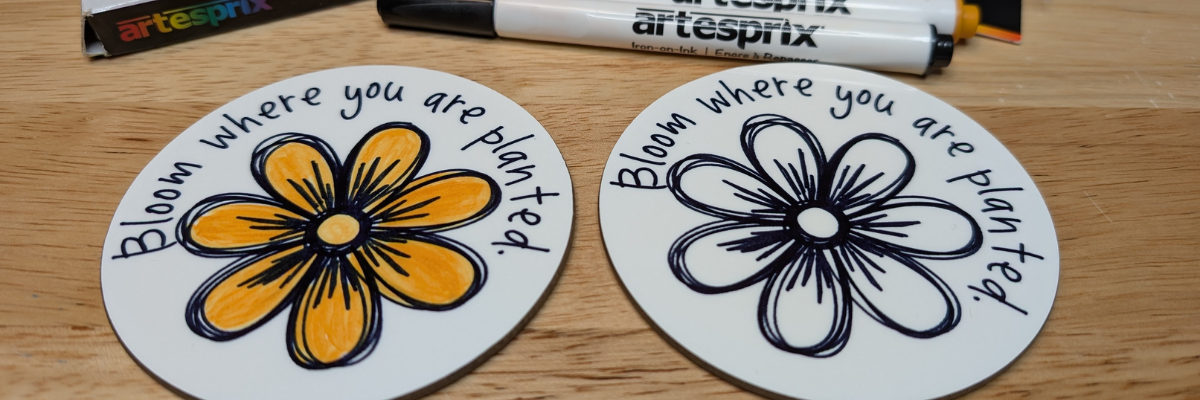
Two circular coasters featuring floral designs with the phrase 'Bloom where you are planted', surrounded by various Artesprix sublimation markers and packaging on a wooden surface.

I had so much fun in the design process of these custom sketch designs and just kept on creating flower designs just to see if they would turn out.

Preview of custom sketch flower designs in Silhouette Studio with text 'Bloom where you are planted' and 'Stop and smell the flowers'.

I used the sketch designs to create sublimation coasters using the Artesprix sublimation markers. Since the class would be viewed by a variety of cutting machine owners, I designed in Silhouette Studio and then saved the file as a SVG.

Here is the supply list for the sublimation coasters in case you want to create too!

Supplies Used:

Additional Resources:

Head over to the Silhouette Secrets+ YouTube channel and follow along as we unlock the creative power of sketching with your Silhouette machine! Can you spot my mistake I made in the video?

A close-up of two round coasters featuring the phrase 'Bloom where you are planted' with floral designs. One coaster has a black outline with a simple flower, while the other is filled with yellow and orange colors. The text 'CREATE CUSTOM SKETCH DESIGNS IN SILHOUETTE STUDIO' is prominently displayed at the top.
A colorful image showing various crafting supplies, including mixed media gel sticks and stencil materials, neatly arranged on a surface.

What custom sketch designs will you create? Let us know in the comments below.

Save this for future reference by pinning the image below.

Image featuring custom sketch designs created in Silhouette Studio, showcasing two coasters with a flower illustration and the phrase 'Bloom where you are planted', surrounded by Artesprix sublimation markers.

Enjoy !

THANK YOU for your support! How can you help? Click HERE & buy a coffee.
Every little bit helps with the cost of running the site.

Silhouette Classes

Never stop learning! Let me help you take the anxiety out of learning with Silhouette and get to creating faster! My Silhouette classes are heavily focused on software, so you can take the skills & techniques taught and apply them to many future projects!

Silhouette step-by-step Classes by Silhouette Secrets+

Silhouette Secrets+ with EllyMae
**This post may contain affiliate links. What that means is that I may receive compensation if you purchase through the links I have provided. The price you pay for the product or service is not higher but I may get compensated for sharing.

Posted on 6 Comments

Sketching Supplies for Silhouette

Sketching Supplies for Silhouette

The Silhouette machines have some awesome features and tools, including sketching supplies to use with your Silhouette! With the right sketching supplies, you can create amazing things with your Silhouette machine. Whether that is for sketching out words or designs, it can do it all!

Silhouette Sketching Examples

Today I’m going to share some of the supplies I’ve tested with sketching with my Silhouette machines.

Sketching Supplies for Silhouette

Affiliate links may be present in the following blog post and as an Amazon Associate I earn from qualifying purchases.

There are some differences between the different Silhouette model machines on the supplies you might need so I have broken it down into specific information for the machine models.

*updated 12/31/23 to include new machine models & tools

Silhouette Cameo 5, Cameo 5 Plus, Curio 2 owners

a Silhouette Type C pen holder for Carriage 2 – Silhouette America, HPN

Silhouette Type C Pen Holder

The Cameo 5, Cameo 5 Plus & Curio 2 can also use the supplies listed below for the Cameo 4 as well.

Cameo 4, Cameo Plus, Cameo Pro, Portrait 3, and Portrait 4 owners

Either:

a Silhouette blue sketch pen adapter (Silhouette America, CrafterCuts, Amazon)
with Silhouette black bodied pens (Silhouette America, CrafterCuts, Amazon)

Or

a Silhouette Type B pen holder (Silhouette America, CrafterCuts, Amazon) and pens that fit
Pens I’ve tested: Sharpie Pen S-Gel, Sharpie Pen Style, Pilot G2 Gel Fine 0.7 mm, Gelly Roll Classic 06 Black, Gelly Roll white, Gelly Roll Moonlight 10 Ice Cream Smooth

Silhouette Type B Pen Holder and Pens

The Silhouette Sketch Pens with adapter and Type B Pen Holder are Carriage 1 Tools as indicated with a 1 on the front of the tool.

Cameo 3, Cameo 2, Cameo 1, Curio, Portrait 1 or 2 owners

Either:

Silhouette black bodied pens or white bodied pens
(Silhouette America, CrafterCuts, Amazon)

Silhouette Sketch Pens

Or

A Silhouette Type A pen holder (Silhouette America, Amazon) and pens that fit
*pens listed above with links

Silhouette Type A Pen Holder and Pens

Sketching Resources

I encourage you to grab the right supplies for your machine and just get to playing with it.

But I also have some resources that can help on the blog.

Silhouette Sketch Pens & Sketch Pen Design Class

Silhouette Sketch Pen Class by EllyMae at Silhouette Secrets+

Check out the full class HERE where we discuss pens styles, adapters, sketch designs, fonts, filling designs, and troubleshooting too!

Sketching with Silhouette

Sketching cards with Silhouette

I created these cards following a class led by Kelly Wayment and hosted by Michaels – check it out HERE.

Let’s Explore v4 – Line Effects/Sketch Panel

Line Effects and Sketch Panel in Silhouette Studio

Learn about the Line Effects/Sketch Panel and how to fill text or designs in with sketching HERE.

Let’s Explore v4 – Send Tab – Line Option

Silhouette Send Tab - Line Color Option

In this tutorial, I am sharing how to cut and sketch by Line Color – find out more HERE.

More resources on Sketching found on the A to Z resource list HERE.

Save this for future reference by pinning the image below.

Sketching with Silhouette

Enjoy !

THANK YOU for your support! How can you help? Click HERE & buy a coffee.
Every little bit helps with the cost of running the site.

Silhouette Classes

Never stop learning! Let me help you take the anxiety out of learning with Silhouette and get to creating faster! My Silhouette classes are heavily focused on software, so you can take the skills & techniques taught and apply them to many future projects!

Silhouette step-by-step Classes by Silhouette Secrets+

**This post may contain affiliate links. What that means is that I may receive compensation if you purchase through the links I have provided. The price you pay for the product or service is not higher but I may get compensated for sharing.
Posted on 2 Comments

Sublimation Markers & Silhouette

Have you seen or used Sublimation markers?

The great part is that you can use your Silhouette to help draw with these markers.

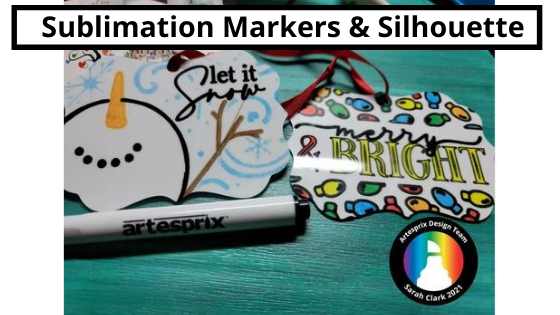
Today I wanted to share some awesome ornaments my friend Sarah with Silhouette Made has created with the Artesprix blank of the month & Artesprix sublimation markers.
I love these ornaments!

Check out the full blog post tutorial HERE

Affiliate links may be present in the following blog post and as an Amazon Associate I earn from qualifying purchases.

There are just not enough hours in the day to do it all!
Want to use these same designs?
Merry & Bright by Diva Watts Designs – Design #388075
Let It Snow by Diva Watts Designs – Design #382434

If you have never sketched with your Silhouette machine, it can be a lot of fun. I have sketched on cardstock, faux leather paper, wood (with a Curio). Basically anything that a pen will write on, you can use if it fits in the Silhouette machine.

Grab the pen holder and some pens and just start to play. Then take it to the next level with the Artesprix sublimation markers.

In May I released a step-by-step sketch pen class and shared on the blog all of the supplies to get started with sketching.

Check out the post HERE to see what supplies you will need for your specific Silhouette model.

This class covers all about sketch pens & creating sketch designs. We discuss different pen styles, adapters, sketch designs, fonts, filling designs, and trouble-shooting too.
We do some testing, demos, and finished projects.
At the end of the class, you will have a better understanding of what works and doesn’t work for sketching with your Silhouette machine.
This class can be completed with a Portrait, Cameo, or Curio machine.

Whether you take the class to get started or not, just start!
Play with the sketch features and you will be able to create fabulous things like Sarah at Silhouette Made has done.

And the best part is, anyone can do this! It just takes a bit of practice.
Grab some paper, a Silhouette pen holder, pens, and get to sketching today.

Check out more of the awesome creations on the Artesprix blog HERE.

I’d love seeing what you are creating with your Silhouette machines or software.
Feel free to post photos or questions on my Facebook group at 
Silhouette Secrets with EllyMae.

Save this for future reference by pinning the image below.

Enjoy!

This image has an empty alt attribute; its file name is logo.jpg

THANK YOU for your support! How can you help? Click HERE & buy a coffee.
Every little bit helps with the cost of running the site.

Or if you are looking for more in-depth, step-by-step classes, check out all of my online Silhouette classes on my Teachable site HERE.

SS Logo snip it
**This post may contain affiliate links. What that means is that I may receive compensation if you purchase through the links I have provided. The price you pay for the product or service is not higher but I may get compensated for sharing.