Have you ever wanted a handy chart that shows what blades are what? What is each blade used for? Does it need an adapter or does it fit with no adapter? What materials is each designed to cut?
Today I wanted to share a free resource that I’ve created that gives information on the current blades and tools available for the Cameo 4 , Cameo Plus, and Cameo Pro.
Cameo 4 , Cameo Plus, and Cameo Pro Tool Chart
This free PDF chart is is available as a free download exclusively for confirmed newsletter subscribers.
Download this to your computer and open it. Click the blue links in the chart for more resources on that particular tool.
Print the PDF file out for visual reference as well.
Don’t forget to check out the Silhouette classes on my Teachable site while you are there! Step-by-step classes taught for many Silhouette projects and software techniques. And the best part – once registered, you can access any time and as many times as you need to take the class! Never stop learning & creating!
**Please note that these may be affiliate links which means that by using these links and/or codes, I may received a small compensation for sharing the links with you. The price you pay for the product or service is not higher. Thank you for using affiliate links as it provides a way for me to continue doing what I do as an Instructor, blogger, and event organizer.
I hope this helps you get to know your Silhouette Cameo machine a little bit better!
I have lots more things on my project list to share in the future!
I would love to see what you are creating with your Silhouette software or machines! Feel free to post on my Facebook group at Silhouette Secrets with EllyMae.
Save this for future reference by pinning the image below.
Enjoy !
THANK YOU for your support! How can you help? Click HERE & buy a coffee. Every little bit helps with the cost of running the site.
Silhouette Classes
Never stop learning! Let me help you take the anxiety out of learning with Silhouette and get to creating faster! My Silhouette classes are heavily focused on software, so you can take the skills & techniques taught and apply them to many future projects!
**This post may contain affiliate links. What that means is that I may receive compensation if you purchase through the links I have provided. The price you pay for the product or service is not higher but I may get compensated for sharing.
I always recommend having at least one extra blade and mat on hand just in case. Speaking from personal experience that there is nothing more frustrating than being in the middle of a big project and things aren’t cutting well.
Affiliate links may be present in the following blog post and as an Amazon Associate I earn from qualifying purchases.
To extend the life on your cutting blade, I recommend having a separate blade for each material you cut. I find this works well and is the same concept as having separate fabric and paper scissors. Each material will dull the blade at a different rate. When all else fails and I cannot get a clean cut no matter the troubleshooting, I pop in a new blade and it makes a big difference. I also have some tips for getting the most out of your cutting mat HERE. These can extend the life, but sometimes you just need a new one.
And where do you store all these blades for each material?
This little thing is pretty handy and I don’t have my blades just rolling around on my workspace any longer. Find this organizer on Amazon HERE
Let’s talk about some of the blades.
New blades
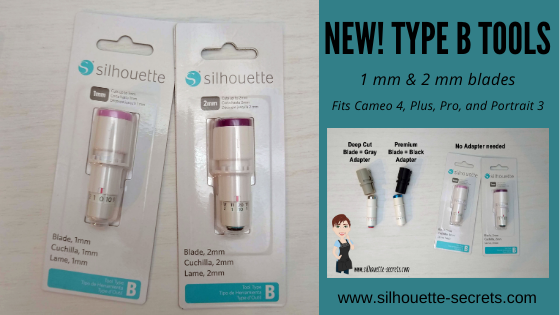
There are 2 new blades released in 2021. The new 1 mm manual blade is equivalent to the Premium blade and the 2 mm manual blade is the equivalent to the Deep Cut blade.
These 2 blades are designed for the Cameo 4, Cameo Plus, Cameo Pro, and Portrait 3 models and will fit directly in the Tool 1 (Carriage 1) housing on the machine. They are NOT compatible with older machines. They cut the same materials as the premium and deep cut blade would.
Check out more in depth details in this post here New Type B Tools
Autoblades – Both Type A and Type B are in stock What does that mean? Type A and Type B?
Type Ais the Autoblade for the Cameo 3 or Portrait 2 machine models.
You can see these 2 blades have some differences just in the looks of them. The Type B blade has an area on the front where the hooks on the lock for the Cameo 4 models or Portrait 3 models grab the blade.
But you are not just limited to those blades.
I started with Silhouette before there were many options of blades and my first blade was what most call the “ratchet” blade. It’s technical name if you are searching for it is “Silhouette blade” or sometimes you’ll see “Silhouette replacement blade”.
It is called a “ratchet” blade because you turn the bottom of the blade to “ratchet” the blade depth and adjust it.
Note: In the v4.4 software you will now see all blades that are adjusted manually called “Manual” blade vs the older term “ratchet” blade.
Two things to know about this blade. There is a specific way to install it for the best cutting results.
After you have adjusted the bottom of the blade so the red line is lined up with the correct blade depth number, place the blade in the machine housing. The fin of the blade should be at the 6 o’clock position and there should be no gap between the lip on the blade and the housing.
The next thing to note is that if you are a Cameo 4 model or Portrait 3 owner, you will need an adapter to use this style of blade. This “ratchet” blade uses the black adapter.
These adapters have been out of stock for awhile, but hopefully will be restocked soon. But, with the new 1 mm tool options released, those will slide right into the Tool 1 (Carriage 1) housing as well. So if you don’t have the adapters, I would try those new blades out.
There are a few more blade types out there as well for different materials. The Premium blade is the older style blade that is made out of a Tungsten alloy (high performance) metal. The Deep Cut blade cuts thicker materials and has blade depth from 1-20. The 2 mm Kraft blade also cuts thicker materials and extends up to 2 mm. This blade has a broad tip on it and works more like an exacto knife versus a Deep Cut blade.
The black Silhouette blade, Premium blade, Deep Cut blade, and 2 mm Kraft blade can be used in all Silhouette Cameo, Portrait, and Curio machines. The Curio will need the firmware updated on the machine in order to have access to the Kraft cut and 2 mm Kraft blade. If using these blades in the Cameo 4 or Portrait 3, they do require an adapter as mentioned above.
What this means is that all the blades listed above are now made with the exact same metal. A Tungsten alloy (high performance) metal.
This is great news as we move forward in our Silhouette journeys. No one likes changes, but they happen and sometimes they are for the best! New blades – new metals – high performance!
For the Cameo 4 – Carriage 2, there are 3 additional tools.
Again, it works more like an exacto knife and does not do sharp corners or intricate cuts well. I have cut high quality leather with the 3 mm Kraft blade. Here are a few of the finished projects I’ve cut while testing.
For tips on cutting fabric check out this post HERE.
Or this post for more details on cutting crepe paper HERE.
and the Punch Tool Which is not really a blade, but used to “mark” the material with a small hole to designate where to weed.
What blades do I prefer?
Personally, I use them ALL!
When the Autoblade first came out, I found it annoying with it’s “tap dance” to adjust the blade depth. And I was so used to manually adjusting my blade, that I could do it faster than the machine could. However, over time, I got used to it. That whole “change” thing can be hard for all. But, now, I set it and forget it. I send my project to cut and I go about doing something else while it does. No more taking the blade in and out.
There are 2 BIG things that affect the Autoblade adjusting properly.
#1 – Having the blade installed properly!
If the blade is not installed properly with no gap and adjusting properly, you WILL have cut issues. This is an important step no matter what blade type you are using. If you have a gap between the lip of the blade and the housing, you will most likely experience inconsistent cut results.
This is how the blade should be installed on a Cameo 4, Cameo Plus, Cameo Pro, or Portrait 3.
Cameo Pro model in the photo
There should be absolutely no gap between the lip of the blade and the housing. AND the lock on the front of the blade needs to be pushed in completely.
#2 – Is it hitting the adjustment holes properly?
For those using the Autoblade watch as the machine does it’s “tap dance” at the beginning of the cut, does the red line inside the blade adjust properly and to the correct number?
If it does not, we can start troubleshooting it with a photo of the blade installed with the cutting mat or vinyl loaded if you post on the Silhouette Secrets+ Facebook group or check out this video by Silhouette America on Cutting Machine Maintenance and how to Reset the Motor at 4:38 in the video. This should reset the housing so that it is properly aligned to hit the adjustment holes correctly.
If the blade is still not adjusting properly after that, then more troubleshooting may be needed.
If you are always cutting the same materials with the same settings, you can also change the Tool on the Send tab in the software to a “manual” blade (ratchetin older software versions) and then manually set the blade. This means that the blade will NOT adjust itself, but it will stay at the blade you place it at.
We love seeing what you are creating with your Silhouette machines or software. Feel free to post photos or questions on my Facebook group at Silhouette Secrets with EllyMae.
Save this for future reference by pinning the image below.
Enjoy!
THANK YOU for your support! How can you help? Click HERE & buy a coffee. Every little bit helps with the cost of running the site.
Or if you are looking for more in-depth, step-by-step classes, check out all of my online Silhouette classes on my Teachable site HERE.
**This post may contain affiliate links. What that means is that I may receive compensation if you purchase through the links I have provided. The price you pay for the product or service is not higher but I may get compensated for sharing.
New Type B Tools – 1 mm and 2 mm blades releasing! Coming Soon!
You asked and Silhouette America listened! Many said they didn’t like having to use the adapters with the Cameo 4 models or Portrait 3 machines. Well, they heard that and created a new 1mm Manual Blade and 2 mm Manual Blade. These are equivalent to the Premium blade (1 mm) and the Deep Cut Blade (2 mm) blades that currently are out, except the new ones fit directly in the housing.
Let’s take a closer look.
Affiliate links may be present in the following blog post and as an Amazon Associate I earn from qualifying purchases.
Ok, so first, as I write this post, these blades have been released in some International areas right now (February 2021). They are estimated to be released in the U.S. in March of 2021. Keep in mind that this is an estimated time and things are crazy right now as they have been this past year.
I am lucky enough to have International contacts and a big shout out to my FB group Admin (Teresa P.) who was able to order and ship them to me! Yay! So I get to share this information with all of you! Thank you Teresa P.!
Again, I want to make sure that for all my U.S. readers – these blades are coming, but have not been released in the U.S. yet. Estimated release of March 2021.
Here are the new Tool Type B tools. On the left is the 1 mm Blade, which is the equivalent to the Premium blade. And on the right is the new 2 mm Blade, which is the equivalent to the Deep Cut blade.
So, let’s talk about the differences between these blades and the older style. The main difference is that the new Tool Type B tools will fit directly in the Tool 1 housing of the Cameo 4, Cameo Plus, Cameo Pro, or Portrait 3.
Tool Type B 1 mm Blade = older style Premium Tool Type B 2 mm Blade = older style Deep Cut Blade
All of these blades are “manual” blades, which means that you will have to adjust the blade depth “manually” by turning the bottom of the blade to the correct blade depth. But, the best part is that with this manual style blade, you can actually go in between on the numbers if you want. For example, to do a 1.5 blade depth if needed.
Note: in the older software these blades will be called “ratchet” blades because of the manual setting. In the newer software versions being released, starting with v4.4.472, they will be called “manual” blades in the Tool Type on the Send tab. Both designations still mean the same thing. You have to “manually” adjust the blade depth, the machine does not do it for you.
Since you set the blade depth manually, there is no need to wait or watch to see if the blade adjusted to the correct depth like you do with the Autoblade. You set the blade depth and the software knows it’s a “ratchet” or “manual” blade and it gets to cutting.
How do you adjust these “manual” blades?
Here is a video explanation of adjusting the blades and the adapters that are needed with the older style blades.
What types of materials can these blades be used for?
The Premium blade and Tool Type B 1 mm blade can generally be used for any material that is under 1 mm in thickness. However, keep in mind that material density can play a factor into all materials that you cut. Even if something is thin, it may be dense and therefore more difficult to cut.
The most common materials that the blade is used for are: paper, cardstock, adhesive vinyl, heat transfer vinyl, sticker sheets, and other specialty materials.
The Deep Cut blade and Tool Type B 2 mm blade are generally used for any material under 2 mm in thickness. However, keep in mind that blade depth 1-10 is the same as a regular blade, the difference comes with the depths of 11-20. Again keep in mind that with all blades and materials, the material density is going to play a factor.
The most common materials cut with this blade are: craft foam, thicker faux leather, thick cardstock, chipboard, coverstock, and other specialty materials. If a regular blade set at a 10 and force of 33 is not cutting through a material, then I will give the Deep Cut blade a try and see if it will get the job done.
Note: Swing Design does have these listed under the blades section on their website. They are showing Sold Out, however did not miss out. They have not been released in the U.S and that is just how they show on the site at the moment.
And I know everyone is going to ask – What do they cost?
At the moment since they have not been released in the U.S., I do not know the U.S. retail value that retailers will be listing. Once released, I will update the post with more information.
Testing these new blades out
Now, I couldn’t just leave these new blades in the package. Time for testing!
Testing the 1 mm Tool Type B blade
I first tested in the v4.4.463 software and it was recognized as soon as I put the blade in.
Now, I just grabbed some of my kid’s craft foam. I have no idea how long I’ve had it or where I got it.
I used the recommended settings for Craft Foam in the software.
I am now using the v4.4.472 software where the new “manual” blade is listed under the Tool section.
Always check the cut before you unload the mat. This way if it didn’t cut completely through, you can send it again. I did have to send the craft foam again to cut, but on the 2nd pass through, it cut completely and cleanly through.
Now, I have not cut a lot of craft foam, so I will be looking for more ideas. But, why not test this a bit more. I chose a smaller design, just to see what it could do.
This was a little bit more intricate of a design and after sending the design through to cut twice, so a total of 4 passes, I still had to “pop it out” a bit. But, I am thrilled with the results. I’ve only cut craft foam a couple of times and it definitely didn’t cut like this before. Again, the craft foam brand can make a big difference to. I have no idea what I grabbed from the stash.
My son asked for a frog when I asked him what I should cut from craft foam. I was not sure how this card would turn out, but it works!
I always recommend having extra blades and mats on hand. Through experience, there is nothing worse than being in the middle of a big project and not having cuts turn out. A new blade or cutting mat can make a big difference!
Grab some extra mats and supplies at Silhouette America with my code SILSECRETS and save 30% right now through February 14, 2021. Enter the code SILSECRETS at checkout and the savings will show. I grabbed a few extra Strong hold cutting mats this month for an upcoming class Cutting Leather with the Cameo 4 & Kraft blade. Stay tuned for more details on that!
Save this for future reference by pinning the image below.
Enjoy!
THANK YOU for your support! How can you help? Click HERE & buy a coffee. Every little bit helps with the cost of running the site.
Or if you are looking for more in-depth, step-by-step classes, check out all of my online Silhouette classes on my Teachable site HERE.
**This post may contain affiliate links. What that means is that I may receive compensation if you purchase through the links I have provided. The price you pay for the product or service is not higher but I may get compensated for sharing.
THANK YOU for your support! How can you help? Click the link to buy a coffee. Every little bit helps in the cost of running the site.