Posted on Leave a comment

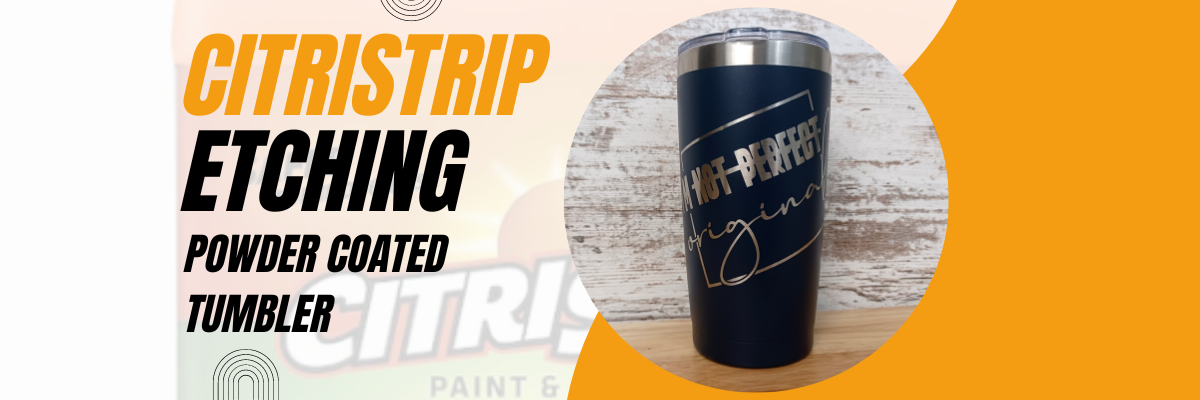
CitriStrip Etching on Powder Coated Tumbler

This has been a very popular technique that has popped up in the last year.
I have made several tumblers with it and love it!

Etched Powder Coated Tumbler with CitriStrip and Silhouette

Affiliate links may be present in the following blog post and as an Amazon Associate I earn from qualifying purchases.

Did you know you could etch a design on a powder coated tumbler?
Well, it’s not really “etching”, but that is still the term used in the industry.
It’s really the same process as glass etching with an etching cream such as Etchall or Armour Etch. The etching cream is “eating” away at the surface of the object. In the case of glass, it’s an acid etching the glass. But, the same process is done with CitriStrip, which is a paint stripper. So it’s basically “eating” the powder coated surface off the tumbler.

I have another new video that I’ve just released on the Silhouette Secrets+ YouTube channel showing this technique and sharing tips for success with the CitriStrip Etching.

CitriStrip Etching a Powder Coated Tumbler

Check out the new video HERE or click the photo above.

The process of creating the stencil could be done with any cutting machine model.

Supplies for the CitriStrip Etching

I’m Not Perfect by Tanya Batrak – Design #326840 (modified details below)
Powder Coated Tumbler
*not all tumblers work – the ones I’ve linked I have had great success with. Other styles that are painted vs powder coated, I have not.
Oracal 651 Adhesive Vinyl
Transfer Tape
Citristrip Paint Stripper
Painters Tape
Gloves
Weeding tool
Paper towels, water
Optional: Artesprix Project Mat
*this is great for working with sublimation projects or a safe surface so your tumbler doesn’t roll

Want to learn how to create your own designs?

The CitriStrip video demonstration was created for a class I developed earlier this year that does just that!

In the video class, you will learn how to create 4 different designs in the Silhouette Studio software, including how I modified the design used in the video demonstration.

Silhouette Class Creating Unique Designs in Silhouette Studio

For more details on the class check out the full description HERE on Teachable.

I also have a Glass Etching class on my Teachable site too!

Glass Etching with Silhouette

Find all the details on the Glass Etching Class HERE

I have been teaching Silhouette classes since 2016 and cover a wide variety of topics.
What are you looking for?

Silhouette step-by-step classes by Silhouette Secrets+ with EllyMae

Check out all the classes available on the Silhouette Secrets+ Teachable site HERE.

The classes are designed to help you get started faster and take the guess work out of designing or creating projects with your Silhouette.
No more anxiety or guessing, follow along at your own pace and watch as many times as needed to fully understand and retain the information.
I hope you find something that will help you in your Silhouette journey!

If you have a suggestion on a class you’d like to see in the future, I would love to hear your ideas. You can make those suggestions HERE.

As I mentioned above, I have made several of these tumblers.
Here is one of the first ones we made.

Powder Coated Tumblers for Swift Creek Customs with CitriStrip and Silhouette Studio

You can find the video on us creating the ones pictured above HERE on the Swift Creek Customs YouTube channel too! This was a video I partnered with my husband on and was really a test to see if it really worked!

I hope you have a chance to be creative today!

Save this for future reference by pinning the image below.

Pinterest Citristrip Etching a Powder Coated Tumbler

Enjoy !

THANK YOU for your support! How can you help? Click HERE & buy a coffee.
Every little bit helps with the cost of running the site.

Silhouette Classes

Never stop learning! Let me help you take the anxiety out of learning with Silhouette and get to creating faster! My Silhouette classes are heavily focused on software, so you can take the skills & techniques taught and apply them to many future projects!

Silhouette step-by-step Classes by Silhouette Secrets+

SS Logo snip it
**This post may contain affiliate links. What that means is that I may receive compensation if you purchase through the links I have provided. The price you pay for the product or service is not higher but I may get compensated for sharing.
Posted on Leave a comment

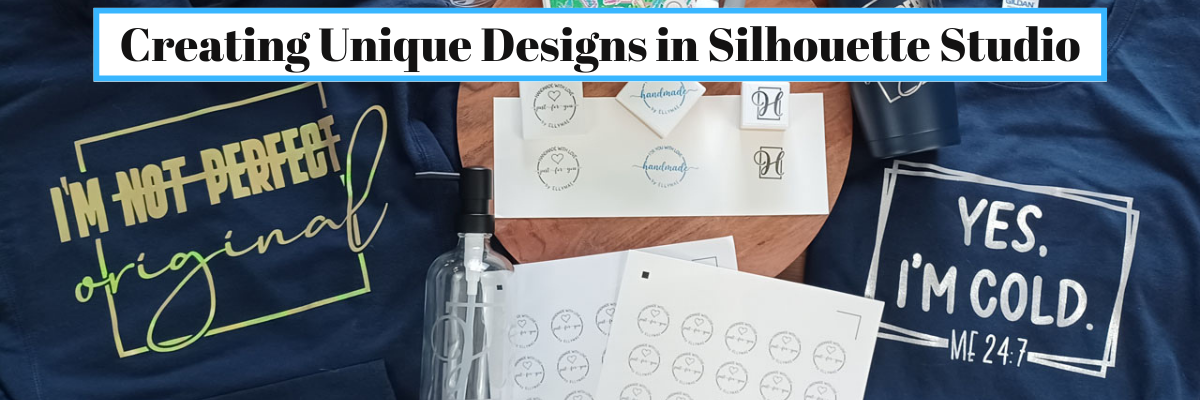
Join me to Create Unique Designs in Silhouette Studio

I have just released a new class and I’m so excited to share with you as we use many tools in the Silhouette Studio software to create unique designs.

New Silhouette Class!!!

Creating Unique Designs in Silhouette Studio – Choose Your Own Project

In this class you will learn how to create all of these designs in the photo above and you can choose what you want to create as a finished project.
Choose to make one or choose them all!

In this step-by-step class, we put the Silhouette Studio tools to work for us! This class is designed for all levels of users to follow along and create. A few of the tools we will discuss and use are: drawing tools, compound paths, text, offset, knife, glyphs, text to path, and more!

This is a custom design created by YOU could be used for all kinds of projects from adhesive vinyl, HTV, Mint stamps, stencils, and more!

I share examples of different finished projects with the techniques used and include optional supplies for additional projects on the class supply list.

As a bonus, I have also included a demonstration of Citristrip etching on a powder coated tumbler using a design created as the stencil.

Check out all of the details for this class HERE

Here are a few closer photos of the projects I created when testing and developing the class.

Affiliate links may be present in the below and as an Amazon Associate I earn from qualifying purchases. What that means is that I may receive compensation if you purchase through the links I have provided. The price you pay for the product or service is not higher but I may get compensated for sharing.

Sweatshirt created with:
Siser Aurora HTV – Goldish
I’m Not Perfect by Tanya Batrak – Design #326840

Long Sleeve Shirt
Siser Sparkle – Snowstorm White Glitter
BFC Magic Marker Font by Blush Fonts
BFC Shiplap Bold font by Blush Fonts

Mint Stamps
Mint Stamp Machine
Mint Stamp Kit
Mint Stamp Ink color of choice

Stickers
– Silhouette Sticker Paper – Silhouette or Amazon
Staples Sticker Paper

Fonts
BFC Basically Semi Bold Handwriting Font by Blush Fonts
Dahlia by Graphix Line Studio

Glass Etching soap dispensers
Babylone Script font by Almeera Studio

And another Citristrip etched tumbler that turned out AMAZING!
Supplies:
Powder Coated Tumbler – not all tumblers work
– Oracal 651
– Transfer Tape
Citristrip Paint Stripper
Painters Tape
– Gloves, paper towels, water, weeding tool
– Optional:
Artesprix Project Mat mentioned in the demo video – 2 size available

While those are the projects I created, you could do anything you want! I’ve provided a list of supplies depending on what you would choose to do or you might even have other ideas after working through the class design portion.

CLICK HERE FOR MORE CLASS INFORMATION

Or check out all the Silhouette classes on my Teachable site HERE.

I’d love to see what you create!
Feel free to post on the Silhouette Secrets+ with EllyMae Facebook Group HERE.

I also put out 2 new videos on the Silhouette Secrets+ YouTube channel with supporting information to this class.

Setting up Stickers in Silhouette for Print and Cut

Check it out HERE

Silhouette Mint Stamp Machine – Step-by-step to Creating a Stamp

Check it out HERE

There are so many possibilities that you can do in the Silhouette Software!
Get started today!

Save this for future reference by pinning the image below.

Enjoy !

THANK YOU for your support! How can you help? Click HERE & buy a coffee.
Every little bit helps with the cost of running the site.

Silhouette Classes

Never stop learning! Let me help you take the anxiety out of learning with Silhouette and get to creating faster! My Silhouette classes are heavily focused on software, so you can take the skills & techniques taught and apply them to many future projects!

Silhouette step-by-step Classes by Silhouette Secrets+

Silhouette Secrets+ with EllyMae
**This post may contain affiliate links. What that means is that I may receive compensation if you purchase through the links I have provided. The price you pay for the product or service is not higher, but I may get compensated for sharing.
Posted on Leave a comment

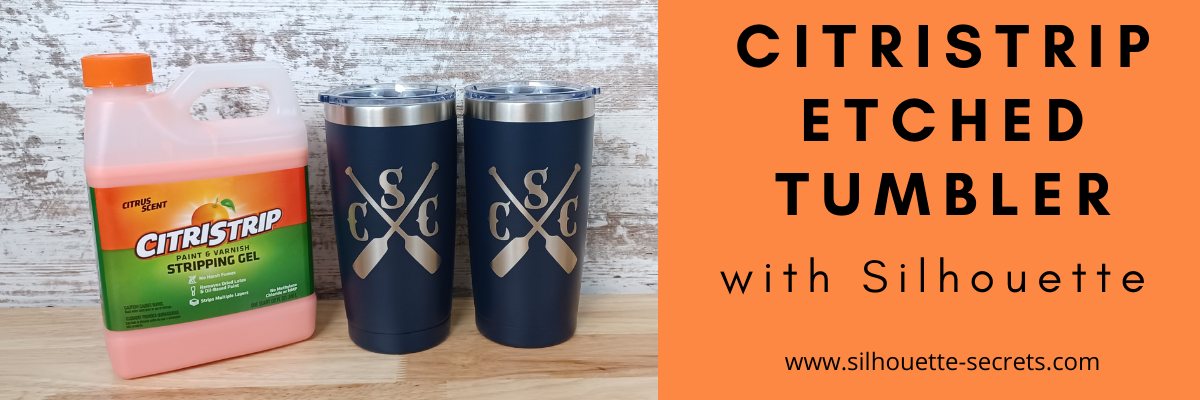
Etched (Engraved) Tumbler with Silhouette

Have you seen the etched powder coated tumblers using CitriStrip?

I’ve seen it popping up on social media and we always like to try something new!

It turned out fantastic!

I bought all the supplies needed and then set up to record how we did it, whether it was going to turn out or not, we were going to share.
We had so many microphone issues it took us several attempts to get it recorded.
All we could do was laugh!

Check out the full video HERE on the Swift Creek Customs YouTube channel.

We had a bit of fun while making the video!
You never know what you might see or hear in our videos.
We hope to bring you more project videos in the near future.
Make sure to Like and Subscribe to the Swift Creek Customs and Silhouette Secrets+ YouTube channels to be notified of new content!

Having a Silhouette machine makes it so easy to do custom things!

I cut a stencil using the Silhouette Cameo and Oracal 651 scraps.

When cutting a stencil vs a decal, you weed out the design so you are left with the negative space open, instead of weeding around the design.

Affiliate links may be present in the below and as an Amazon Associate I earn from qualifying purchases. What that means is that I may receive compensation if you purchase through the links I have provided. The price you pay for the product or service is not higher but I may get compensated for sharing.

Want to try it out?
Here are the supplies we used in the project:
4 Pack Travel Tumblers from Amazon
CitriStrip paint stripper – found at Lowe’s or Amazon
EK Tools Reverse Tweezers
– Cameo 4 cutting machine found at Silhouette retailers:
Silhouette America
Michaels
The Vinyl Spectrum

I love finding new ways to etch!

This process is the same as etching on glass with Etchall etching cream. Just a different product used for the etch process.

Check out more details on etching glass or slate here:
Glass Etching Silhouette Class

Love trying new things and testing!

I would love to see what you are creating with your Silhouette software or machines!
Feel free to post on my Facebook group at 
Silhouette Secrets with EllyMae.

Save this for future reference by pinning the image below.

Enjoy !

This image has an empty alt attribute; its file name is logo.jpg

THANK YOU for your support! How can you help? Click HERE & buy a coffee.
Every little bit helps with the cost of running the site.

Or if you are looking for more in-depth, step-by-step classes, check out all of my online Silhouette classes on my Teachable site HERE.

SS Logo snip it
**This post may contain affiliate links. What that means is that I may receive compensation if you purchase through the links I have provided. The price you pay for the product or service is not higher but I may get compensated for sharing.