Posted on 1 Comment

How to Make Custom Stencils with a Silhouette Machine: Tips, Materials & Project Ideas

Silhouette Secrets+ with EllyMae

Ready to unlock the full potential of your Silhouette machine? Whether you’re a seasoned crafter or just starting out, stenciling is a fun and versatile technique that can transform almost any project. In this post, I’m sharing creative stencil ideas you can cut right now with your Silhouette—think custom doormats, etched glass, painted wood signs, fabric decor, layered art journaling, and more. You’ll also find must-know tips for designing stencils, multiple stencil materials that can be cut, and step-by-step tutorials below too! This blog post is packed with Silhouette information, tips, and tutorials—so make sure to bookmark it for future reference.

Affiliate links may be present in the following blog post and as an Amazon Associate, I earn from qualifying purchases.

Stencils can be created from many different materials. Cardstock, adhesive vinyl, plastic stencil materials, and more! I’m sharing some of those materials below with tips and tutorials to help you design and create in Silhouette Studio.

Crafting Creativity Projects – Silhouette & Stencils

Project #1 – Custom Stencils with Silhouette Stencil Material

Create your own stencils with basic shapes and patterns in the Silhouette Studio software.

A silhouette cutting machine with a light blue mat displaying two custom stencils in geometric shapes, alongside a clear storage container holding small cut-out pieces and labels.

I created these 2 stencil patterns and cut them from the Silhouette non-adhesive stencil material using the Silhouette Autoblade.

Silhouette stencil material packs displayed on a work surface next to a Silhouette cutting machine.

Silhouette has both adhesive backed and non-adhesive backed stencil material as shown above. One might work better for your projects versus another. Since my plan was to use the stencil on a flat material like mixed media paper, I didn’t really need it to be sticky on the backside.

A Silhouette cutting machine positioned on a wooden surface with blue stencil material and cut-out shapes displayed.

I also kept all the negative bits that were cut out from this stencil for a possible future project. They could be used as elements on a card, creating a pattern on a card, as a stencil by itself, and more!

I used this stencil with some TCW stencil butter to create a background on mixed media paper.

Workspace with stencils, paint, and a heat gun, featuring teal and gold colors, used for crafting projects.

Then I pressed a piece of bubble wrap into the stencil butter to give it even more texture.

A sheet of white paper featuring blue, textured triangle shapes arranged in a geometric pattern. Tools and materials are partially visible on the side, suggesting a creative crafting project.

Make sure to let the stencil butter dry completely before touching it. I sometimes get impatient, so having a heat gun can be handy to help speed up the process too.

I shared how I created these stencil designs in this video – How to Create a Custom Stencil Design in Silhouette Studio on the Silhouette Secrets+ YouTube channel HERE.

Close-up of a Silhouette cutting machine with a blue mat displaying two stencil designs, featuring various geometric shapes, with a tool holder beside it.

Supplies Used:

Handy Tools to Have:

Additional Resources:

Project #2 – Stencils with Adhesive Vinyl

I use adhesive vinyl for many different projects as a stencil such as glass etching, painting, or in this project below – I was trying it with a Scorch marker for wood burning.

When creating a stencil with adhesive vinyl, weed out the design and that creates the stencil. In the photo below, I have weeded the flower design out of the black adhesive vinyl. I use basic shapes such as a rectangle around the design to create the outer edge of the stencil. The actual project I’m creating will determine the size of the shape I place around my design for the stencil outer edge. For projects such as painting or glass etching, I will give myself plenty of space around the design. For something smaller, as shown below, I don’t need as much extra space since it will be close to the edge of the blank being used.

Workspace featuring a Silhouette cutting machine with various stencil designs on a blue mat, alongside wooden shapes and craft tools.

Now, in this case, my project failed, but I’m still sharing it with you because it happens! Projects don’t turn out, projects fail and what you see on social media is not always reality.

Four painted wooden teardrop shapes on a wooden surface, with a Scorch marker positioned nearby.

These wood earring blanks were a bit too porous, and the Scorch marker liquid just bled too much. It looks more like those therapy cards – What shape do you see?

And that’s just how it goes sometimes. Some projects fail!

Here is another example of adhesive vinyl cut for stencils that I was using for glass etching.

A Silhouette cutting machine with five custom cut designs featuring a longhorn skull and the number '3-7-77' on a blue surface.

And this one turned out fabulous!

A crystal decanter with a matching set of four engraved glasses, each featuring a bull skull design and the inscription '3-7-77'. The glasses are positioned next to the decanter on a neutral backdrop.

Additional Resources for the tools I used to create the design:

Supplies Used:

Project #3 – Layered Stencil with Plastic Stencil Material

We see a lot of questions by users on cutting stencil materials. Typically, it is in reference to plastic materials that a user is trying to cut. While Silhouette machines can cut a lot of different materials, there are limits and it is not just about thickness, but also density and composition.

A hand holding a stencil sheet with flower patterns, positioned next to a Silhouette cutting machine on a workspace with a cutting mat.

Another thing to keep in mind is that stencil material is plastic and plastic will dull the blade quicker than other materials. It is perfectly normal to have to increase the blade settings or passes the more that is cut. And if you are cutting this material a lot, you may go through more blades than other thinner, easier to cut materials.

I cut this 6 mil stencil material using the preset for Stencil Material in the Silhouette Studio software. All I changed was to increase the passes to 2 and then when that started having a few hang ups, I increased it to 3 passes.

Screenshot of Silhouette Studio software showing a design workspace with flowers and circles. The interface displays cutting settings and options for stencil material.

The settings that work for you will depend on the blade sharpness, material, and your machine. There is no perfect setting that works for all users magically.

I do recommend cutting one stencil design at a time. This way you can catch any issues before you’ve wasted time and materials.

Do not unload the cutting mat before you check the cut and if it did not cut through you can send it again.

I was using the same Autoblade that I used with the Silhouette Stencil material mentioned above and it’s still going strong with the settings pictured above on the 6 mil stencil material.

The hardest part for me was that I had to stop the design and creation process and move on to other things. Once you get started cutting, it is easy to get wrapped up in the projects. Here are a couple more I cut before I moved on to the next phase – using the stencils.

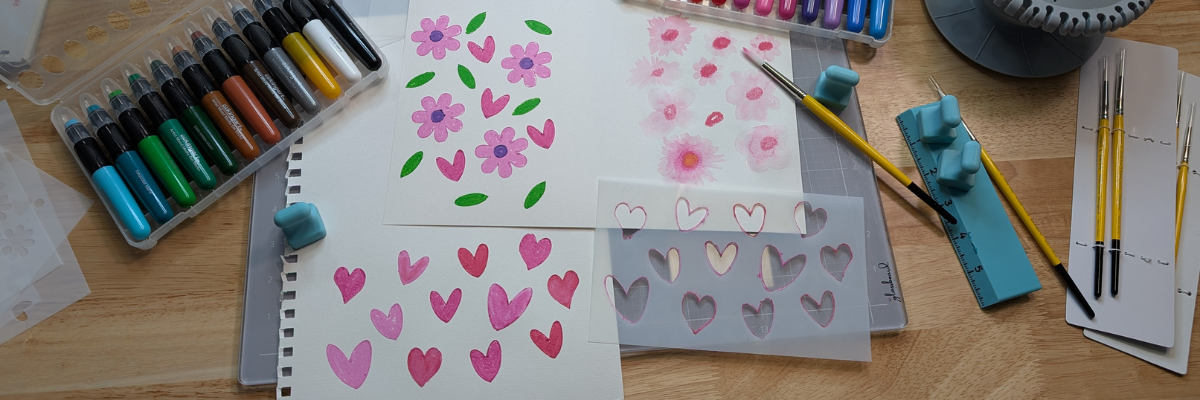
Now to test the stencils with some Kingart mixed media gel sticks. I love how it turned out!

An assortment of colorful markers beside sketched floral designs and hearts on paper, with a ruler and crafting tools visible on a wooden workspace.

Want to learn even more on how I designed the layered stencil used to create the design pictured above? Check out How to Create a Layered Stencil Design in Silhouette Studio video tutorial HERE on the Silhouette Secrets+ YouTube channel.

A screenshot of the Silhouette Studio software displaying a step-by-step design tutorial for creating DIY stencil designs, featuring floral and leaf patterns.

And there is more!!! A follower asked for more design tutorials after seeing the video above. So I also shared how to quickly design a flower and a heart in Silhouette too!

A screenshot of the Silhouette Studio software showing a flower design being created. The text overlay reads 'Quick DIY Flower in Silhouette Studio' with additional messaging about completing the task in less than a minute.

Screenshot of Silhouette Studio interface displaying a custom heart design with tutorial text.

Click the images above or the links below to watch these quick tutorials:

Supplies Used:

Handy Tools:

Project #4 – Stencil Fonts

When working with stencils whether it is a design or a font, the pieces have to all remain in the stencil somehow. If a piece is completely cut out, it will fall out of the stencil.

Screenshot of the Silhouette Studio software displaying stencil letters with the text 'ABCDOPQR' highlighted in a bold font style.

For instance, for letters A, B, D, O, P, Q, and R, they all have “counters”, which are the centers of the design that would fall out when cut. In order to cut as a stencil and remain in place, the letter needs a “bridge” so it can be held in place when cut.

I typed in “stencil font” to the Silhouette Design Store search and many options come up. All kinds of styles and the perfect one will vary based on your project and taste.

A collage of various stencil font designs available for cutting with a Silhouette machine, showcasing different styles and fonts labeled with their names and prices.

A few I own are:

You can see my taste varies and some of these will cut better at larger sizes than smaller. Each project may vary and you never really know until you test it.

The fastest way to create a stencil font is to use a premade font file, but you can also create your own from a font. This works best with a bold font where you can make “bridges” to help hold the centers (counters) of the letters in place.

A Silhouette cutting machine is positioned next to a cutting mat displaying a stencil with the text: "MAKE WAVES, NOT WORRIES. GO WITH THE FLOW. DON'T BE CRABBY. SALTY AIR, NOT MOODS. SEAS LIFE'S MOMENTS. SHELL-ABRATE THE LITTLE THINGS."

I used a font style called Grossura to create the stencil quote shown above.

Once you see how easy it is to alter a font, you may not want to stop creating and the ideas may just continue to flow. See how easy it is in this video tutorial – How to Alter Fonts for Stencils with Silhouette Studio | Quick Silhouette Tutorial on the Silhouette Secrets+ YouTube channel HERE.

A tutorial image showing the Silhouette Studio interface with bold text characters 'ABCDOPQR' displayed, indicating how to make a font stencil-ready. It features vibrant pink accents and highlights the text with an arrow pointing to the words 'Quick Tutorial'.

Supplies Used:

There is so many different projects you can create with stencils! And you can apply the same techniques and design steps to other projects as well. I hope you’ve picked up a few new ideas and techniques!

Looking for more creative ideas and inspiration? Check out the Crafting Creativity blog posts for a treasure trove of fun and unique projects! Each month, I share a fresh collection of craft ideas designed to spark your imagination and help you expand your skills with confidence. Don’t miss out—your next favorite project could be just a click away!

Save this for future reference by pinning the image below.

Collage of images showcasing custom stencils created with a Silhouette machine, featuring various designs and crafting materials.

Enjoy !

THANK YOU for your support! How can you help? Click HERE & buy a coffee.
Every little bit helps with the cost of running the site.

Silhouette Classes

Never stop learning! Let me help you take the anxiety out of learning with Silhouette and get to creating faster! My Silhouette classes are heavily focused on software, so you can take the skills & techniques taught and apply them to many future projects!

Silhouette step-by-step Classes by Silhouette Secrets+

Silhouette Secrets+ with EllyMae
**This post may contain affiliate links. What that means is that I may receive compensation if you purchase through the links I have provided. The price you pay for the product or service is not higher but I may get compensated for sharing.
Posted on 2 Comments

Crafting with Abstract Florals: 5+ Creative Project Ideas Using Clikchic Designs

Silhouette Secrets+ with EllyMae

Welcome to this edition of Crafting Creativity, featuring the bold and beautiful abstract floral designs by Clikchic Designs! These eye-catching patterns are the centerpiece of a wide range of creative projects that highlight the versatility of digital designs. From a custom shaker card and sketch-style greeting cards to shrink plastic tool charms, bracelet charms, earrings, wine charms, and a personalized chalkboard sign—these florals bring a fresh and modern flair to every creation. You’ll also see them used in card backgrounds and oversized tags, offering endless possibilities for crafters of all kinds. Get ready to be inspired by how one design collection can do so much!

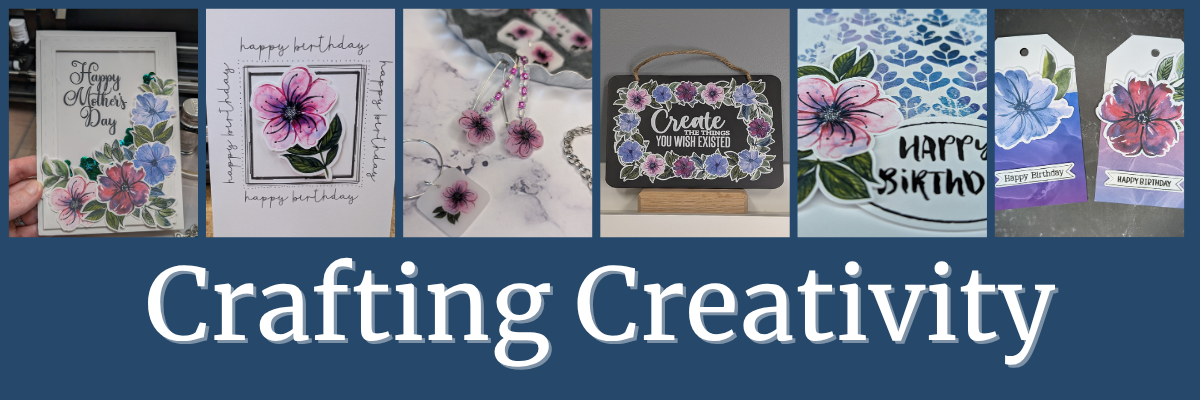
Collage of vibrant floral designs featured in various handmade projects including greeting cards, tags, charms, and bookmarks, showcasing the versatility of digital designs.

Affiliate links may be present in the following blog post and as an Amazon Associate, I earn from qualifying purchases.

A great big THANK YOU to Clikchic Designs for being the May contributing artist for the Silhouette Secrets+ newsletter. These gorgeous abstract floral designs can be found in Clikchic Designs artist store on the Silhouette Design Store site.

A collection of abstract floral designs in various colors, featuring purple, pink, and green blooms, as well as leaves, showcasing the artistry of Clikchic Designs.

Sign up for the Silhouette Secrets+ newsletter HERE for future free files & project inspiration.

Crafting Creativity with Clikchic Abstract Florals

Project #1 – Custom Shaker Card

A hand holding a Mother's Day card embellished with colorful floral designs, positioned in front of a crafting machine and various crafting tools.

I set this up to print on a 12″ x 12″ sheet of cardstock. The only thing that did not fit on one sheet was the frame. It could easily be cut using letter size cardstock too.

Digital design interface displaying a shaker card layout featuring floral elements and a 'Happy Mother's Day' greeting.

I added a bit of sparkle on top of the flowers with a shimmer pen and love it. The hardest part is getting that to show up well on photos.

Close-up of a hand-decorated card featuring colorful abstract floral designs in shades of pink, red, and blue, adorned with green leaves and sparkly embellishments.

My mom loved it!

Don’t forget to add your shaker bits before you adhere the acetate & frame down. I got excited and forgot, so I had to peel up a corner and add them in. Nothing like making a project harder than it needs to be.

Additional Resources:

Supplies Used:

Project #2 – Sketched Card Backgrounds

Two birthday cards featuring abstract floral designs, one with a pink flower and the other with a blue flower, placed on a wooden table beside a container holding more floral stickers. A black pen and a white gel pen are also visible.

I drew out 2 rectangles and applied different Sketch Effects to them to create the sketched squares, then added a sketch sentiment around the outer edge of the border using a font called Flannel Shirt Sketch.

I then added some foam tape on the back of the Abstract Floral designs and added those to the center of the sketched frame to give it some dimension.

Next, I sketched a couple more with a premade frame called Dot Frame Sketched.

Two handmade greeting cards featuring colorful floral motifs with the text 'just for you' at the top. The cards are displayed on a wooden surface alongside a Gelly Roll marker and a black pen, with additional floral stickers in the background.

I think this one is my favorite of them all, but I think I’m drawn to this pink flower for some reason.

A birthday card featuring a colorful floral design on a white background, surrounded by the text 'happy birthday' repeated around the frame. In the background, a cutting machine is partially visible.

They are all gorgeous when paired with the Abstract Floral designs by Clikchic Designs.

A birthday card featuring a watercolor-style pink flower with dark outlines, positioned centrally within a black frame. The words 'happy birthday' are printed around the frame in a playful font.

I added the random dots around the edge of the square frames by hand after the card was sketched. I could have set it up in the software and had the machine do it perfectly, but it might have also smooshed the tip of my pen. This gives each card a randomness to it as well and makes it unique.

Additional Resources:

Supplies Used:

Project #3 – Shrink Plastic Projects

Have you ever used shrink plastic before?

There are so many things you can create with shrink plastic. From wine charms, bracelet charms, earrings, tumbler charms, tool charms, and more!

A variety of shrink plastic charms and earrings featuring abstract floral designs, displayed on a silver tray. The collection includes two flower-themed earrings, decorative tags, and a bracelet adorned with floral motifs.

Here is a look at my printed page using Silhouette Shrink Plastic Sheets.

A hand holding a printed sheet featuring various colorful abstract floral designs, showcasing purple, pink, and blue flowers alongside the word 'INSPIRE'. The sheet is being prepared for use with a cutting machine in a crafting workspace.

I used the default settings in the Silhouette Studio software to start with. Here is a look at the Send tab when I sent this page to cut.

A digital design workspace in Silhouette Studio, showcasing colorful abstract floral elements with the text 'INSPIRE'. Various floral shapes are arranged for cutting on shrink plastic.

Larger shrink plastic designs can be interesting when they shrink and you just have to keep going to get them to flatten out. Sometimes, they will also not be a uniform shape at the end. I think that adds to their uniqueness and can be fun to see what happens.

Custom tool charms are a great way to mark your scissors either for a specific purpose or to identify them when you go craft with friends. They are also handy to help you locate them on your craft table if they like to hide in a “safe” place often.

A pair of beige scissors with a protective cover sits on a grey surface, alongside a handmade keychain featuring a bookmark that reads 'INSPIRE' decorated with pink flowers and colorful beads.

I love watching it shrink when heat is applied! Check out this quick video on the Silhouette Secrets+ Facebook Page, on Instagram, or on my YouTube channel.

Any type of plastic will dull the blade quicker than other materials, so it is not uncommon to have to increase the settings the more you cut.

There are several brands of shrink plastic out there and they can all be a bit different. I cut both Silhouette Shrink Plastic and Grafix Shrink Plastic during this process. I was using an older blade and I think it’s about done for now. It was having a hard time cutting through the Grafix Shrink Plastic in clear.

Test cuts are really the only way to know what is going to work with your blade and materials.

Two “secrets” of mine are:

  1. I’ll take a blade that isn’t cutting other materials such as cardstock or HTV well and move it to my shrink plastic blade. I get a bit more life out of my blades this way.
  2. Do not unload the cutting mat after the cut and check it first. If it did not cut through, you can increase the settings and send it again until it does cut.

Additional Resources:

Supplies Used:

Project #4 – Custom Sign or Chalkboard Sign

I started by measuring out the size of this chalkboard sign and then drew a rectangle the same size in Silhouette Studio. Then I just started adding the abstract floral designs and moving them around to create a floral frame.

A decorative black sign featuring a colorful floral border and the text "Create THE THINGS YOU WISH EXISTED" in white and pastel hues.

Did you know that vinyl goes bad? Yep! I started this project using Silhouette Printable Vinyl, which I love for the print quality. However, it must have been an old package because it would not weed properly and was separating. I ended up using Orajet 1917 that I’ve had in my craft stash for many, many years and it cut beautifully.

There is a shelf life for vinyl and other craft products such as pens, paint, string, inks, tape, etc.

What is the lifespan of vinyl? Well, there really isn’t an exact date or time as you never really know how long it’s sat on a retailers shelf or the manufacturer’s shelf, etc. And other factors play into it as well, such as temperature, humidity, etc. You will see many mention 2 years when stored properly. But, you never really know how it was treated before you bought it. I have some vinyl that I still try to cut even though I know it’s like 7 years old. Sometimes it works and sometimes it doesn’t.

How can you tell if it’s gone bad?

The 2 most obvious signs I have found is that it can separate when you try to weed it and it’s a bugger to work with no matter your troubleshooting or cut settings. These 2 things can present themselves by the adhesive can visibly be separating from the actual vinyl or the vinyl will not easily come off the backing paper.

Usually I try to push through and I always end up kicking myself for working so hard to try to salvage it.

However, the final way I know the vinyl has gone bad is when I get a new good piece and it weeds so smoothly. And that’s when I end up kicking myself.

For this project, I lost a few letters of the text in the middle, so I just ended up cutting the text from a scrap of Oracal 651 in white and adding that on to the project. A great use of scraps!

Additional Resources:

Supplies Used:

Project #5 – Cards with Unique Backgrounds

When I do a print and cut page, I will fill the page with extra designs and this month I had a good bunch of the florals left over to create with. So I set about brainstorming what I could do with the left overs.

A collection of colorful floral stickers featuring various flower designs in shades of blue, pink, and red, arranged on a light blue background.

I was browsing Pinterest and found an idea where they created custom backgrounds with a stencil and inks. Why not do that with a stencil design & digital patterns?

Here is a look at the first ones I created.

Four handmade birthday cards featuring abstract floral designs in various colors, each with the text 'Happy Birthday' displayed prominently. The designs include a mix of pink, blue, and purple hues, set against a white background.

The next set, I started playing around with the orientation and mixed it up a bit.

I had so much fun playing around and creating backgrounds with different pattern papers.

Here is a close up look at one of the cards.

A birthday card featuring a pink flower with green leaves, against a background of blue and purple leaf patterns, with the text 'HAPPY BIRTHDAY' prominently displayed.

You can do this too! Check out the video How to Make Stunning Card Backgrounds with Stencils & Digital Patterns in Silhouette on the Silhouette Secrets+ YouTube channel.

A digital tutorial for creating cards with stencils and patterned designs, featuring a split-screen image of the design process on a computer and finished card samples showcasing floral elements.

I am sharing my process of design creation, mistakes, and explanations of how and why I did things too!

Additional Resources:

Supplies Used:

Project #6 – Custom Tag Designs

Whether you need a design 2″ or 6″, you can do it with your cutting machine. You can create things whatever size you want.

These tags are 3.5″ wide and 6.125″ tall. I used the Project Wizard in Silhouette Studio to create the basic tag design and cut from 110 lb Neenah cardstock.

Two colorful birthday tags featuring floral designs, one with a blue flower and another with a red flower, both embellished with 'Happy Birthday' labels.

I used up the last 2 flowers and bits of greenery I had printed on cardstock and combined that with a patterned paper I designed and printed when I shared the tutorial on Creating Custom Background Patterns in Silhouette.

A person holding a printed page with an abstract blue and purple design, showcasing swirling patterns. In the background, there is a white printer and part of a calendar visible.

Additional Resources:

Supplies Used:

A great big THANK YOU to Clikchic Designs for collaborating for the Silhouette Secrets+ newsletter!

Find more designs by Clikchic Designs at:

Follow Clikchic Designs for more inspiration on her website, Facebook, and Instagram. I love watching the videos of how the designs are created. I love how she takes something that she has physically painted and turns it into a digital file so we can all enjoy and create with her amazing artwork!

Sign up for the Silhouette Secrets+ newsletter HERE so you don’t miss out on future collaborations.

From handmade cards to custom jewelry and home décor, the possibilities with these abstract floral designs by Clikchic Designs are truly endless. Each project in this Crafting Creativity edition showcases how one digital collection can be transformed into a wide variety of unique creations. Whether you’re crafting with paper, shrink plastic, or chalkboard materials, these versatile florals add a bold, artistic touch to every piece. We hope you’re inspired to explore new techniques and think outside the box with your next project.

Check out the Crafting Creativity series HERE.

Save this for future reference by pinning the image below.

A collage of various handcrafted projects featuring abstract floral designs, including greeting cards, jewelry, and a chalkboard sign, all showcasing the versatility of Clikchic Designs.

Enjoy !

THANK YOU for your support! How can you help? Click HERE & buy a coffee.
Every little bit helps with the cost of running the site.

Silhouette Classes

Never stop learning! Let me help you take the anxiety out of learning with Silhouette and get to creating faster! My Silhouette classes are heavily focused on software, so you can take the skills & techniques taught and apply them to many future projects!

Silhouette step-by-step Classes by Silhouette Secrets+

Silhouette Secrets+ with EllyMae
**This post may contain affiliate links. What that means is that I may receive compensation if you purchase through the links I have provided. The price you pay for the product or service is not higher but I may get compensated for sharing.