Posted on 1 Comment

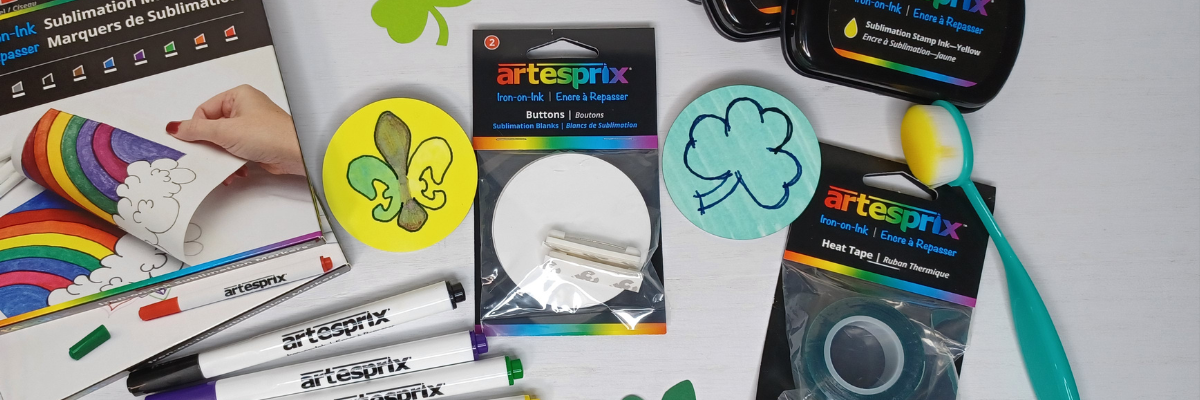
Grafix Frisket Film with Silhouette

Frisket Film Card Designs
Silhouette Secrets+ with EllyMae

There are so many possibilities when you have a cutting machine and can cut any design that you want. Combine that with the Grafix Frisket Film and wow! Endless card designs and projects you can create. I’m sharing a few cards I created below and I hope it sparks some ideas of projects you could create too!

Affiliate links may be present in the following blog post and as an Amazon Associate, I earn from qualifying purchases.

For this project I used several flower designs in Silhouette Studio and cut those from the Grafix Frisket Film on the Silhouette Cameo 5. You could use any brand of cutting machine or a die cut machine as well to cut the Grafix Frisket Film.

Silhouette Studio Setup Flower Designs

Cut settings for materials can vary by machine, blade life, material, and more! Test cuts are the only way you will know for sure what will work best and not waste materials.

For the Grafix Frisket Film, I used Silhouette settings of:
Blade Depth – 2, Force – 10, and Speed – 5

Additional Resources:

Cards with Grafix Frisket Film

Take a look at these stunning cards—yes, you can create them too! I am sharing the video tutorial and supply list below to start crafting your own beautiful designs today!

Grafix Frisket Film to Create Cards with Silhouette

Find the new video on the Grafix Arts YouTube channel where I share how I did this HERE and I’ve included a supply list below too!

Supplies used for Creating Cards with Grafix Frisket Film:

Flower Designs I used in the video:

Grafix Frisket Film Cards Close Up

Every card you create can be unique and you can use the Grafix Frisket Film over and over again or cut new designs to use too!

Save this for future reference by pinning the image below.

Grafix Frisket Film for Card Masking

Enjoy !

THANK YOU for your support! How can you help? Click HERE & buy a coffee.
Every little bit helps with the cost of running the site.

Silhouette Classes

Never stop learning! Let me help you take the anxiety out of learning with Silhouette and get to creating faster! My Silhouette classes are heavily focused on software, so you can take the skills & techniques taught and apply them to many future projects!

Silhouette step-by-step Classes by Silhouette Secrets+

Silhouette Secrets+ with EllyMae
**This post may contain affiliate links. What that means is that I may receive compensation if you purchase through the links I have provided. The price you pay for the product or service is not higher but I may get compensated for sharing.
Posted on 2 Comments

Create Stunning Silhouette Projects with Sarah Hurley’s Designs: Cards, T-shirts & More

Crafting Creativity Sarah Hurley
Silhouette Secrets+ with EllyMae

In this edition of Crafting Creativity I’ll be sharing the projects I created through the month with an arrow background/stencil design. So many great options from one file! A great big thank you to Sarah Hurley for providing the free file for the Silhouette Secrets+ August newsletter!

Affiliate links may be present in the following blog post and as an Amazon Associate, I earn from qualifying purchases.

Sarah Hurley website

What is Crafting Creativity?

I started sharing a blog post each month where I’m sharing the projects I’ve created with 1 file from an artist I have collaborated with. This is a file that the designer has provided for the Silhouette Secrets+ Newsletter subscribers and each month is something new! My goal is to share how you can take 1 design and think about different projects use it in to make your designs go farther! In each blog post, I’m sharing the projects created, the supply list, and additional resources that can help you learn more and advance your skills!

Sarah Hurley Arrow Background Stencil Design Silhouette Design Store

Crafting Creativity with Sarah Hurley

Project #1 – Fun Card with Bosh Cat and Arrow Background

Card created with designs by Sarah Hurley

I knew the moment I saw the Bosh cat design that I wanted to use him on a project. In following Sarah Hurley on social media and saw that she had adopted him, so I watch for his appearances. I always wonder what he’s thinking and feel like many of her designs would fit right in with Bosh’s thoughts.

Additional Resources:

Supplies Used:

Project #2 – Fun Interchangeable Sign

Fun Interchangeable Sign with Silhouette with designs by Sarah Hurley

Projects seem to take on a life of their own and I am getting better about just going with the flow of things and the direction it takes me. I knew I wanted to start with something bigger with this project and it developed along the way.

This fun sign is magnetic and the saying can be swapped out depending on what mood strikes you. Feeling snarky? Add a snarky saying. Sarah Hurley has some good ones in the Silhouette Design Store and sometimes I just enjoy scrolling through them for a laugh.
Need a pick-me-up? Add an inspiration saying…. or – leave them guessing at what will be up next.

Watch the video on the Silhouette Secrets+ YouTube channel and learn how to create your own interchangeable sign. Find it out HERE or click the image below.

Video Tutorial link to Silhouette Secrets+ YouTube channel for Interchangeable Sign
Video tutorial on the Silhouette Secrets+ YouTube channel HERE

Additional Resources:

Supplies Used:

Project #3 – This Side Up T-Shirt Using Text to Path

Text To Path T-Shirt Design in Silhouette with designs by Sarah Hurley

This was a fun way to use up scraps and create a fun shirt for myself. Anyone who’s ever traveled with me knows that I can trip over thin air. It’s genetic or that’s what we joke about because I get it from my Mom. If you ever see me on the ground, you’ll know why.

Text to Path is an awesome feature in the Silhouette Studio software and is available for all users. Check out how easy it is in this new video – Silhouette Tutorial: Quick and Easy Text to Path Tutorial HERE.

Silhouette Tutorial Text to Path

Additional Resources:

Supplies Used:

Project #4 – Sublimation Journal Cover with a Stencil

Grafix Stencil Film with Silhouette

I love being able to create my own projects and modify them as needed. That is exactly what I did in creating this stencil with the Grafix Stencil Film. The arrow background/stencil design came in as a square, but I was able to modify it with a few simple steps to make it for what I needed.

Check out more details on how I created the stencil in this blog post:
Create Customs Stencils: Using Grafix Stencil Film with Your Silhouette HERE

Stencil Design in Silhouette Studio with Sarah Hurley design

This was a fun project I created in a collaboration with Grafix Arts. Find the new video tutorial on the Grafix YouTube channel HERE

Additional Resources:

Supplies Used:

Project #5 – Bookmarks with Print and Cut

Silhouette Print and Cut Bookmarks with a Holographic Overlay with Sarah Hurley design

I used the arrow background/stencil design to create these bookmarks and then added my own custom color to it with the help of the Color Cubes by Sarah Renae Clark to select a color palette for the 2 different designs.

I shared how I did that in this video – Silhouette Studio Custom Color Palette Add Colors found HERE on the Silhouette Secrets+ YouTube channel.

Custom Color Palette in Silhouette Studio

The holographic overlay adds a fun touch as well as protects the bookmark front too!

Additional Resources:

Supplies Used:

I hope this edition of Crafting Creativity with Sarah Hurley has sparked a few ideas about what you can create. Write those ideas down and see where they take you!!!

Find more amazing designs by Sarah Hurley at the Silhouette Design Store. Follow along with Sarah Hurley on their website, Facebook, and Instagram too!

A great big thank you to Sarah Hurley for contributing the free file for the Silhouette Secrets+ newsletter for the month of August! If you missed grabbing the free Arrow Background/Stencil, it is available in the Silhouette Design Store HERE.

Sign up for the weekly newsletter HERE to have information delivered direct to your inbox and grab the new freebie each month.

Silhouette Secrets+ Newsletter

Never miss out on the news, tips, “secrets”, deals, classes, and more that I share on Silhouette Secrets+. Sign up for the newsletter and get information delivered to your inbox every Friday.
Unsubscribe at anytime.

I hope this has given you some ideas on how one file can lead to many different projects!

Save this for future reference by pinning the image below.

Multiple Projects from 1 Design by Sarah Hurley

Enjoy !

THANK YOU for your support! How can you help? Click HERE & buy a coffee.
Every little bit helps with the cost of running the site.

Silhouette Classes

Never stop learning! Let me help you take the anxiety out of learning with Silhouette and get to creating faster! My Silhouette classes are heavily focused on software, so you can take the skills & techniques taught and apply them to many future projects!

Silhouette step-by-step Classes by Silhouette Secrets+

Silhouette Secrets+ with EllyMae
**This post may contain affiliate links. What that means is that I may receive compensation if you purchase through the links I have provided. The price you pay for the product or service is not higher but I may get compensated for sharing.
Posted on Leave a comment

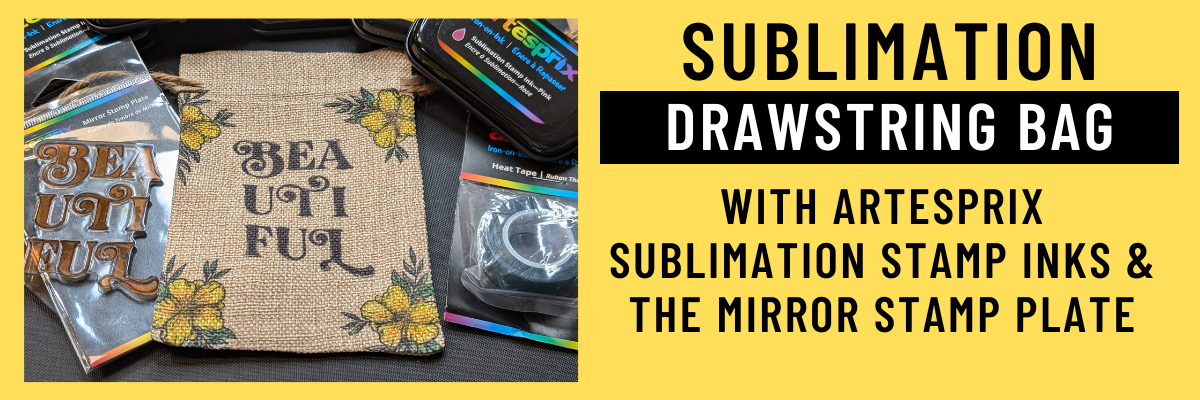
Sublimation Without a Printer: Easy DIY Drawstring Bag Tutorial Using Artesprix Inks

Artesprix Sublimation Inks to Create Custom Drawstring Bag
Silhouette Secrets+ with EllyMae

I love creating with the Artesprix Sublimation products! It has really helped me to just let go of my perfectionist tendencies and just create. These custom drawstring bags turned out FANTASTIC! I used the Artesprix mirror stamp plate for the text and then used it again as a color palette to pick up ink and paint the flowers. I wasn’t quite sure how the colors would show up on the background of the drawstring bag, but it was so bright and vibrant.

Custom Drawstring Bag: Sublimation Without a Printer Using Artesprix Sublimation Inks & Mirror Stamp Pad

Affiliate links may be present in the following blog post and as an Amazon Associate I earn from qualifying purchases.

Anyone can do this and you do NOT have to be an artist to create with the Artesprix Sublimation products. You also do NOT need a sublimation printer, so it is a great way to dip your toe in the water to test sublimation before investing in a bunch of equipment.

I am sharing the supplies I used to create the custom sublimation bag in the video that is linked below too!

Custom Drawstring Bag: Sublimation Without a Printer Using Artesprix Sublimation Inks & Mirror Stamp Pad

Supplies used to create custom sublimation bags:

Watch how I made these custom drawstring bags with the Artesprix Sublimation products in the new tutorial HERE on the Artesprix YouTube channel.

Find more ideas on creating with the Artesprix Drawstring Bag HERE.

You never know what you can create until you just do it and there are times I have to give myself a little pep talk and say “Just Do It!”… Just get started and see where it might take you!
Find more projects I’ve created using the Artesprix sublimation products HERE.

I’ll be sharing more so make sure to follow Artesprix on social media to see more projects!
YouTube channel
Blog
Facebook Page
Iron-on-Ink Inspirational Facebook Group

Save this for future reference by pinning the image below.

Artesprix Sublimation Ink Pads & Mirror Stamp Plate with Drawstring Bags


Want more creative ideas using the Artesprix sublimation products?
Check out all other projects HERE.

Grab some Artesprix sublimation products and get to creating today!

Enjoy !

THANK YOU for your support! How can you help? Click HERE & buy a coffee.
Every little bit helps with the cost of running the site.

Silhouette Classes

Never stop learning! Let me help you take the anxiety out of learning with Silhouette and get to creating faster! My Silhouette classes are heavily focused on software, so you can take the skills & techniques taught and apply them to many future projects!

Silhouette step-by-step Classes by Silhouette Secrets+

Silhouette Secrets+ with EllyMae
**This post may contain affiliate links. What that means is that I may receive compensation if you purchase through the links I have provided. The price you pay for the product or service is not higher but I may get compensated for sharing.
Posted on Leave a comment

Create Custom Stencils: Using Grafix Stencil Film with Your Silhouette Machine

Grafix Stencil Film with Silhouette and Artesprix
Silhouette Secrets+ with EllyMae

Have you ever made your own custom stencils? Combining Grafix Stencil Film with a Silhouette cutting machine opens up endless possibilities for creative projects and designs. You can easily create a wide variety of customized pieces! Using the Silhouette, a design by Sarah Hurley, and Grafix Stencil Film, I created a custom stencil that can be used over and over again.

Affiliate links may be present in the following blog post and as an Amazon Associate, I earn from qualifying purchases.

For this project I used Artesprix Sublimation inks with the custom cut Grafix Stencil Film and created a sublimation journal cover.

DIY Stencils with Grafix Stencil Film and Silhouette

I would recommend having a dedicated blade for cutting different materials. This will help to increase the lifespan on the blades, as well as help with future cut issues. Each material will dull the blade differently and stencil material is plastic, so that does affect it differently than say cutting a much thinner material such as adhesive vinyl.

The best thing you can do is test cut to determine what settings are going to work for your blade, machine model, and the materials being used.

Silhouette settings used:

After the cut is finished, check the cut to see if it cut completely through before unloading the mat from the machine. I have to tell myself this constantly because I’m so quick to press that unload button, but it can save you time and materials if you get in the habit of checking the cut first and if it did not cut through, then you can send it again and it should cut in the same exact location.

Additional Resources:

Custom Stencils with Grafix Stencil Film and Silhouette

Check out the new video on the Grafix Arts YouTube channel where I share how I did this HERE and I’ve included a supply list below too!

Supplies used for DIY Custom Stencils with Grafix Stencil Film:

Custom Sublimation Journal with Artesprix Sublimation Inks, Grafix Stencil Film, and Silhouette

What kind of projects would you create with your own custom stencils? Let us know in the comments below, we would love to hear from you!

Save this for future reference by pinning the image below.

Grafix Stencil Film for DIY Custom Stencils with Silhouette and Artesprix

Enjoy !

THANK YOU for your support! How can you help? Click HERE & buy a coffee.
Every little bit helps with the cost of running the site.

Silhouette Classes

Never stop learning! Let me help you take the anxiety out of learning with Silhouette and get to creating faster! My Silhouette classes are heavily focused on software, so you can take the skills & techniques taught and apply them to many future projects!
Silhouette step-by-step Classes by Silhouette Secrets+

Silhouette Secrets+ with EllyMae
**This post may contain affiliate links. What that means is that I may receive compensation if you purchase through the links I have provided. The price you pay for the product or service is not higher but I may get compensated for sharing.
Posted on 1 Comment

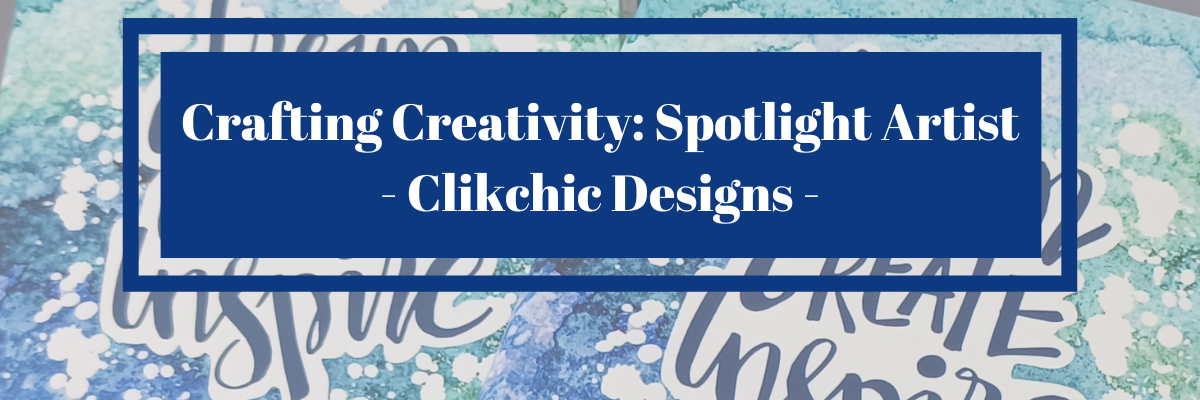
Creative Projects Using ClikChic Background Patterns in Silhouette: Cards, Coasters, and More

Crafting Creativity Spotlight Artist Clikchic Designs
Silhouette Secrets+ with EllyMae

In this edition of Crafting Creativity I’ll be sharing the projects I created through the month with a watercolor background pattern. Patterns can really make your project unique and be used in creative ways with Silhouette. A great big thank you to Clikchic Designs for providing the free file for the Silhouette Secrets+ July newsletter!

Clik Chick Designs Website

Affiliate links may be present in the following blog post and as an Amazon Associate, I earn from qualifying purchases.

Silhouette Background Patterns Projects

This past month I have had so much fun designing and creating with the Watercolor Background design by Clikchic Designs.

Blue Teal Green Watercolor Grunge Printable Background Pattern by Clik Chic Designs

I even went LIVE on YouTube – which for me is a big step, especially with all the issues Silhouette has been having. In the live video tutorial I shared all about pattern fill and how you can use it.

Check out the YouTube Live Tutorial – Design with Pattern Fill: Silhouette Studio Tips for Stunning Results HERE.

Silhouette Secrets YouTube Silhouette Tutorial Pattern Fill

I’ve been collaborating with designers this year and each week I am sharing new projects that can be created from 1 file. This is a file that the designer has provided for the Silhouette Secrets+ Newsletter subscribers. I want to share how you can take 1 design and think about different projects you can use it in to make your designs go farther!

Project #1 – Card Design with Watercolor Background

I used the Watercolor Grunge background and printed it on a 12″ x 12″ sheet of cardstock. Don’t worry if you don’t have the capability to print on 12″ x 12″ cardstock, the same technique can be done with letter size paper too!

Watercolor Background Cards Created with Background by Clik Chic Designs

I participated in a card swap and signed up to exchange 20 cards, so this was a perfect way to create 6 cards from one sheet of paper. And every one of these cards was different because of the unique watercolor grunge background.

Here is another set I made with a vertical layout.

Watercolor Background on Cards with Clik Chic Designs

Check out the written tutorial on how I made these cards in this post – Distressed or Grunge Background Designs in Silhouette Studio HERE

Additional Resources:

Supplies Used:

Project #2 – Sublimation Journal Cover

What started out as a sublimation tumbler idea, morphed into a sublimation journal cover project instead. I could not think of what I wanted to put as a saying onto a tumbler and while I was stumbling over that, I kept walking by these sublimation journals that I had ordered several weeks back.

Sublimation Journal Design with Clik Chic Designs Watercolor background pattern

Sometimes when the original project does not turn out, the next one is even better than you could imagine. I love these journal covers!

Additional Resources:

Supplies Used:

Project #3 – Eclipse Cards

Have you tried the eclipse card design? While it can be difficult to photograph, it can have a big WOW factor in person.

Eclipse Card with Watercolor Printable Background with Silhouette

When assembling the design you can use foam tape to either bump up the letters cut out or the background. Each can have a unique look to it.

Creating an eclipse Card with Silhouette

Play around with different design ideas and see what you like best.

Additional Resources:

Supplies Used:

Project #4 – T-shirt Design using Siser EasyColor DTV

Printable patterns can be used for all kinds of projects, including printable HTV. Siser EasyColor DTV is real HTV that can be used with an inkjet printer.

Printable Background Pattern using Siser EasyColor DTV with Clik Chic Design Background

I have had great success with the Siser EasyColor DTV and I would contribute that to following the printing and care instructions exactly. I have shirts that still look fantastic that I made when it was first released in August 2022.

In the video, Design with Pattern Fill: Silhouette Studio Tips for Stunning Results, I showed exactly how I created this design and you even get to see a little bit of troubleshooting LIVE while I tried to figure out what I was doing wrong and how I fixed it.

Additional Resources:

Supplies Used:

Project #5 & 6 – Sublimation Coaster, Earrings & Necklace

I had a misprint when I first did the sublimation print for the journal and I had a line of “tiling”, which is a sharp distinct line in the actual printout and would not look good on my finished project. I explained about this and showed exactly what it looks like in the YouTube video HERE.

But, I wasn’t just going to throw away the printed sublimation page. I can use it for other projects! So I started digging in my sublimation blanks to see what the design would fit completely on. The coaster was the perfect fit and now sits on my desk too!

Sublimation Coaster with Printable Background from Clik Chic Designs

For the photo, I paired it with a tumbler that I use all the time from a previous class on creating your own custom designs.

Sometimes mistakes can be a good thing!

Next, I took a few more sublimation blanks and made some earrings and a necklace pendant from the extra pieces of the mistake sublimation print.

Sublimation Earrings and Necklace with Background Pattern by Clik Chic Designs

I don’t even want to admit how many pieces of sublimation printed designs I have just hanging out waiting for the perfect blank. Shhhh…. we won’t talk about it.

Additional Resources:

Supplies Used:

I had so much fun crafting projects with the watercolor grunge background this month and still lots more ideas for future projects too!

Find more amazing designs by Clikchic Designs at:

Follow along with Clikchic Designs on their website, Facebook, and Instagram too!

A great big thank you to Clikchic Designs for contributing the free file for the Silhouette Secrets+ newsletter for the month of July! If you missed grabbing the free Watercolor Grunge Background, it is available in the Silhouette Design Store HERE.

This year I started offering a free file each month for Silhouette Secrets+ newsletter subscribers. I love designing in the Silhouette Studio software and have shared some of my creations as well as look forward to collaborating with more artists in the future too!

Silhouette Secrets+ Newsletter

Never miss out on the news, tips, “secrets”, deals, classes, and more that I share on Silhouette Secrets+. Sign up for the newsletter and get information delivered to your inbox every Friday.
Unsubscribe at anytime.

Sign up for the weekly newsletter HERE to have information delivered direct to your inbox and grab each month new freebie.

I hope this has given you some ideas on how one file can lead to many different projects!

Save this for future reference by pinning the image below.

Multiple projects created with a watercolor grunge background in Silhouette Studio

Enjoy !

THANK YOU for your support! How can you help? Click HERE & buy a coffee.
Every little bit helps with the cost of running the site.

Silhouette Classes

Never stop learning! Let me help you take the anxiety out of learning with Silhouette and get to creating faster! My Silhouette classes are heavily focused on software, so you can take the skills & techniques taught and apply them to many future projects!

Silhouette step-by-step Classes by Silhouette Secrets+

Silhouette Secrets+ with EllyMae
**This post may contain affiliate links. What that means is that I may receive compensation if you purchase through the links I have provided. The price you pay for the product or service is not higher but I may get compensated for sharing.
Posted on Leave a comment

Sparkle and Shine: Creating Personalized Sequin Pillowcases with Artesprix Paints

Artesprix Sublimation Sequin Pillow with Heat Resistant Transfer Mask
Silhouette Secrets+ with EllyMae

Join me in creating a custom pillowcase that sparkles and shines! With the Artesprix Sublimation Sequin Pillowcase and the Artesprix Heat Resistant Mask, this project is not only fun but also easy to personalize. Using the Silhouette Cameo 5, I cut out a design that bring a unique flair to the pillowcase.

Sublimation Sequin Pillow Case with Artesprix Sublimation Paints and Heat Transfer Resistance Mask

Affiliate links may be present in the following blog post and as an Amazon Associate I earn from qualifying purchases.

Watch how you can make your own custom creation with the Artesprix Sublimation products in the new tutorial HERE on the Artesprix YouTube channel.

Supplies used for Sequin Sublimation Pillow Case:

Here is a list of the supplies I mentioned and demonstrated in the new YouTube video:

Artesprix Sublimation Sequin Pillow Case with Heat Resistant Transfer Mask

Find more ideas on creating with the Artesprix Sublimation Sequin Pillow Case HERE.

Let your imagination go and see what you could create to add some sparkle to your space! Find more projects I’ve created using the Artesprix sublimation products HERE.

I’ll be sharing more so make sure to follow Artesprix on social media to see more projects!
YouTube channel
Blog
Facebook Page
Iron-on-Ink Inspirational Facebook Group

Save this for future reference by pinning the image below.

Sublimation Sequin Pillow Case Artesprix Heat Transfer Resist Mask


Want more creative ideas using the Artesprix sublimation products?
Check out all other projects HERE.

Grab some Artesprix sublimation products and get to creating today!

Enjoy !

THANK YOU for your support! How can you help? Click HERE & buy a coffee.
Every little bit helps with the cost of running the site.

Silhouette Classes

Never stop learning! Let me help you take the anxiety out of learning with Silhouette and get to creating faster! My Silhouette classes are heavily focused on software, so you can take the skills & techniques taught and apply them to many future projects!

Silhouette step-by-step Classes by Silhouette Secrets+

Silhouette Secrets+ with EllyMae
**This post may contain affiliate links. What that means is that I may receive compensation if you purchase through the links I have provided. The price you pay for the product or service is not higher but I may get compensated for sharing.
Posted on Leave a comment

Custom Water Bottle with Artesprix Sublimation Inks

Artesprix Sublimation Ink - Custom Water Bottle
Silhouette Secrets+ with EllyMae

Join me as I share how you can take a few stamps and create a custom water bottle using the Artesprix sublimation inks.

Custom Sublimation Water Bottle with Artesprix Sublimation Ink

Affiliate links may be present in the following blog post and as an Amazon Associate I earn from qualifying purchases.

Watch how you can make your own custom creation with the Artesprix Sublimation products in the new tutorial HERE on the Artesprix YouTube channel.

Supplies used for Custom Water Bottle:

Here is a list of the supplies I mentioned and demonstrated in the new YouTube video:

Artesprix Sublimation Water Bottle with Inks

Find more ideas on creating with the Artesprix Sublimation Water Bottle HERE.

So much fun to create this custom water bottle! And I have more to share too! Find more projects I’ve created using the Artesprix sublimation products HERE.

I’ll be sharing more so make sure to follow Artesprix on social media to see more projects!
YouTube channel
Blog
Facebook Page
Iron-on-Ink Inspirational Facebook Group

Save this for future reference by pinning the image below.

Sublimation Water Bottle with Artesprix Inks


Want more creative ideas using the Artesprix sublimation products?
Check out all other projects HERE.

Grab some Artesprix sublimation products and get to creating today!

Enjoy !

THANK YOU for your support! How can you help? Click HERE & buy a coffee.
Every little bit helps with the cost of running the site.

Silhouette Classes

Never stop learning! Let me help you take the anxiety out of learning with Silhouette and get to creating faster! My Silhouette classes are heavily focused on software, so you can take the skills & techniques taught and apply them to many future projects!

Silhouette step-by-step Classes by Silhouette Secrets+

Silhouette Secrets+ with EllyMae
**This post may contain affiliate links. What that means is that I may receive compensation if you purchase through the links I have provided. The price you pay for the product or service is not higher but I may get compensated for sharing.
Posted on 1 Comment

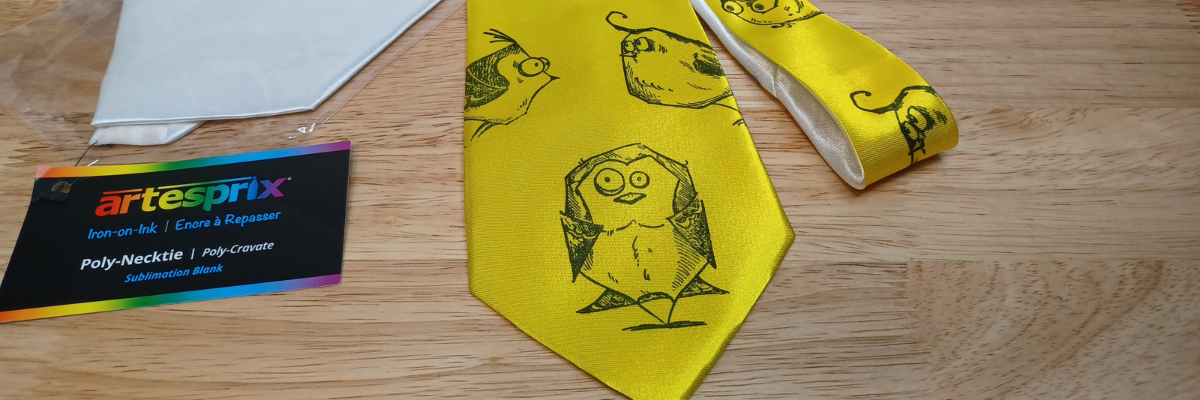
Creating a Bright and Unique DIY Necktie with Tim Holtz Crazy Birds Stamps

DIY Necktie with Artesprix Sublimation Paint & Stamp Pads
Silhouette Secrets+ with EllyMae

Want to create unique DIY items? This month I created this fun, bright colored DIY necktie that is definitely unique and a one-of-a-kind using the Artesprix sublimation paints, stamp ink, and a fun Tim Holtz – Crazy Birds stamp set. The best part is… you can do this too!

Artesprix DIY Sublimation Necktie

Affiliate links may be present in the following blog post and as an Amazon Associate I earn from qualifying purchases.

I went to ask my husband to tie this as I was trying to take the final photos and he had a friend over. The reaction I got was worth it all! They both loved it! A unique DIY necktie that is one-of-a-kind. I mentioned that it would take a special, fun event to wear this and his remark was, “Absolutely not.” I think he was ready to take it and prove me wrong. It was the perfect reaction to confirm I was on the right path with my unique creation.

Watch how you can make your own DIY creation with the Artesprix Sublimation products in the new tutorial HERE on the Artesprix YouTube channel.

I just love these fun spirited birds. They bring a smile to my face each time I see them.

Supplies used for DIY Necktie:

Here is a list of the supplies I mentioned and demonstrated in the new YouTube video:

Sublimation Necktie with Artesprix DIY

Find more ideas on creating with the Artesprix Sublimation Necktie HERE.

So much fun to create! And I have more to share too! Find more projects I’ve created using the Artesprix sublimation products HERE. And stay tuned for other fun projects because I just couldn’t stop creating with the ribbon and inks!

I’ll be sharing more so make sure to follow Artesprix on social media to see more projects!
YouTube channel
Blog
Facebook Page
Iron-on-Ink Inspirational Facebook Group

Save this for future reference by pinning the image below.

DIY Necktie with Artesprix Sublimation Paints and Stamp Pads


Want more creative ideas using the Artesprix sublimation products?
Check out all other projects HERE.

Grab some Artesprix sublimation products and get to creating today!

Enjoy !

THANK YOU for your support! How can you help? Click HERE & buy a coffee.
Every little bit helps with the cost of running the site.

Silhouette Classes

Never stop learning! Let me help you take the anxiety out of learning with Silhouette and get to creating faster! My Silhouette classes are heavily focused on software, so you can take the skills & techniques taught and apply them to many future projects!

Silhouette step-by-step Classes by Silhouette Secrets+

Silhouette Secrets+ with EllyMae
**This post may contain affiliate links. What that means is that I may receive compensation if you purchase through the links I have provided. The price you pay for the product or service is not higher but I may get compensated for sharing.
Posted on Leave a comment

Art with Artesprix Sublimation Ink Refills

Artesprix Sublimation Ribbon and Stamp Ink Refills
Silhouette Secrets+ with EllyMae

This months video for the Artesprix YouTube channel took a turn when I had too much ink leftover and I loved the end result of my “accident” better than my original idea. I used the Artesprix Sublimation Stamp Ink Refills, mixed media paper, and Artesprix Satin Ribbon to create some fun and awesome creations. For my original idea, I used a paint brush and painted brushstrokes for my design, but then when I went to clean up my excess ink, I found that I loved the pattern it created so much better!

Affiliate links may be present in the following blog post and as an Amazon Associate I earn from qualifying purchases.

Artesprix Sublimation Satin Ribbon and Ink Refills

Do you ever have that happen? Think you have a plan and then it all changes and turns out even better than your original idea?

Watch how I made these custom ribbons with the Artesprix Sublimation products and added it to make custom ribbon in the new tutorial HERE on the Artesprix YouTube channel.

Artesprix Sublimation Supplies

Here is a list of the supplies I mentioned and demonstrated in the new YouTube video:

Bows with Artesprix Satin Ribbon and Sublimation

So much fun to create! And I have more to share too! Stay tuned for other fun projects because I just couldn’t stop creating with the ribbon and inks!

I’ll be sharing more so make sure to follow Artesprix on social media to see more projects!
YouTube channel
Blog
Facebook Page
Iron-on-Ink Inspirational Facebook Group

Save this for future reference by pinning the image below.

Artesprix Sublimation Stamp Pads, Ink Refills, Markers, Paints, and Stain Ribbon


Want more creative ideas using the Artesprix sublimation products?
Check out all other projects HERE.

Grab some Artesprix sublimation products and get to creating today!

Enjoy !

THANK YOU for your support! How can you help? Click HERE & buy a coffee.
Every little bit helps with the cost of running the site.

Silhouette Classes

Never stop learning! Let me help you take the anxiety out of learning with Silhouette and get to creating faster! My Silhouette classes are heavily focused on software, so you can take the skills & techniques taught and apply them to many future projects!

Silhouette step-by-step Classes by Silhouette Secrets+

Silhouette Secrets+ with EllyMae
**This post may contain affiliate links. What that means is that I may receive compensation if you purchase through the links I have provided. The price you pay for the product or service is not higher but I may get compensated for sharing.
Posted on Leave a comment

New Artesprix Sublimation Paint Colors!!!

Artesprix Sublimation Paint
Silhouette Secrets+ with EllyMae

I’m playing with paint this month on the Artesprix YouTube channel. Specifically, the new colors of the Artesprix Sublimation Paints. I made a fun potholder for my craft room.

Yes, you read that right! Since I’m often playing with sublimation blanks, they get HOT! This will come in handy in my craft room and brighten up the place a bit. But, you can also create these to brighten up your kitchen. Function and fun all in one!

Affiliate links may be present in the following blog post and as an Amazon Associate I earn from qualifying purchases.

Artesprix Sublimation Paints

Watch how I created this Spring potholder in the new tutorial HERE on the Artesprix YouTube channel.

Now, if you don’t want to hand draw a design, you can always used your craft machine to draw out a design too!

Check out this post where I used the markers to draw a design HERE.

Artesprix Sublimation Supplies

Here is a list of the supplies I mentioned and demonstrated in the new YouTube video:

Artesprix Sublimation Paints New Colors

I’ll be sharing more so make sure to follow Artesprix on social media to see more projects!
YouTube channel
Blog
Facebook Page
Iron-on-Ink Inspirational Facebook Group

Save this for future reference by pinning the image below.

Artesprix Sublimation Paint Colors Pinterest


Want more creative ideas using the Artesprix sublimation products?
Check out all other projects HERE.

Grab some Artesprix sublimation products and get to creating today!

Enjoy !

THANK YOU for your support! How can you help? Click HERE & buy a coffee.
Every little bit helps with the cost of running the site.

Silhouette Classes

Never stop learning! Let me help you take the anxiety out of learning with Silhouette and get to creating faster! My Silhouette classes are heavily focused on software, so you can take the skills & techniques taught and apply them to many future projects!

Silhouette step-by-step Classes by Silhouette Secrets+

Silhouette Secrets+ with EllyMae
**This post may contain affiliate links. What that means is that I may receive compensation if you purchase through the links I have provided. The price you pay for the product or service is not higher but I may get compensated for sharing.