Posted on Leave a comment

Custom Tumbler Sublimation Made Easy with Artesprix Inks | Step-by-Step DIY

Creating a custom sublimation tumbler doesn’t have to be complicated! In this step-by-step DIY tutorial, I’m sharing an easy and creative way to make vibrant, one-of-a-kind tumblers using Artesprix Sublimation Inks. This project combines simple techniques like plastic wrap and heat resist mask to achieve stunning results—perfect for beginners, girls’ nights, craft nights, handmade gifts, or even small business projects. In this post, you’ll find the full video tutorial, a complete supply list, and helpful tips to confidently create your own custom sublimation tumblers from start to finish.

Affiliate links may be present in the following blog post and as an Amazon Associate I earn from qualifying purchases.

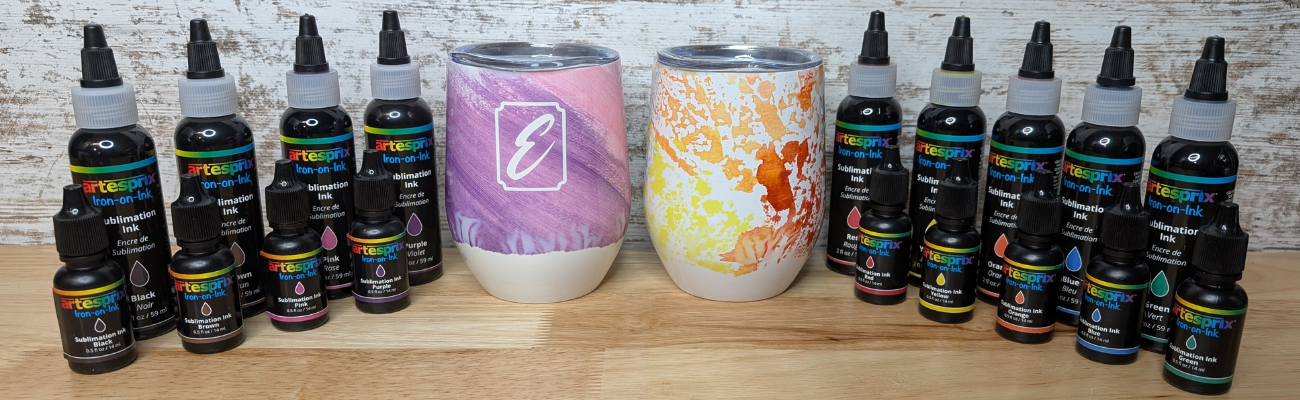
Two custom sublimation tumblers featuring vibrant colors and designs, surrounded by Artesprix sublimation inks in various shades.

Want to know what I love about the Artesprix sublimation inks, paints, markers, and stamp pads. They make me step outside my comfort zone and accept what comes. That each project I create is unique and even if I did the same exact steps the next time, it would still look different.

For these custom wine tumblers, I used the Artesprix Heat Resist Mask and cut a monogram out with my Silhouette.

Digital design workspace in Silhouette Studio featuring various monogram letters for a wine tumbler project.

Here is a look at my design file. The letter ‘E’ is one of those that can look really ugly in many fonts and always takes me forever to find one I really like. On the left side, I have the keepers, until I find the one that speaks to me the most.

In the video you’ll see that the first monogram I tried was just the letter and because I didn’t have a solid background it is a “hidden message” monogram. I couldn’t stop there and had to create another, so I added a frame around the letter too.

Close-up of hands applying a monogram letter 'E' to a white sublimation tumbler, on a black surface with a colorful background.

I have better luck with securing the Artesprix Heat Transfer Resist directly to the blank and then there is no space for the sublimation gases to leak in underneath during the process. For a design that has pieces like the second one with the frame, I used transfer tape to transfer it to the blank just like you do with adhesive vinyl.

A person holding a piece of plastic wrap above a custom sublimation tumbler with a purple design, in a crafting workspace.

The shape of the tumbler and the crinkled paper gave it a unique look on the bottom.

I think it turned out unique and it completely shows that sometimes you just have to take “control” and throw it out the window. Now, I kind of want to try the wrinkle, cloudy technique on purpose. While I cannot control the final outcome on colors and pattern, I was able to “fix” the monogram so it’s no longer a “hidden message” and it turned out so crisp.

Two custom sublimation tumblers side by side, one with a purple and pink swirl pattern featuring a white monogram 'E', and the other with an abstract orange and yellow design.

I don’t waste any of the sublimation ink. Anytime there is extra paint or ink, I will grab a sheet of copy paper and make a new print, let it dry, and then add it to my stash. As long as the sublimation pages don’t get wet or aren’t subjected to high heat, you can use them for a year or longer after they’ve been made.

Here is a look at the “hidden message” monogram on the right.

Two custom sublimation tumblers, one featuring a purple swirl design with a white monogram 'E', and the other showcasing a blue and red abstract design. Surrounding them are various bottles of Artesprix sublimation inks.

Looking for the step-by-step video?
It’s linked right below the supplies section.

Supplies for Custom Sublimation Wine Tumblers:

Watch this tutorial on these sublimation wine tumblers HERE on the Artesprix YouTube channel.

Check out more of my Artesprix sublimation creations HERE.

I’ll be sharing more so make sure to follow Artesprix on social media to see more projects!
YouTube channel
Blog
Facebook Page
Iron-on-Ink Inspirational Facebook Group

Save this for future reference by pinning the image below.

Two custom sublimation wine tumblers, one featuring a purple and white marbled design with a monogram 'E', and the other with an orange and yellow gradient. Bottles of Artesprix sublimation inks are visible in the background.

Grab some Artesprix sublimation products and get to creating today!

Enjoy !

THANK YOU for your support! How can you help? Click HERE & buy a coffee.
Every little bit helps with the cost of running the site.

Silhouette Classes

Never stop learning! Let me help you take the anxiety out of learning with Silhouette and get to creating faster! My Silhouette classes are heavily focused on software, so you can take the skills & techniques taught and apply them to many future projects!

Silhouette step-by-step Classes by Silhouette Secrets+

Silhouette Secrets+ with EllyMae
**This post may contain affiliate links. What that means is that I may receive compensation if you purchase through the links I have provided. The price you pay for the product or service is not higher but I may get compensated for sharing.
Posted on 1 Comment

DIY Etched Glass Tiered Tray Using Etchall and Silhouette

Silhouette Secrets+ with EllyMae

If you’ve ever spotted a hidden gem at a thrift store and talked yourself out of it… this project is your reminder to turn back and grab it! That’s exactly how this Etched Tiered Tray came to life. I found a gorgeous three-tiered glass tray tucked behind a stack of dishes, walked away, and then thankfully circled back to bring it home. Today I’m sharing how I transformed that thrifted treasure using custom-designed stencils created in Silhouette Studio and Etchall etching creme. With the right design setup and a few simple steps, you can get beautifully crisp results that make any glass piece look high-end and completely personalized.

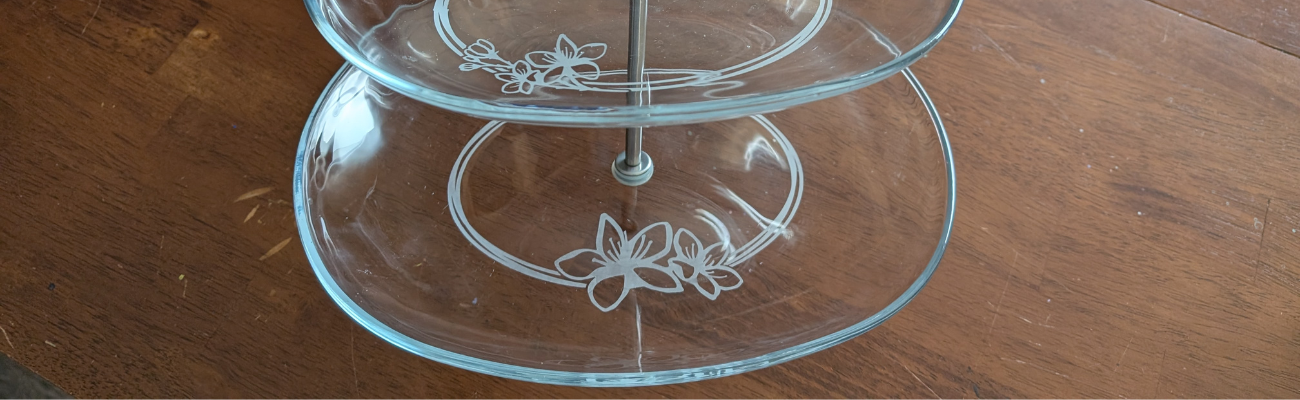
A three-tiered glass tray with floral etchings on the plates, showcasing a decorative design.

Affiliate links may be present in the following blog post and as an Amazon Associate, I earn from qualifying purchases.

If you have a cutting machine, you have unlimited possibilities of custom designs at your fingertips.

Supplies Used for Custom Etched Tiered Tray:

I started by measuring each level of the tiered tray. This gives me a starting point to draw out a template in Silhouette Studio to design within. If the tiered tray has a curve to it, then you’ll want to make sure to account for that. Adding a stencil onto a curved area can get a bit tricky to lay it straight and flat. I created my stencils so the design would be on the flat area before the curve starts.

Three-tiered glass tray with a metal handle, resting on a wooden surface.

Here is a look at my working file in Silhouette Studio.

Screenshot of the Silhouette Studio software showcasing various floral designs and templates for crafting projects.

On the left side are some designs I was playing around with to decide what I wanted to work with. I settled on using the Cherry Blossom Design by Tanya Batrak. On the right you can see the design for each level of the tiered tray. The outer oval is the template from my measurements and then I was able to design within the template for each level.

I knew I wanted something that went all the way around and I designed an oval frame using the same technique that I shared in the video tutorial on the Silhouette Secrets+ channel – Creating a Circle Frame in Silhouette Studio with Basic Tools.

Screenshot of the Silhouette Studio interface showing various circle frame designs and a tutorial title 'Creating a Circle Frame in Silhouette Studio'.

Then I brought in the Cherry Blossom Design and scaled it to the size I wanted and placed it on top of the oval frame.

I modified the design a bit by cutting off the branch on one side and then for the largest tiered tray, I cut off the top 3rd flower and used edit points to make the design smooth. So each layer of this tiered tray is a bit different. Here is a close up look at my final designs.

A design layout in Silhouette Studio showcasing three oval templates featuring hibiscus flowers, with a focus on creating custom stencils for crafting projects.

I then made an offset of the entire design and subtracted the offset from the circle frame to give the design some space and set it apart.

Here is a look at my stencil file on the Send tab in Silhouette. I used the Cut by Line Color tab so I could set up 2 different settings and have it kiss cut around the stencil and then cut the red cut line all the way through on the offset around the entire design. This way the center of the design was cut out for me by the Silhouette machine.

Screenshot of the Silhouette Studio software showing a design with three oval frames adorned with floral elements, intended for use in crafting.

Then I grabbed a color of Oracal 651 adhesive vinyl that has been in my stash for awhile and not used. Scraps or colors that you don’t use often are great for stencils.

Once the designs were cut, then carefully weed out the design. And if you mess up in the weeding or application process, grab another sheet of vinyl and cut another one. I messed up along the way on one decal and ended up cutting another stencil. So glad I have this option with owning a cutting machine!

A close-up of a hand using a crafting tool to weed an intricate stencil design featuring cherry blossoms, with a grid cutting mat in the background.

If your tiered tray comes apart easily, it may be easier to apply the stencils and etch by taking it apart. My husband suggested I do this, but with the rubber rings separating each layer, I didn’t want to mess something up taking it apart or putting it back together, so I worked with it fully assembled.

This meant that I needed to cut the stencil apart for 2 of the layers to wrap it around and apply to the bottom of the tier.

A person's hand holding a craft knife over an orange stencil design featuring cherry blossoms on a cutting mat.

I looked for a good section of the design to slice it apart at that would be easy to line up and get connected again when I was applying.

Find some way to set up so your glass is secure and is as flat as possible for the stencil application and while the etching creme is on the glass.

Since I left my tiered tray assembled, I propped it up using my bulk roll of AT65 Transfer Tape.

A tiered glass tray sits on a table surrounded by crafting supplies, including etching cream, a cutting machine, and various tools.

This was actually a really sturdy way to hold my tiered tray and it was stable, secure, and level the entire time.

Make sure to clean the area where you’ll be applying the adhesive vinyl with alcohol first to remove any dirt and debris so you get a good adhesion. And then let it dry completely.

The bottom layer was the easiest since it was the most accessible and that is where I started. I applied the Oracal 651 adhesive vinyl stencil and then I applied a bit of heat to help the adhesive vinyl to adhere well. I have some intricate areas and I wanted to give myself the best chance of success and not have any bleed. While this is step is not mandatory for glass etching, I do think whatever you can do to set yourself up for success saves your time and money.

Not all glass etches too! And I wasn’t sure if this would work or not on the tiered tray. Starting with the bottom layer first, this was my test. I heated it a bit and then carefully smoothed down the vinyl edges all along. Be careful as hot glass looks the same as cold glass. I then waited for the glass to cool completely before applying the Etching creme so that the adhesive could set up and less likely to move around on the smooth surface.

A person using a heat gun to apply a stencil on a glass tiered tray, featuring a Cherry Blossom design, in a home crafting setting.

The next step isn’t mandatory either, but I do feel it will help you be successful! Tape off the edges around the stencil in case any etching creme gets outside of where you want it to be. It never fails that if the etching creme even touches an area you don’t want it to etch, it will.

A close-up view of a glass tiered tray with a stencil design featuring cherry blossoms being prepared for etching, surrounded by crafting tools.

Use painter’s tape or in this case, I had lots of excess transfer tape and since it was an oval object on a curved surface, I ended up cutting smaller sections of the AT65 transfer tape and applying it around the outer edge and the inside edge of my stencil.

For flat objects, you can simply make your stencil larger to cover a larger area of the object. However, on a curved object that can be more difficult to lay the adhesive vinyl completely flat, so I chose this method.

Next, I applied the Etchall etching creme around the entire design. And set my timer for 20 minutes.

Close-up view of a glass tiered tray with a stencil applied, surrounded by painter's tape and etching creme, showcasing the crafting process.

The next steps are very important! After 20 minutes, carefully remove any excess Etchall etching creme and put it back in the bottle. It can be reused over and over again. Then I take a paper towel and wipe away any excess. And once all the excess has been removed, I will run water in my sink and then washed the entire design and remove the stencil while under running water.

It worked!!! So I dried it off and then repeated the same steps on the other 2 layers of the tiered tray.

A close-up view of a glass tiered tray being prepared for etching, with tape securing an oval stencil around the rim and etching creme applied within the stencil area.

As you can see I have 2 different colors of adhesive vinyl as I messed up weeding the top layer stencil. Easily remedied by cutting another stencil with my Silhouette machine.

A close-up view of a tiered glass tray with an intricate design being applied, featuring painter's tape and etching creme around the edges.

All the extra steps to secure with heat and taping off the design paid off!

A close-up of an etched glass tray featuring a floral design, with a metal stand in the center and a towel nearby.

This etched tiered tray project turned out fantastic!!!

A three-tiered glass tray with etched cherry blossom designs on each layer, displayed on a wooden table.

The hardest part about glass etching is getting a good photo and in this case, getting a good photo that shows all 3 levels off well.

A three-tiered glass tray with floral etchings and a metallic handle, showcasing a DIY glass etching project.

I love being able to create custom and unique projects. This one was quickly claimed by my youngest, who put it to work immediately. I asked if she could to a “lifestyle” photo for me to use and this is what she did.

A three-tiered glass tray displaying various pieces of jewelry and accessories, including earrings, bracelets, and decorative items.

It is definitely being put to good use and she loves it.

Check out more information for even more creative ideas and tips to take your crafting to the next level HERE!

Additional Resources:

Save this for future reference by pinning the image below.

A beautifully etched three-tiered glass tray featuring a floral design, showcasing the effect of glass etching with the Etchall etching creme.

Enjoy !

THANK YOU for your support! How can you help? Click HERE & buy a coffee.
Every little bit helps with the cost of running the site.

Silhouette Classes

Never stop learning! Let me help you take the anxiety out of learning with Silhouette and get to creating faster! My Silhouette classes are heavily focused on software, so you can take the skills & techniques taught and apply them to many future projects!

Silhouette step-by-step Classes by Silhouette Secrets+

Silhouette Secrets+ with EllyMae
**This post may contain affiliate links. What that means is that I may receive compensation if you purchase through the links I have provided. The price you pay for the product or service is not higher but I may get compensated for sharing.

Posted on Leave a comment

Custom Etched Decanter Set: A Personalized Gift Made with Etchall

Silhouette Secrets+ with EllyMae

Looking for a unique and elegant gift idea? This custom glass etched decanter set is the perfect project to showcase both creativity and craftsmanship! Using Silhouette Studio to design the stencil and cutting it from Oracal 651 adhesive vinyl with the Silhouette Cameo 5, I created crisp, intricate, and detailed stencils that made the etching process a breeze. With a little help from Etchall etching creme, each piece transformed into a beautifully personalized set — perfect for gifting or adding a touch of class to your own home bar. Keep reading for a full supply list, a look at the step-by-step process, and plenty of inspiration photos of the finished project!

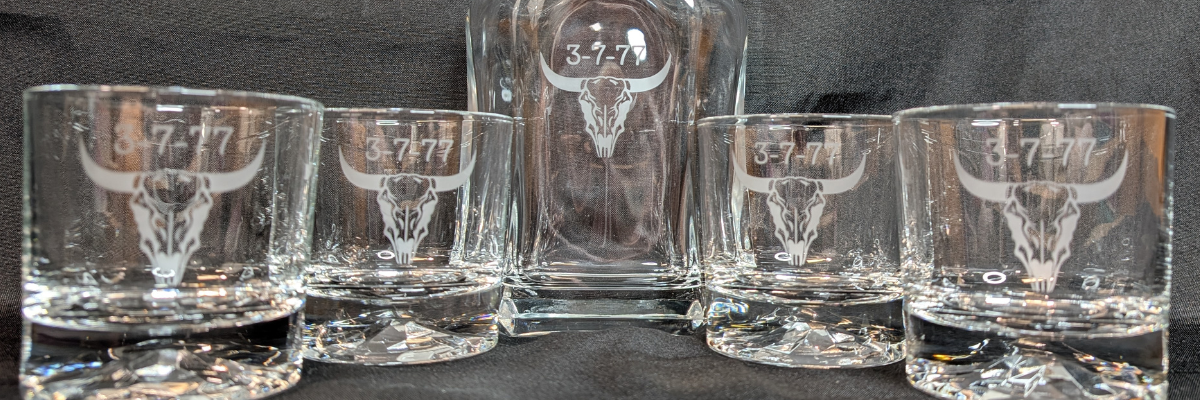
Custom etched glass decanter set featuring a bull skull design with the numbers '3-7-77' on each glass and the decanter.

Affiliate links may be present in the following blog post and as an Amazon Associate, I earn from qualifying purchases.

The best part about this project is that it came together for less than $20! I found the perfect glassware and decanter set during a quick trip to Goodwill, and I couldn’t pass it up. It was a very successful shopping trip to Goodwill for glassware.

A top view of a grocery cart filled with various glassware and a book, showcasing a collection of clear drinking glasses and jars.

After a good cleaning, the glass pieces were like new and ready for a makeover. My husband had the idea to create our own custom etched decanter set, and it turned out even better than we imagined. It just goes to show — with a little creativity (and a great thrift store find!), you can create something beautiful, personal, and completely unique without spending a fortune.

Ready to make your own custom etched decanter set? Here’s a look at the supplies and tools I used to bring this project to life — from the thrifted glassware to the vinyl stencil and etching cream that made the magic happen!

Supplies Used for Custom Etched Decanter Set:

Now that you’ve got your supplies ready, let’s take a look at how this custom etched decanter set came together! I snapped a few photos along the way to show each step — from creating the stencil in Silhouette Studio to applying the Etchall etching creme and revealing the final design.

I started by using a file I purchased on Etsy and then did some clean up on the file to make it more suitable for the glass etching project. I did not need all of the fine, intricate details of the original design at the size I was creating with. On the left is the original design I purchased, and on the right is the file I used for my stencil.

Digital design of a buffalo skull with intricate details, displayed in Silhouette Studio software.

Creating a clean cutting stencil can take some test cut attempts just to make sure that the details you want will remain and you won’t have any cutting issues. I started with one stencil, adjusted my design a bit after seeing how it cut, and then cut the rest of the stencils I needed.

Design interface of Silhouette Studio displaying multiple buffalo skull designs with the text '3-7-77'.

I used scraps of Oracal 651 adhesive vinyl for this project. Or if you have a color in your stash that isn’t your favorite, this is the perfect project for it!

A Silhouette cutting machine with adhesive vinyl designs featuring a bull skull and the text '3-7-77' on a workspace.

I applied the stencils using AT65 Transfer Tape and then I highly recommend adding painters tape around the edges of your stencil design, especially on a curved object. Etching cream is awesome and can work super quick, especially if it gets onto a spot of the glassware that you do not want to be etched. It seems like those mistakes always seem to etch the fastest.

A hand holding a heat gun next to a custom glass decanter and etched glasses, with vinyl stencils and etching cream visible on a work surface.

The next step I took is optional, but since I knew my stencils were detailed, I thought it was worth the extra step to apply a bit of heat to the adhesive vinyl and make sure it had a really good adhesion. I grabbed my Heat It Gun by Ranger and applied it for a few seconds all around. Be careful as hot glass looks like cold glass. I let it cool completely so the adhesive vinyl would be well stuck.

I really like this Heat Gun by Ranger as it has more of a direct heat towards your project and doesn’t blow the hot air out around as much. I know that sounds odd, but it’s one of those things that you don’t really “get” until you have used the tool. I used it in a class at Creativation 2025 and came home and bought myself one even though I have several embossing guns already in my tool box.

Close-up of glassware with a stencil applied using painters tape, Etchall etching cream nearby, showcasing the glass etching process.

Here is a close up look at the etching cream as it sneaked off my stencil and why I highly recommend using the painters tape. With curved objects, it’s not always easy to simply make the stencil bigger. That can be more difficult to get a smooth application on the glass object, so the painters tape is a great way to help add an additional barrier.

I leave the etching cream on for 20 minutes and then this is IMPORTANT! Scrape off any excess etching cream and put it back in the bottle!!! It can be reused over and over again. I’ve had bottles of Etchall Etching Creme for many years, and it is still good to use, no matter what color it turns into.

Then I take a paper towel and wipe off any excess etching cream before rinsing it thoroughly in the sink.

They turned out FANTASTIC! And I was doing a happy dance. I do believe that taking the extra time to heat the adhesive vinyl and let it cool before applying the etching cream helped to seal the edges of the stencil to prevent any seepage of the etching cream and give it crisp, smooth lines.

A custom etched glass decanter set, featuring a decanter and four matching glasses, each engraved with the number '3-7-77' and a decorative bull skull design.

The next step – put them to the test & enjoy our new custom decanter set.

A custom etched glass decanter set featuring a bull skull design with the numbers '3-7-77' on the decanter and two glasses, placed on a dark background.

For our project, we thought that Buffalo Trace fit it perfectly and filled the decanter well.
(*not sponsored or a promotion for Buffalo Trace – please enjoy responsibly)

Custom etched decanter set featuring a glass decanter and matching glass with a bull skull design, accompanied by a bottle of Buffalo Trace bourbon.

Whether you’re creating a special gift or adding a custom touch to your own space, glass etching is a simple way to make something truly unforgettable. With your cutting machine, Oracal 651 vinyl, and a little Etchall etching creme, you can personalize glassware, mirrors, and so much more! I hope this project inspires you to give etching a try and see just how easy it is to get professional-looking results at home. Check out more information for even more creative ideas and tips to take your crafting to the next level HERE!

Save this for future reference by pinning the image below.

A DIY custom etched decanter set featuring a glass decanter and matching glasses, all engraved with the same design. The decanter holds a dark liquid and is placed on a light background, showcasing the intricate details of the etching.

Enjoy !

THANK YOU for your support! How can you help? Click HERE & buy a coffee.
Every little bit helps with the cost of running the site.

Silhouette Classes

Never stop learning! Let me help you take the anxiety out of learning with Silhouette and get to creating faster! My Silhouette classes are heavily focused on software, so you can take the skills & techniques taught and apply them to many future projects!

Silhouette step-by-step Classes by Silhouette Secrets+

Silhouette Secrets+ with EllyMae
**This post may contain affiliate links. What that means is that I may receive compensation if you purchase through the links I have provided. The price you pay for the product or service is not higher but I may get compensated for sharing.

Posted on Leave a comment

How to Create Unique Sublimation Coasters with Artesprix Inks and Embossing Folders

Looking for a fun and creative way to take your sublimation projects to the next level? In this tutorial, I’m sharing how to combine Artesprix Sublimation Inks with embossing folders to create beautiful, designs on textured sublimation coasters! 🎨 This unique technique adds incredible depth and dimension to your projects—perfect for gifts, décor, or one-of-a-kind keepsakes. I’ll walk you through the full process step-by-step in the video below, along with a complete list of the supplies you’ll need to get started. Grab your favorite embossing folders, your Artesprix inks, and let’s create something truly unique!

Affiliate links may be present in the following blog post and as an Amazon Associate I earn from qualifying purchases.

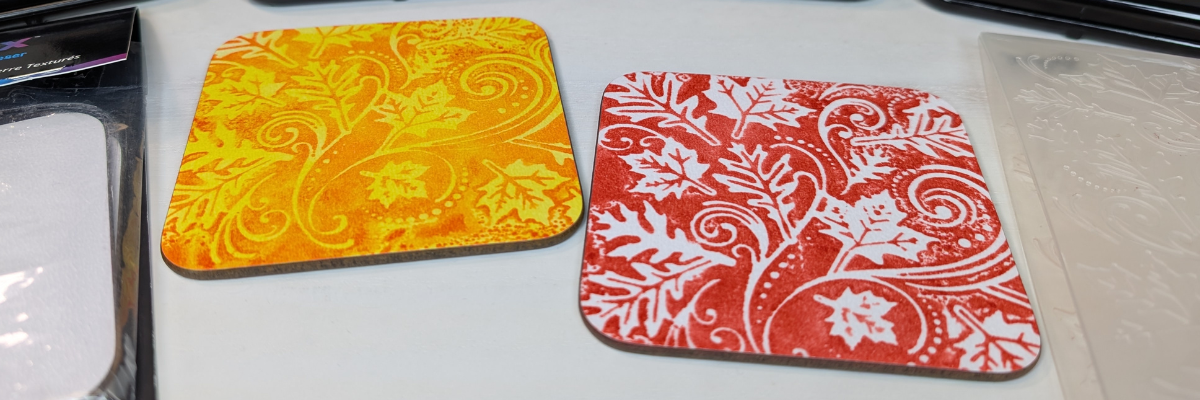
Two textured sublimation coasters, one orange with floral designs and one red with leaf patterns, displayed among various Artesprix inks.

My favorite is the single color with the white of the textured coaster coming through. I think it really makes it pop, but there are so many different color options that you could do.

Supplies for DIY Sublimation Coaster Creations:

Watch this tutorial HERE on the Artesprix YouTube channel.

Check out more of my Artesprix sublimation creations HERE.

I’ll be sharing more so make sure to follow Artesprix on social media to see more projects!
YouTube channel
Blog
Facebook Page
Iron-on-Ink Inspirational Facebook Group

Save this for future reference by pinning the image below.

Image showcasing colorful sublimation coasters created using Artesprix inks, textured coasters, and an embossing folder.

Grab some Artesprix sublimation products and get to creating today!

Enjoy !

THANK YOU for your support! How can you help? Click HERE & buy a coffee.
Every little bit helps with the cost of running the site.

Silhouette Classes

Never stop learning! Let me help you take the anxiety out of learning with Silhouette and get to creating faster! My Silhouette classes are heavily focused on software, so you can take the skills & techniques taught and apply them to many future projects!

Silhouette step-by-step Classes by Silhouette Secrets+

Silhouette Secrets+ with EllyMae
**This post may contain affiliate links. What that means is that I may receive compensation if you purchase through the links I have provided. The price you pay for the product or service is not higher but I may get compensated for sharing.
Posted on Leave a comment

Boo-tiful DIY Ghost Headband | Spooky Cute Halloween Sublimation with Artesprix

Halloween crafts are some of my absolute favorites, and this year I couldn’t resist making a Boo-tiful DIY Ghost Headband 👻 using Artesprix Sublimation Paints and Markers. Sublimation isn’t just for mugs and coasters—it’s a fun way to customize wearable accessories too! With just a few supplies, I transformed a plain Artesprix sublimation headband into a spooky-cute Halloween accessory that’s perfect for parties, trick-or-treating, or just getting into the festive spirit. Create your own ghostly design so you can rock a one-of-a-kind headband this Halloween.

Affiliate links may be present in the following blog post and as an Amazon Associate I earn from qualifying purchases.

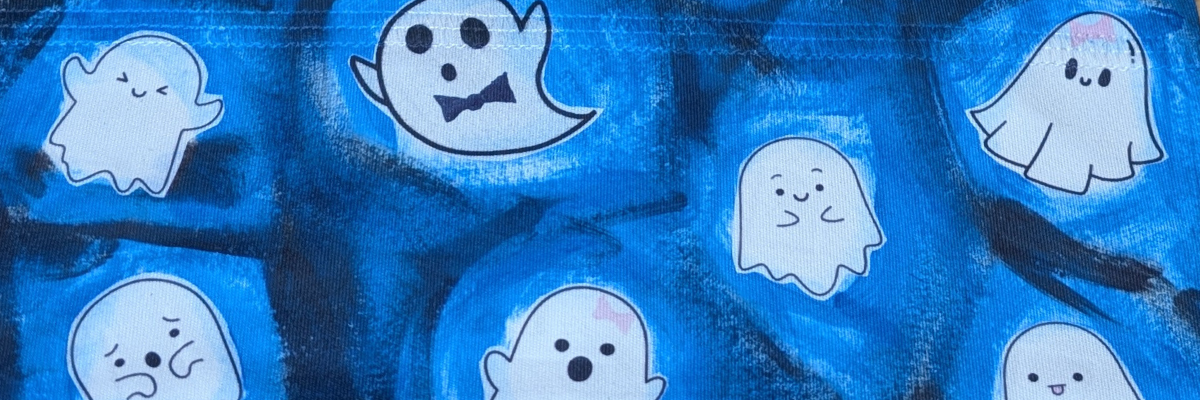
Array of Artesprix sublimation paints and markers displayed on a wooden surface, featuring various colors, alongside a fabric swatch with ghost designs.

In this video tutorial I shared how to use the new Artesprix Sublimation Coloring Books. These sublimation coloring books are available in 2 formats – a printed copy ($4.99) that you can order to be shipped to you or you can download the digital copy (free) and print with a sublimation printer at home.

Display of various Artesprix sublimation coloring books available for purchase, showcasing covers featuring themes like Alphabet Print, Fall & Halloween, Floral, and more.

While brainstorming for this video, I asked my youngest her thoughts and that is how the ghosts were chosen. This headband literally walked out the door this morning and I may never get it back.

A girl wearing a blue headband featuring cute ghost designs, set against a backdrop of greenery.

Now she has requested one in orange for “Halloween” colors. I love all the options that can be created using the Artesprix sublimation paints, markers, and inks! So many possibilities to create unique creations.

Supplies for Custom Sublimation Headbands:

Watch this tutorial HERE on the Artesprix YouTube channel.

Check out more of my Artesprix sublimation creations HERE.

I’ll be sharing more so make sure to follow Artesprix on social media to see more projects!
YouTube channel
Blog
Facebook Page
Iron-on-Ink Inspirational Facebook Group

Save this for future reference by pinning the image below.

Sublimation headband with Artesprix paints, markers, and a ghost-themed design on a blue background, showcasing crafting supplies.

Grab some Artesprix sublimation products and get to creating today!

Enjoy !

THANK YOU for your support! How can you help? Click HERE & buy a coffee.
Every little bit helps with the cost of running the site.

Silhouette Classes

Never stop learning! Let me help you take the anxiety out of learning with Silhouette and get to creating faster! My Silhouette classes are heavily focused on software, so you can take the skills & techniques taught and apply them to many future projects!

Silhouette step-by-step Classes by Silhouette Secrets+

Silhouette Secrets+ with EllyMae
**This post may contain affiliate links. What that means is that I may receive compensation if you purchase through the links I have provided. The price you pay for the product or service is not higher but I may get compensated for sharing.
Posted on Leave a comment

DIY Sublimation Bookmarks with Artesprix Coloring Books, Paints, Markers & Gel Plate Techniques

Looking for a fun and creative sublimation project? These DIY Sublimation Bookmarks made with Artesprix Coloring Books, Sublimation Paints, Markers, and a Gel Plate are the perfect mix of easy and artistic! Whether you’re crafting for yourself, making gifts for book lovers, or exploring new ways to use Artesprix products, this project is full of vibrant color and unique techniques. In this tutorial, I’ll show you how to use paints on a gel plate, add detail with sublimation markers, and transform coloring book pages into stunning sublimation bookmarks you’ll love to use or share.

Affiliate links may be present in the following blog post and as an Amazon Associate I earn from qualifying purchases.

A display of various Artesprix sublimation products, including markers, a coloring book, and sublimation supplies on a wooden table. Supplies to create a DIY Sublimation Bookmark.

Here’s a look at the supplies on my table ready to go. I am using the new(ish) Artesprix Sublimation Coloring books combined with Artesprix Sublimation Paints & a gel plate, plus breaking a “sublimation” rule in this new tutorial. I’ve included the supply list to create DIY Sublimation Bookmarks below.

Supplies for Custom Sublimation Bookmarks:

A layout featuring two colorful DIY sublimation bookmarks with the words 'FUN' and 'READ' on a wooden surface, surrounded by various Artesprix sublimation markers and acrylic paints.

Watch this tutorial HERE on the Artesprix YouTube channel.

Using the Artesprix Sublimation products opens up so many options to create and just let go and see where the art takes you. What kind of design or colors would you use on a DIY sublimation bookmark?

Check out more of my Artesprix sublimation creations HERE.

I’ll be sharing more so make sure to follow Artesprix on social media to see more projects!
YouTube channel
Blog
Facebook Page
Iron-on-Ink Inspirational Facebook Group

Save this for future reference by pinning the image below.

Image showing colorful DIY sublimation bookmarks with the words 'FUN' and 'READ', surrounded by Artesprix supplies including sublimation markers and a guidebook.

Grab some Artesprix sublimation products and get to creating today!

Enjoy !

THANK YOU for your support! How can you help? Click HERE & buy a coffee.
Every little bit helps with the cost of running the site.

Silhouette Classes

Never stop learning! Let me help you take the anxiety out of learning with Silhouette and get to creating faster! My Silhouette classes are heavily focused on software, so you can take the skills & techniques taught and apply them to many future projects!

Silhouette step-by-step Classes by Silhouette Secrets+

Silhouette Secrets+ with EllyMae
**This post may contain affiliate links. What that means is that I may receive compensation if you purchase through the links I have provided. The price you pay for the product or service is not higher but I may get compensated for sharing.
Posted on Leave a comment

Easy Sublimation Charm Tutorial Using Artesprix Markers – Beginner Friendly

Want to start playing with sublimation but don’t have all the fancy tools? This easy sublimation charm tutorial using Artesprix markers is perfect for beginners! With just three Artesprix sublimation markers, a charm blank, and a few other supplies, you can create bold, personalized designs in minutes. Whether you’re making custom keychains, jewelry, or backpack tags, this simple project is a budget-friendly way to explore sublimation with minimal supplies and maximum creativity.

Affiliate links may be present in the following blog post and as an Amazon Associate I earn from qualifying purchases.

A collection of handmade charm pendants featuring floral and palm tree designs alongside Artesprix sublimation markers on a wooden surface.
Hand drawn design on Artesprix Sublimation Charms

So here was the challenge – a sublimation project for less than $20. This is a great way to test the waters and get started. But, I will warn you, once you get started, it’s hard to stop and the ideas just start flowing.

Artesprix now sells individual sublimation markers, which means you don’t have to buy the entire set and you can mix and match the fine tip and chisel tips markers. Will you want the full set? YES! But, you can also get started with just a few, if you can decide on the colors.

For me, the black sublimation marker is a staple, so that is a must have. I chose yellow and blue for my other 2 colors, then I could make green as well, which I share how easy that is in the video tutorial below.

I mentioned above that once you start playing it can be hard to stop. My first charms were all free hand and I noticed my hand was not as steady as I would like. This is what happens when you are on camera and standing up to record. It was a bit better when I sat down and let things dry a bit better, but once I did that, new ideas just kept coming.

Did you know you can also use the markers in your cutting machine with the pen holders?

A close-up of a cutting machine, with a white sheet of paper and an Artesprix sublimation marker placed in front of it on a wooden surface.

The Artesprix Sublimation Charms are small at 0.75″. Using the Silhouette Studio software, I drew out a circle that was 0.75″ and turned the cut line off on the Send tab for my circle template. Then I started filling the circles with designs and sizing them down to fit.

Screenshot of Silhouette Studio showing a design layout for sublimation charms, featuring various colorful circular designs.

I knew that not all these designs would turn out. I made duplicates of the designs, just in case one worked better than the other and I would have a choice. Since it’s just a bit of ink and copy paper, if it doesn’t turn out, no big deal! This is a great way to test designs and see what will happen.

A Silhouette cutting machine with a sheet of paper featuring various hand-drawn designs and an Artesprix sublimation marker placed next to it.

When sketching with a cutting machine, just like when writing by hand, the tip of the pen makes a difference in the thickness of the line. Felt tip pens will spread out more than a ball point pen tip. That can affect whether the lines bleed together or not.

A workspace featuring Artesprix sublimation markers, charm blanks, and printed designs on pieces of paper arranged on a wooden surface.

I chose the designs that I wanted to use and then using only the 3 markers just like in the video below, I added color to the designs with a few different methods. I used the markers to color in some areas, then with a paint brush and a bit of water you can get a watercolor effect for a background, or combine ink and water on a slick surface and smoosh the paper onto top to get a splatter or color blotch effect.

Colorful designs on sublimation paper alongside three Artesprix sublimation markers and a blank charm, laid out on a wooden surface.

Love them! And I satisfied that little voice in my head that said… “Hey, wait, you aren’t done – what about this idea?”

Three Artesprix sublimation markers in black, yellow, and blue are positioned above four small circular charm blanks, each featuring different colorful designs, on a wooden surface.

Use the tools in your craft space and see what you can create! Check out the supply list and video tutorial below.

Supplies for Custom Charms with Sublimation Markers:

Also mentioned in the video:

Sketching with Silhouette

Find additional resources on sketching with your Silhouette machines HERE

Watch this tutorial HERE on the Artesprix YouTube channel.

Check out more of my Artesprix sublimation creations HERE.

I’ll be sharing more so make sure to follow Artesprix on social media to see more projects!
YouTube channel
Blog
Facebook Page
Iron-on-Ink Inspirational Facebook Group

Save this for future reference by pinning the image below.

Image showcasing Artesprix sublimation markers and three colorful charm designs on a wooden surface.

Grab some Artesprix sublimation products and get to creating today!

Enjoy !

THANK YOU for your support! How can you help? Click HERE & buy a coffee.
Every little bit helps with the cost of running the site.

Silhouette Classes

Never stop learning! Let me help you take the anxiety out of learning with Silhouette and get to creating faster! My Silhouette classes are heavily focused on software, so you can take the skills & techniques taught and apply them to many future projects!

Silhouette step-by-step Classes by Silhouette Secrets+

Silhouette Secrets+ with EllyMae
**This post may contain affiliate links. What that means is that I may receive compensation if you purchase through the links I have provided. The price you pay for the product or service is not higher but I may get compensated for sharing.
Posted on Leave a comment

How to Make Custom Magnets with Artesprix Sublimation Ink Pads | Easy DIY Sublimation Craft

Looking for a fun and easy sublimation project you can make at home? These custom magnets made with Artesprix Sublimation Ink Pads are the perfect DIY craft! Using your favorite stamp set, you can create unique designs, add color to the design, or play with ink backgrounds for a bold look. Whether you’re making personalized gifts or adding a pop of personality to your fridge or workspace, this project is a great way to explore sublimation with vibrant, professional-quality results. I’ll share how you can make your own custom sublimation magnets today!

Affiliate links may be present in the following blog post and as an Amazon Associate I earn from qualifying purchases.

An assortment of Artesprix sublimation ink pads in various colors, displayed alongside hexagonal magnets featuring colorful butterfly designs.

Artesprix Sublimation products make it so easy to create many different projects. In the current line up of products Artesprix has sublimation markers, paints, ink pads, and ink refills. The possibilities are endless in what can be created with them and the only thing you have to do is GET STARTED!

You don’t even need a plan. Just start creating and see what happens. One of the great things about the Artesprix Sublimation products is that they only need copy paper to work. Yes! Copy paper! So if you decide you are not “feeling” what you’ve created, set it aside and try again.

I have been itching to use some new Arden Creative Studio stamp sets that I had ordered. These are designed by Katie Pertiet, who I recently met again at Creativation 2025 in Seattle. I love seeing the designer work with their products and I do wish I’d recorded more of that. On my list for next year!

A flat lay of crafting supplies for sublimation projects, including Artesprix ink pads in various colors, sublimation coasters, a clear stamp set labeled 'Ledger Wings', and a roll of heat tape.

Supplies for Custom Magnets with Sublimation Inks:

A display of custom hexagonal sublimation magnets featuring colorful butterfly designs created using Artesprix Sublimation Ink Pads, arranged on a wooden surface alongside the ink pads.

Watch this tutorial HERE on the Artesprix YouTube channel.

Check out more of my Artesprix sublimation creations HERE.

I’ll be sharing more so make sure to follow Artesprix on social media to see more projects!
YouTube channel
Blog
Facebook Page
Iron-on-Ink Inspirational Facebook Group

Save this for future reference by pinning the image below.

Flat lay of Artesprix sublimation ink pads, heat tape, and custom magnets featuring butterfly designs on a gradient background.

Grab some Artesprix sublimation products and get to creating today!

Enjoy !

THANK YOU for your support! How can you help? Click HERE & buy a coffee.
Every little bit helps with the cost of running the site.

Silhouette Classes

Never stop learning! Let me help you take the anxiety out of learning with Silhouette and get to creating faster! My Silhouette classes are heavily focused on software, so you can take the skills & techniques taught and apply them to many future projects!

Silhouette step-by-step Classes by Silhouette Secrets+

Silhouette Secrets+ with EllyMae
**This post may contain affiliate links. What that means is that I may receive compensation if you purchase through the links I have provided. The price you pay for the product or service is not higher but I may get compensated for sharing.
Posted on Leave a comment

DIY Abstract Sublimation Coasters with Artesprix Markers

If you’ve been curious about trying sublimation, this is the perfect place to start! I’m sharing a beginner-friendly project —DIY abstract coasters using Artesprix Sublimation Markers. The Artesprix Sublimation markers make it so easy to play with color and design, no matter your skill level. Whether you’re brand new to sublimation or just looking for a quick, creative project, these coasters are a fun way to jump in. Grab your heat press and let’s create something bold, vibrant, and totally unique—no perfection required!

Affiliate links may be present in the following blog post and as an Amazon Associate I earn from qualifying purchases.

A variety of Artesprix sublimation markers arranged next to colorful abstract coasters, featuring geometric designs, on a wooden surface.

This is a project that anyone, even little ones, could do! There is no wrong way to do it.

This is a great way to see what all the colors in the marker sets will look like when heat pressed. With sublimation inks, they will appear duller until the high heat and pressure is applied and that is when the colors really pop.

Here is a closer look at the finished Artesprix polished sublimation coasters.

A collection of four colorful abstract coasters decorated with various geometric patterns, created using Artesprix Sublimation Markers, arranged on a wooden surface alongside the markers.

I would recommend letting the copy paper dry completely after adding in the colors. Mine was still a bit damp in areas from my coloring and you can see a few spots where the black bled a little bit. But, that’s what also makes it unique! It does not have to be perfect or match anyone else’s design.

Supplies for DIY Abstract Sublimation Coasters:

Colorful DIY abstract coasters designed with Artesprix sublimation markers, arranged on a wooden surface with additional markers and supplies in the background.

Watch this tutorial HERE on the Artesprix YouTube channel.

Check out more of my Artesprix sublimation creations HERE.

I’ll be sharing more so make sure to follow Artesprix on social media to see more projects!
YouTube channel
Blog
Facebook Page
Iron-on-Ink Inspirational Facebook Group

Save this for future reference by pinning the image below.

A display of colorful abstract coasters created using Artesprix sublimation markers, featuring geometric designs, with a variety of marker colors and additional sublimation supplies in the background.

Grab some Artesprix sublimation products and get to creating today!

Enjoy !

THANK YOU for your support! How can you help? Click HERE & buy a coffee.
Every little bit helps with the cost of running the site.

Silhouette Classes

Never stop learning! Let me help you take the anxiety out of learning with Silhouette and get to creating faster! My Silhouette classes are heavily focused on software, so you can take the skills & techniques taught and apply them to many future projects!

Silhouette step-by-step Classes by Silhouette Secrets+

Silhouette Secrets+ with EllyMae
**This post may contain affiliate links. What that means is that I may receive compensation if you purchase through the links I have provided. The price you pay for the product or service is not higher but I may get compensated for sharing.
Posted on Leave a comment

DIY Watercolor Tote Bag with Artesprix Sublimation Inks

Silhouette Secrets+ with EllyMae

Looking for a fun and vibrant way to personalize your own tote bag? In this DIY project, I’m sharing how I combined techniques I recently learned from a class taught by my talented friend Tracy Weinzapfel to create a custom watercolor-inspired design using Artesprix Sublimation Inks. I took those creative watercolor techniques and transformed them into a one-of-a-kind sublimation design that pops with color on an Artesprix sublimation tote bag. Whether you’re new to sublimation or looking for fresh inspiration, this project is a perfect blend of art and function—let’s get creative and make something beautiful you can carry with pride!

Affiliate links may be present in the following blog post and as an Amazon Associate I earn from qualifying purchases.

You do not have to be an artist to do this! All you need is the ability to let yourself go and see what you can create. I share tips in the new video that help me create this and allow myself the freedom to just let it go.

Here is a look at watercolor image before I added in the black outlines with the Artesprix black sublimation marker.

The black sketched outline really makes it all pop and come together. Keep in mind that sublimation inks do not show their true colors until they are heat pressed for the full time and temperature. Once pressed, you will see those colors brighten and become vibrant.

Supplies for Custom DIY Watercolor Design Sublimation Tote:

Watch this tutorial HERE on the Artesprix YouTube channel.

I’m completely hooked on crafting with Artesprix products—every time I use them, my creativity sparks and fresh project ideas start flowing! Combine using Artesprix with your cutting machines or just allow yourself to play all on your own. There are so many possibilities.

I would highly recommend just playing around and see what you create, but if you just don’t feel comfortable drawing freehand, you can always set up your cutting machine to sketch with a pencil too.

Here is a sample I did using a mechanical pencil using a Flower Sketch design.

A Silhouette cutting machine set up on a table with a pencil in one of its slots, ready for sketching a design on paper.

Since it is pencil, it is harder to see. Here is a close up of this sketch flower design.

Close-up of a silhouette cutting machine, with a faint outline of a flower design on the paper below.

Since pencil does not transfer to the sublimation blank, I’m not worried about the drag marks, but you could adjust and play with settings to get it just right if you wanted. When using pencil, keep in mind that it will dull quickly, but you can always send it back through again as long as you do not unload the cutting mat.

Sketching with your machine can be done with any pen, marker, pencil that can fit in the pen adapters. Find more resources on sketching with Silhouette HERE and all about sketching supplies HERE.

A vibrant watercolor illustration featuring colorful flowers, including pink, red, and yellow blooms against a light blue background, created on a sublimation tote bag.

This hand drawn design was inspired by Tracy Weinzapfel and her amazing talent as an instructor. I am so glad I signed up for her Fresh Start in Art 5 Day challenge when I saw it.

Check out more of my Artesprix sublimation creations HERE.

I’ll be sharing more so make sure to follow Artesprix on social media to see more projects!
YouTube channel
Blog
Facebook Page
Iron-on-Ink Inspirational Facebook Group

Save this for future reference by pinning the image below.

A custom sublimation tote bag featuring a colorful watercolor design with various flowers, alongside Artesprix sublimation inks and a pen on a wooden surface.

Grab some Artesprix sublimation products and get to creating today!

Enjoy !

THANK YOU for your support! How can you help? Click HERE & buy a coffee.
Every little bit helps with the cost of running the site.

Silhouette Classes

Never stop learning! Let me help you take the anxiety out of learning with Silhouette and get to creating faster! My Silhouette classes are heavily focused on software, so you can take the skills & techniques taught and apply them to many future projects!
Silhouette step-by-step Classes by Silhouette Secrets+

Silhouette Secrets+ with EllyMae
**This post may contain affiliate links. What that means is that I may receive compensation if you purchase through the links I have provided. The price you pay for the product or service is not higher but I may get compensated for sharing.