Posted on 1 Comment

Custom Wine Themed Towels with Stencils & Artesprix

Silhouette Secrets+ with EllyMae

Looking for a creative and personalized way to elevate your kitchen or gift-giving game? Custom wine-themed towels using stencils and Artesprix sublimation products are the perfect solution! This DIY project combines the versatility of Artesprix sublimation markers with the precision of stenciling to create vibrant, professional-looking designs that celebrate your love for wine. Whether you’re crafting for yourself or preparing a thoughtful gift, these custom towels are a fun and easy way to add a touch of elegance and personality to any space. Let’s dive into the step-by-step process to create your own stunning wine-themed towels!

Affiliate links may be present in the following blog post and as an Amazon Associate I earn from qualifying purchases.

This month for the new Artesprix YouTube video I am sharing tips & tricks to using stencils with the Artesprix sublimation projects and creating custom kitchen towels.
With the Artesprix products, there is no sublimation printer required, so you can play and create without a huge investment into equipment.

Wine Themed Kitchen Towels using Artesprix sublimation inks

Check out the new video HERE on the Artesprix YouTube channel.

I share how you can use either the Artesprix stamp pads or the Artesprix markers with the stencils to create a project. Each one can give you just a little bit different look and it’s so fun to see what those differences are.

Artesprix Sublimation inks with stencils for custom kitchen towels

You can see there is a bit of color variation in each of the designs above. I love it!

Wine Themed Kitchen Towels and Wine bag with Artepsrix Sublimation Inks

I found my wine stencils on Amazon, but you could also cut your own stencils using your cutting machine and a stencil material or plastic, even cardstock would work for short term designs. I fell in love with these wine glass designs and just had to use them.

Artesprix Sublimation Supplies to Create Custom Wine Themed Kitchen Towels

Artesprix Sublimation Supplies

Custom Wine bag with stencil and Artesprix Sublimation Inks

Check out the new YouTube video HERE.

I knew I had one final touch to add to these kitchen towels to display them in my kitchen. Check out the post HERE where I added that touch.

I absolutely love working with Artesprix products—they always spark my creativity and leave me inspired with even more ideas for future projects. Find more projects I’ve created using the Artesprix sublimation products HERE.

I’ll be sharing more so make sure to follow Artesprix on social media to see more projects!
Artesprix YouTube channel
Artesprix Blog
Artesprix Facebook Page
Artesprix Iron-on-Ink Inspirational Group

Save this for future reference by pinning the image below.

Custom Wine Themed Kitchen Towel with Artesprix Sublimation Products Pinterest

Grab some Artesprix sublimation products and get to creating today!

Enjoy !

THANK YOU for your support! How can you help? Click HERE & buy a coffee.
Every little bit helps with the cost of running the site.

Silhouette Classes

Never stop learning! Let me help you take the anxiety out of learning with Silhouette and get to creating faster! My Silhouette classes are heavily focused on software, so you can take the skills & techniques taught and apply them to many future projects!

Silhouette step-by-step Classes by Silhouette Secrets+

Silhouette Secrets+ with EllyMae
**This post may contain affiliate links. What that means is that I may receive compensation if you purchase through the links I have provided. The price you pay for the product or service is not higher but I may get compensated for sharing.

Posted on Leave a comment

Decorative Metal Panel with Silhouette & Artesprix Paints & Markers

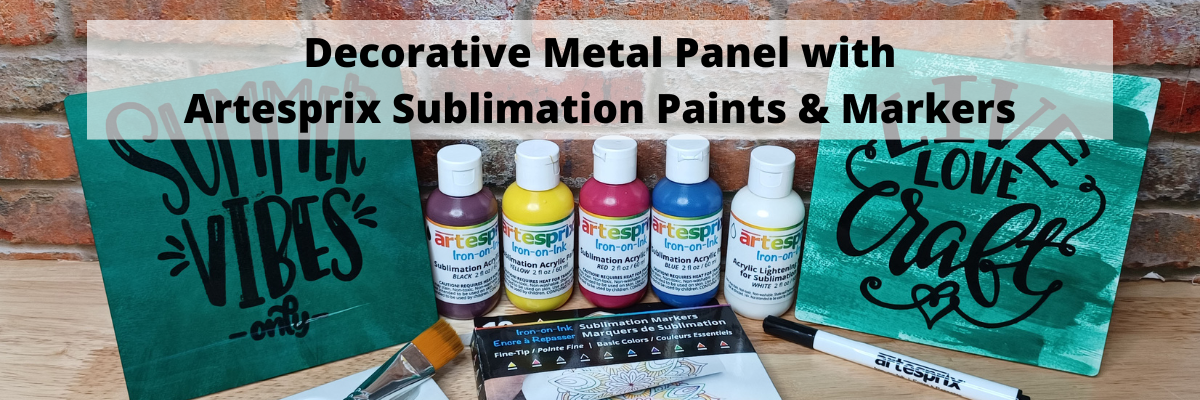
In this month’s new video on the Artesprix YouTube channel, I used the help of my Silhouette Cameo 4 to create a decorative metal panel.

I cannot hand letter worth a darn.
So I called on my sweet Cameo 4 and let it do the work for me.

I am having so much fun just being creative and brainstorming what kinds of projects to create with the Artesprix products! Each month is a new creative burst of “let’s see what happens”.

Check out the new video HERE on the Artesprix YouTube channel.

Affiliate links may be present in the following blog post and as an Amazon Associate I earn from qualifying purchases.

Artesprix Sublimation Supplies

Here is a list of the supplies I mentioned and demonstrated in the new YouTube video:
Live Love Craft by Cali Arroyo – Design #223176
Summer Vibes Only by Graphic House Design – Design #292836
Artesprix Sublimation Markers
Artesprix Sublimation Paints
Artesprix Sublimation Decorative Metal Panel
Artesprix Siliconized Protective Paper
Artesprix Heat Tape
Artesprix Protective Mat
– Artesprix Color Mixing Chart can be found HERE
Siser Heat Press or another heat source to reaches 400 degrees F

– Other supplies: paper towels, copy paper, pencil, scissors
Optional for additional demos:
Silhouette Cameo 4 (or other cutting machine that sketches)
Silhouette Type B Pen Holder

I’ll be sharing more so make sure to follow Artesprix on social media to see more projects!
Artesprix YouTube channel
Artesprix Blog
Artesprix Facebook Page
Artesprix Iron-on-Ink Inspirational Group

Save this for future reference by pinning the image below.

Enjoy !

THANK YOU for your support! How can you help? Click HERE & buy a coffee.
Every little bit helps with the cost of running the site.

Looking for more in-depth, step-by-step classes, check out all of my online Silhouette classes on my Teachable site HERE.

SS Logo snip it
**This post may contain affiliate links. What that means is that I may receive compensation if you purchase through the links I have provided. The price you pay for the product or service is not higher but I may get compensated for sharing.
Posted on 3 Comments

Creating Templates in Silhouette Studio

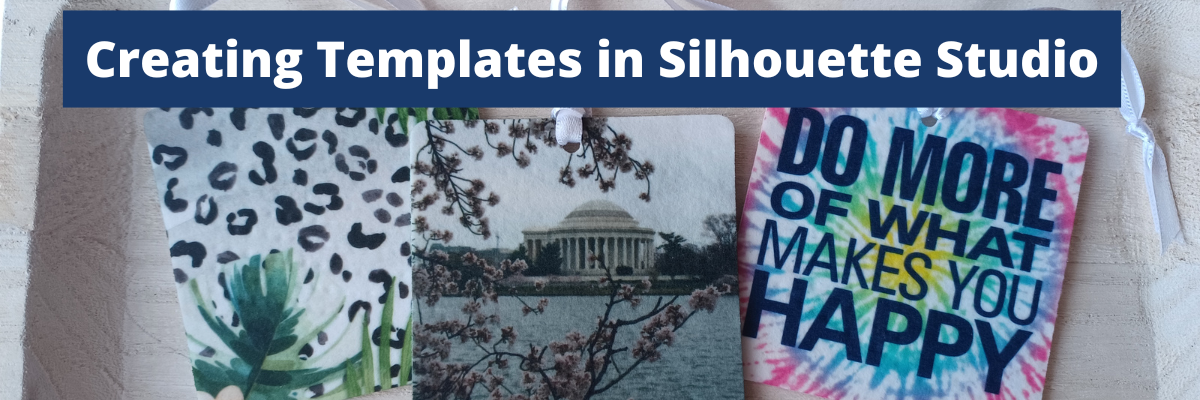
In today’s tutorial I’m going to share how I create a template file in Silhouette Studio that can be reused for future projects. In this particular example, I’ll be using an air freshener sublimation blank. But, this same technique can be applied for all kinds of future projects.
This is a great trick to have in your toolbox, especially if you are using the same blanks over and over.

Affiliate links may be present in the following blog post and as an Amazon Associate I earn from qualifying purchases.

Supplies used:

Sublimation air freshener square blanks from Heat Transfer Warehouse
Epson F170 sublimation printer
Epson sublimation ink
Sublimation paper
Heat Tape
Parchment Paper
Heat Safe Gloves
– Patterns or photos
Patterns in demo below:
Tie-Dye Pattern by Renee Jablow – Design #330722
Tropical Watercolor Leopard Print by Sophie Galo – Design #416584
Do More of What Makes You Happy Phrase by Lori Whitlock – Design #35309
Sharpie Pen font by Flycatcher Design – Design #299019
– Heat source – Siser Heat Press

Optional:
Artesprix Protective Pad (heat safe surface)
Air Purifier (helps with any smells from sublimation)
Tape dispenser

Silhouette Step-by-Step Tutorials

Check out the full written tutorial below or find a video tutorial on the Silhouette Secrets+ YouTube channel HERE.

How to create a Template in Silhouette Studio

Measure sublimation blank.

Use drawing tools in the Silhouette Studio software to draw the shape needed.

Use the Scale Tools under the Transform Panel or the Quick Access Toolbar (QAT) at the top to size the template as needed.

With sublimation it is a good idea to make your print a bit larger than actual size, so you have a little wiggle room when placing your image on the blank. Add a small extra border to the exact measurement you took of the blank and use that as your template.

If you plan to print several on the same page, make copies of the template shape.
If needed, check the Show Print Border option on the Page Setup Panel – Tab 1 to see where your printer page margins are and make sure your design won’t get cut off.

When you have the shape, save the file as your template file that can be reused in the future.

When you are ready to use the template file, open it, then choose File > Save As and rename it for your current project.

Now, we can fill the template shapes with the images or patterns for the project.
If your sublimation blanks are double sided, you will need patterns for both sides.

How to Fill in Template Shapes

With Silhouette Studio you have so many options to design within your template shapes.
Here are a couple ways.

Use the Pattern Fill Panel to add a pattern to the shape

Or access larger images of the Patterns folder from the Show/Hide library option by clicking the folder icon in the bottom left corner of the Silhouette Studio Design Tab.

This will open up a split screen between the library and the design area. It can be easier to view things from the library, especially patterns at a larger size.

Or drag and drop a photo from your computer into the shape too!

Add any additional elements to the design you want.
I added a text design Do More of What Makes You Happy Phrase by Lori Whitlock to the top and text for the location using Sharpie Pen font by Flycatcher Design to the bottom one.

If you do add elements and you want both sides to match exactly, make a copy of the one you altered and delete the template. Then they will match exactly.

Make sure to save your file often and keep in mind that the more graphics you add to a file it increases the size of that file. If you find your computer taking longer to process, it could be due to large photos and patterns.

When you are ready to print, go to File > Print and follow the direction for printing to the sublimation printer you have.

Check that the print came out properly. Any text should be mirrored when it prints because it’s an ink transfer.

Sublimation on Air Freshener Blanks

Cut the printed designs apart and secure the print to the sublimation blank with heat tape.

Even though these are double sided, you still want to press each side separately. The side with the print should be the side that is against the top platen of the heat press, so it gets the adequate heat for a full transfer.

Use a piece of parchment paper on the bottom of the heat press surface to protect it.
Then place the sublimation blank on top with paper side up.
Cover with another piece of parchment paper to protect the top platen of the press.

Press the sublimation blank according to the manufacturer’s instructions.
For these air fresheners it calls for 400 degrees F for 60 seconds with medium to firm pressure. Hot peel!

Be very careful when removing the items after pressing as they will be hot.
Throw out any parchment paper that has ink on it as it can transfer to the next blanks or your press.
These are a hot peel and you better be quick about it!
I would recommend having heat safe gloves ready to go. I had to run get mine the first time and it was not quick enough.

I found it much easier to press 1 at a time and then after remove the sublimation paper quickly and press it down on my Artesprix Heat Safe Protective Mat to help it stay flat and not curl.

I learned several things during this process.
At first I tried to press 3 at a time. I wasn’t fast enough to remove the paper before they cooled and the paper stuck to the blank. I’ll work on ways to remove that in the future and see if I can save those blanks.

Once cooled, secure the sublimation print to the blank with heat tape on the other side of the blank.
Press again at the recommended time and temperature and quickly remove the sublimation paper.

Important Tips

Follow the instructions for any sublimation blank or material you are using.
These specified “hot peel” and I definitely found that out the hard way. The first 3 I did, did not turn out because I wasn’t fast enough.

Get extra blanks.
Especially if it’s the first time you are working with a material! Extra blanks are always a good idea.

Only press one air freshener at a time so you can work quickly.
Unless you are pressing the entire sheet of fresheners with the same pattern. Then you can do the full sheet with a full printed sheet as Heat Transfer Warehouse showed in this tutorial HERE.
They also share how to scent the fresheners there too!

Keep in mind that when you are pressing a print to a surface, the surface can affect the final colors as well. You can see in my projects that my darker photo of Washington D.C. looks a bit darker and not as bright as the others. That is due to how the photo started and the surface of the blank too!

I think this might be my favorite one!

Save this for future reference by pinning the image below.

Enjoy !

THANK YOU for your support! How can you help? Click HERE & buy a coffee.
Every little bit helps with the cost of running the site.

Looking for more in-depth, step-by-step classes, check out all of my online Silhouette classes on my Teachable site HERE.

SS Logo snip it
**This post may contain affiliate links. What that means is that I may receive compensation if you purchase through the links I have provided. The price you pay for the product or service is not higher but I may get compensated for sharing.

Posted on Leave a comment

Creating Unique Projects with Artesprix Sublimation Markers & Stamp Pads

Silhouette Secrets+ with EllyMae

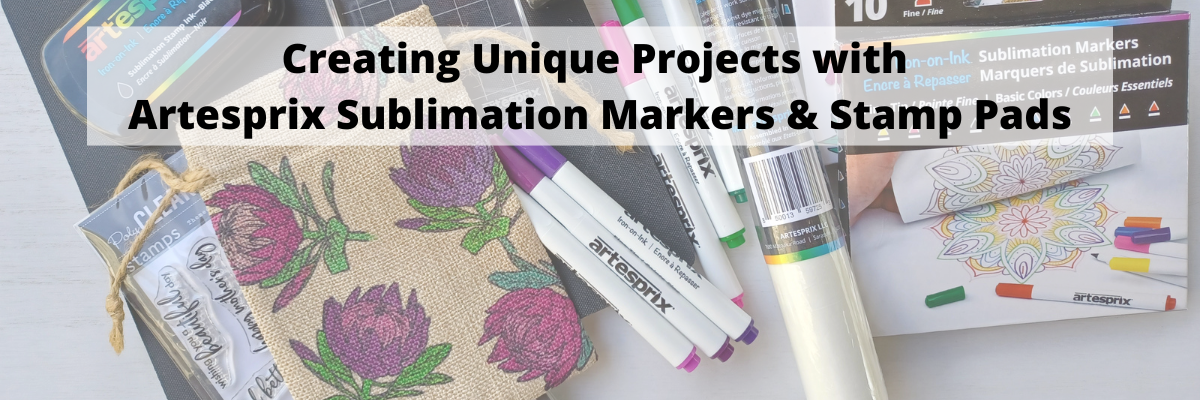
This month, I’m diving back into the creative world of Artesprix, and it feels so good to get crafting again! There’s something incredibly satisfying about turning a blank canvas into a colorful, custom masterpiece—and today, it’s all about a personalized drawstring bag. Using Artesprix Sublimation Stamp Inks and Markers, I’ve created a vibrant and unique project that’s both fun and functional. Does anyone else do a little happy dance when a project turns out just right? Let’s jump into the details and make something amazing together!

I have a new video on the Artesprix YouTube channel this month and let me tell you, while you couldn’t see it on camera, I was doing a happy dance when I revealed the project!
While I am not going to win any awards for my dancing skills, I think this project deserves a happy dance!

And the best part is…. YOU can do this too!

Check out the new video HERE

I am having so much fun using the Artesprix sublimation supplies and creating unique projects!
I have more projects I’ve created to share soon! So stay tuned!

Affiliate links may be present in the following blog post and as an Amazon Associate I earn from qualifying purchases.

Artesprix Sublimation Supplies

Here is a list of the supplies I mentioned and demonstrated in the new YouTube video:

Happy Dance!

Here are a couple others I made using the stamps and ink pads that I shared in the video tutorial as well.

I hope you’ll watch the new video and that it sparks some creative ideas!!!!

I’ll be sharing more so make sure to follow Artesprix on social media to see more projects!
Artesprix YouTube channel
Artesprix Blog
Artesprix Facebook Page
Artesprix Iron-on-Ink Inspirational Group

Save this for future reference by pinning the image below.

I absolutely love working with Artesprix products—they always spark my creativity and leave me inspired with even more ideas for future projects. Find more projects I’ve created using the Artesprix sublimation products HERE.

Enjoy !

THANK YOU for your support! How can you help? Click HERE & buy a coffee.
Every little bit helps with the cost of running the site.

Silhouette Classes

Never stop learning! Let me help you take the anxiety out of learning with Silhouette and get to creating faster! My Silhouette classes are heavily focused on software, so you can take the skills & techniques taught and apply them to many future projects!

Silhouette step-by-step Classes by Silhouette Secrets+

Silhouette Secrets+ with EllyMae
**This post may contain affiliate links. What that means is that I may receive compensation if you purchase through the links I have provided. The price you pay for the product or service is not higher but I may get compensated for sharing.

Posted on Leave a comment

Sublimation Camp 2023

Wahoo!
I just received the word this morning that registration is now open for the 2023 Sublimation Camp!

Why am I excited?
Because I learned so much last year!

I’ll share more on that below, but first let’s find out more on the 2023 Sublimation Camp hosted by Cori George of Hey, Let’s Make Stuff and Angie Holden of The Country Chic Cottage.

One thing I love about this event is it is developed by crafters FOR crafters!!!
It is about information that can help me….. and you!
But mainly, I am recommending it because the information I learned helped me and I felt it was well worth it to attend this event.

There are 32 workshops being taught and 2 options to attend.
Option 1: Free
View the classes for 24 hours. Classes are released each day at 9 am EDT.
Option 2: All Access Pass
View the classes for 1 year and get extra goodies such as: templates, bonuses, transcripts, and more

Find out all the details HERE.

This was an event that I enjoyed and learned a lot from and want to share it with my followers.

Now, what did I learn?
LOTS!

After last year’s camp, I wrote a blog post called
10 Sublimation Tips where I shared tips I learned during the event.
Find that HERE.

I have more Sublimation tutorials available on the Silhouette Secrets blog under the Sublimation header HERE too!
I use Silhouette Studio to do all my sublimation printing.

If you are at all interested in learning more about sublimation or seeing what tips you might pick up, grab the free pass and watch the classes while they are available in that 24 hour window.
Grab that free pass HERE.
However, I would HIGHLY recommend the All Access Pass!!!
Less stress to be able to access and watch at your leisure and really soak up the information and play.

I have loved putting the new tips and tricks to use since last year’s Sublimation Camp and I hope you’ll join me in attending this virtual event!

Enjoy !

THANK YOU for your support! How can you help? Click HERE & buy a coffee.
Every little bit helps with the cost of running the site.

Looking for more in-depth, step-by-step classes, check out all of my online Silhouette classes on my Teachable site HERE.

SS Logo snip it
**This post may contain affiliate links. What that means is that I may receive compensation if you purchase through the links I have provided. The price you pay for the product or service is not higher but I may get compensated for sharing.
Posted on Leave a comment

Sublimation without a Sublimation Printer – Yes, you can!

Did you know you can do sublimation WITHOUT having a sublimation printer?

You can with the Artesprix Sublimation supplies!

Sublimation with Artesprix

This month I spent some time playing with all the different Artesprix Sublimation products and I’m sharing that with you on the Artesprix YouTube channel HERE.

In this new video, I shared how you can easily create a watercolor effect using any of the Artesprix Sublimation supplies. No matter what is in your stash, whether it is the Artesprix sublimation markers, stamp pads, ink refills, or the paints, I shared how you can create a unique project.

It is so much fun to play with and just see what will happen!

Join me on the Artesprix YouTube channel HERE to see how easy it is to play!

Affiliate links may be present in the following blog post and as an Amazon Associate I earn from qualifying purchases.

Artesprix Sublimation Supplies

You do NOT have to have all of these supplies and for my video I wanted to show how you can use any of them in the same way to get the same effect.

Here is a list of the supplies I mentioned and demonstrated in the new YouTube video:
Artesprix Sublimation Markers
Artesprix Sublimation Stamp Pad
Artesprix Sublimation Ink Refills
Artesprix Sublimation Paints
Artesprix Key Chain Blank
Artesprix Siliconized Protective Paper
Artesprix Heat Tape
Artesprix Protective Mat
Artesprix Sublimation Stamp Set
Artesprix Stamp Block
Artesprix Stamp Cleaner
– Heat source to reaches 400 degrees F
– Other supplies: paint brush, water spritzer/mister, paper towels, copy paper, pencil, scissors, plastic bag or plastic wrap

I want to stress again, you don’t need all of the above and in the video I show each one being used. So no matter what you have in your stash or decide to invest in you can do the same technique.
Grab an Artesprix Sublimation products, some siliconized protective paper, heat tape, copy paper, and a pencil to get started.

I’ll be sharing more so make sure to follow Artesprix on social media to see more projects!
Artesprix YouTube channel
Artesprix Blog
Artesprix Facebook Page
Artesprix Iron-on-Ink Inspirational Group

Save this for future reference by pinning the image below.

Enjoy !

THANK YOU for your support! How can you help? Click HERE & buy a coffee.
Every little bit helps with the cost of running the site.

Looking for more in-depth, step-by-step classes, check out all of my online Silhouette classes on my Teachable site HERE.

SS Logo snip it
**This post may contain affiliate links. What that means is that I may receive compensation if you purchase through the links I have provided. The price you pay for the product or service is not higher but I may get compensated for sharing.
Posted on Leave a comment

Sublimation Coffee Mugs with Silhouette

I am so glad I added a sublimation printer into my craft studio!

It can be an investment and while I don’t use it daily, it does come in handy. Especially for gifts!

If you are not familiar with the sublimation process, I have several tutorials on the website HERE that explain it more in-depth. But in reality, it basically is creating the design, printing, and pressing that design to the blank or substrate.

Flat objects are much easier to press on than curved surfaces, but as with everything, it all just takes practice!

Sublimation does require special equipment such as a sublimation printer, paper, ink, and blanks that are all made for this process. But, it can also be a great way to add graphics that are difficult to cut with a cutting machine to objects for customization.

Affiliate links may be present in the following blog post and as an Amazon Associate I earn from qualifying purchases.

Sublimation Supplies

Epson F-170 Sublimation Printer
Epson Sublimation Inks
Sublimation Paper
Sublimation Coffee Mugs
Parchment Paper
Silicone Wraps
Alcohol Swab
Lint Roller
Heat Tape
Sublimation oven/Convection Oven
*dedicated for sublimation, not food
Optional: Paper Trimmer, heat safe gloves, heat safe protective mat

Sublimation with Silhouette Tutorial

The part that takes me the longest is deciding on a design.

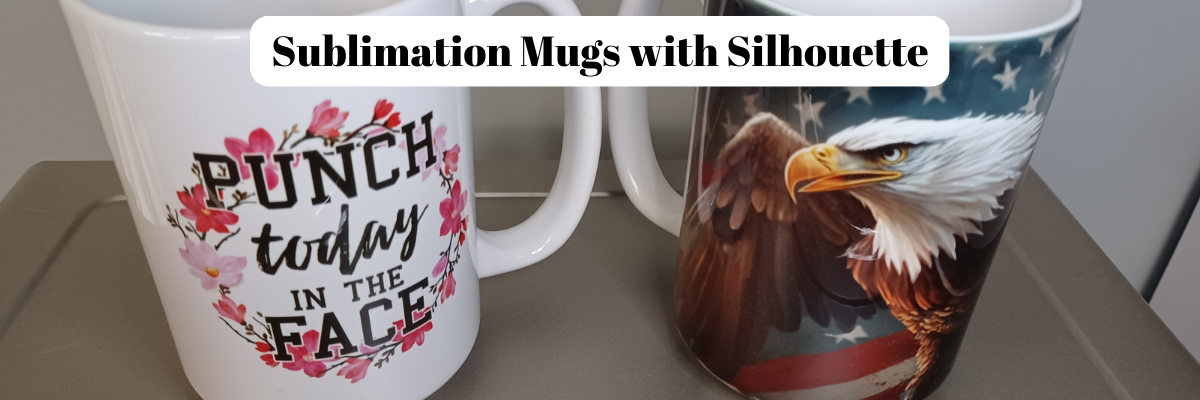
I finally chose a design from the Funny Sublimation Bundle by SVG Cuttables found HERE
and Eagle, American Flag, Patriotic Sublimation Wrap by SunDesign found HERE

Once I’ve decided on the design, I measure the coffee mugs to see how much space I have to work with.

Then I draw a basic shape in the Silhouette Studio software to create a “template” to design within.

If I have extra space on the page, I’ll try to fill it up with another design. But, sometimes that takes me too long to decide on what I want to print, so I just go ahead and get my project started.
In this case, I tried to print a couple pen wrap designs. That didn’t work out in the end as my pen template wasn’t quite long enough, but it was worth a shot.

I printed the design pages through my Epson F170 Sublimation printer.

Then I trimmed them down to size with my paper trimmer.

Next, I cleaned the mugs first with an alcohol swab to get any oils, dust, or debris off. Dust or debris can cause discoloration and odd spots on the finished project.

Then I clean with a lint roller for any fibers. Most times, you cannot see these fibers until after an object has been pressed, which can affect your final outcome.

Once it’s clean, I try not to touch the outside of the mug or blank, so there is no debris or oils transferred. Once it’s completely dry, I wrap or place the design on the mug and secure with heat tape.
Make sure to get it secure on the mug and as centered as you can.
Sublimation is permanent.

Next, I grab a piece of parchment paper and wrap it around the cup and then secure the Silicone Mug Wrap around it.

The parchment paper is very important otherwise the ink can transfer to your silicone wrap. That ink could transfer to a future project. I ended up ordering a 2nd set because I didn’t think to protect my first 15 oz wrap and it now has ink on it.

I preheated the Oster oven I have to 400 degrees. Once preheated, I carefully placed the mugs inside for 12 minutes. Make sure to check your specific sublimation mugs for the time and temperature that you should use.

Once the time was up, I carefully removed them with heat safe gloves and set it on my heat safe protective mat to cool.

Once cool enough to handle, I removed the sublimation paper and heat tape to reveal the design.

And they were ready to mail to my folks.
Unfortunately, the eagle mug did not make it to Montana in one piece. I had saved my file in the Silhouette Studio software and all I had to do was print and press again.
Now to get it in the mail and hopefully this time it arrives safely.

It took me longer to write out this post than it did to make the actual project.

I am loving having all the options. I do find that I still need to print from my Epson F170 printer at least every couple weeks or I end up having to do a print head cleaning. Sublimation ink is different than inkjet inks and if left too long without use the printer lines can get clogged up.

Hope this has given you some ideas of the possibilities with a sublimation printer and how easy it can be.

Save this for future reference by pinning the image below.

Enjoy !

THANK YOU for your support! How can you help? Click HERE & buy a coffee.
Every little bit helps with the cost of running the site.

Looking for more in-depth, step-by-step classes, check out all of my online Silhouette classes on my Teachable site HERE.

SS Logo snip it
**This post may contain affiliate links. What that means is that I may receive compensation if you purchase through the links I have provided. The price you pay for the product or service is not higher but I may get compensated for sharing.