Posted on Leave a comment

DIY Abstract Sublimation Coasters with Artesprix Markers

If you’ve been curious about trying sublimation, this is the perfect place to start! I’m sharing a beginner-friendly project —DIY abstract coasters using Artesprix Sublimation Markers. The Artesprix Sublimation markers make it so easy to play with color and design, no matter your skill level. Whether you’re brand new to sublimation or just looking for a quick, creative project, these coasters are a fun way to jump in. Grab your heat press and let’s create something bold, vibrant, and totally unique—no perfection required!

Affiliate links may be present in the following blog post and as an Amazon Associate I earn from qualifying purchases.

A variety of Artesprix sublimation markers arranged next to colorful abstract coasters, featuring geometric designs, on a wooden surface.

This is a project that anyone, even little ones, could do! There is no wrong way to do it.

This is a great way to see what all the colors in the marker sets will look like when heat pressed. With sublimation inks, they will appear duller until the high heat and pressure is applied and that is when the colors really pop.

Here is a closer look at the finished Artesprix polished sublimation coasters.

A collection of four colorful abstract coasters decorated with various geometric patterns, created using Artesprix Sublimation Markers, arranged on a wooden surface alongside the markers.

I would recommend letting the copy paper dry completely after adding in the colors. Mine was still a bit damp in areas from my coloring and you can see a few spots where the black bled a little bit. But, that’s what also makes it unique! It does not have to be perfect or match anyone else’s design.

Supplies for DIY Abstract Sublimation Coasters:

Colorful DIY abstract coasters designed with Artesprix sublimation markers, arranged on a wooden surface with additional markers and supplies in the background.

Watch this tutorial HERE on the Artesprix YouTube channel.

Check out more of my Artesprix sublimation creations HERE.

I’ll be sharing more so make sure to follow Artesprix on social media to see more projects!
YouTube channel
Blog
Facebook Page
Iron-on-Ink Inspirational Facebook Group

Save this for future reference by pinning the image below.

A display of colorful abstract coasters created using Artesprix sublimation markers, featuring geometric designs, with a variety of marker colors and additional sublimation supplies in the background.

Grab some Artesprix sublimation products and get to creating today!

Enjoy !

THANK YOU for your support! How can you help? Click HERE & buy a coffee.
Every little bit helps with the cost of running the site.

Silhouette Classes

Never stop learning! Let me help you take the anxiety out of learning with Silhouette and get to creating faster! My Silhouette classes are heavily focused on software, so you can take the skills & techniques taught and apply them to many future projects!

Silhouette step-by-step Classes by Silhouette Secrets+

Silhouette Secrets+ with EllyMae
**This post may contain affiliate links. What that means is that I may receive compensation if you purchase through the links I have provided. The price you pay for the product or service is not higher but I may get compensated for sharing.
Posted on Leave a comment

How to Save As PNG in Silhouette Studio

Silhouette Secrets+ with EllyMae

If you’ve ever created a design in Silhouette Studio and wanted to use it outside the software—whether for DTF (Direct to Film) printing, sublimation, print-and-cut, or any high-quality print project—this guide is for you! With just a few simple steps, you can save your design as a transparent PNG file directly from Silhouette Studio. This method is perfect for uploading to services like Siser®’s Easy® Transfers for vibrant, press-ready DTF prints, but it’s also a great option for any project that needs a clean, high-resolution image. In the video below, I’ll walk you through how to export your design as a PNG and show you exactly how to upload it to the Siser Easy Transfers site to order custom DTF transfers—plus, you’ll get tips to ensure your file is properly formatted for print success. You’ll also find written step-by-step instructions below the video in this post to make it even easier to follow along.

Affiliate links may be present in the following blog post and as an Amazon Associate, I earn from qualifying purchases.

Find the video – How to Save as PNG in Silhouette Studio + Upload to Siser® Easy® Transfers for DTF Prints on the Silhouette Secrets+ YouTube channel HERE or click the image below.

Screenshot of Silhouette Studio showing a colorful 'create' design with export settings for saving as a transparent PNG file.

In the video linked above, I show how I created the design featured. I am going to skip right to the steps of saving as a PNG from Silhouette Studio Business Edition. If you would like to see how I create the design, check it out in the video HERE.

When creating your own designs, make sure you are starting with high resolution images. Photos and digital files that are 72 dpi are designed for internet quality images and you want 300 dpi for print quality.

How to Save As a High Resolution PNG File

In order to save as a PNG file type or any other file type, the Silhouette Studio Business Edition upgrade is needed. Find more details on Silhouette software upgrades HERE and how to activate an upgrade on the Silhouette software HERE.

Note: if you are on a MAC, the screenshots below may look a bit different as I am using a Windows computer, however, the process is the same.

Select all parts of the design to be saved. This can be done by left clicking and dragging across the entire design to “rubber band” select everything the mouse moves across.

Silhouette Studio workspace displaying a colorful 'create' design with a gradient background and the text in pink. The interface is shown with tools and options available.

In the top left corner of Silhouette Studio, select File > Save Selection > Save to Hard Drive.

Screenshot of Silhouette Studio showing the steps to save a design as a PNG, including the menu options 'File', 'Save Selection', and 'Save to Hard Drive'. The design features colorful text that says 'create'.

Using this method will save the design at the size created and not the entire art board. I explain and show a demonstration of why I recommend this method in the video tutorial HERE.

Choose the location you want the file to be saved, name the file, and change the Save as type at the bottom to PNG (or whatever other file type you’d like to save as).

Screenshot of the Silhouette Studio save selection window, showing options to save a design as different file types including PNG.

Silhouette has a default DPI (Dots per inch), this is NOT print quality. Highlight the number and change it to 300, then press the Enter key. You will notice that the Pixels for both Width and Height increase. Pixel size is directly related to DPI.

Check the box next to Transparent background if you want a transparent background.

Silhouette Studio export settings window showing options for width, height, dots per inch, and transparent background.

PNG and JPEG files are rectangle shaped files. If a PNG was not designed with a transparent background, it will show as a white rectangle behind the design. JPEG files do not have transparent backgrounds.

The maximum pixel size that can be saved for either width or height in Silhouette Studio is 10,000 pixels.

Make sure to press Enter after changing the DPI or the change will not take effect.

Click the Save button to save the file as a PNG.

Screenshot of Silhouette Studio showing the Export Bitmap settings with options for width, height, and DPI, along with a colorful design in the background.

Check the file in the saved location to make sure it saved as you want. On a Windows computer, in the Windows folder, move the mouse over the image and it will tell you the pixel size.

Screenshot of a computer window showing a file directory with a saved PNG design titled 'Create Shirt Demo Silhouette'. The design features a colorful gradient background with the word 'create' in pink cursive font.

To change how you view files in the Windows Folder, select View at the top and select how you want to see those files in the folder.

When using those steps, the design should be saved at 300 DPI from Silhouette Studio.

Upload your high resolution designs and order Siser® Easy® Transfers DTF prints HERE.

Supplies I used in the design featured:

Save this for future reference by pinning the image below.

Instructional graphic showing the steps to save a design as a PNG file in Silhouette Studio, with highlighted options for width, height, DPI, and a 'Save' button.

Enjoy !

THANK YOU for your support! How can you help? Click HERE & buy a coffee.
Every little bit helps with the cost of running the site.

Silhouette Classes

Never stop learning! Let me help you take the anxiety out of learning with Silhouette and get to creating faster! My Silhouette classes are heavily focused on software, so you can take the skills & techniques taught and apply them to many future projects!

Silhouette step-by-step Classes by Silhouette Secrets+

Silhouette Secrets+ with EllyMae
**This post may contain affiliate links. What that means is that I may receive compensation if you purchase through the links I have provided. The price you pay for the product or service is not higher but I may get compensated for sharing.

Posted on Leave a comment

DIY Watercolor Tote Bag with Artesprix Sublimation Inks

Silhouette Secrets+ with EllyMae

Looking for a fun and vibrant way to personalize your own tote bag? In this DIY project, I’m sharing how I combined techniques I recently learned from a class taught by my talented friend Tracy Weinzapfel to create a custom watercolor-inspired design using Artesprix Sublimation Inks. I took those creative watercolor techniques and transformed them into a one-of-a-kind sublimation design that pops with color on an Artesprix sublimation tote bag. Whether you’re new to sublimation or looking for fresh inspiration, this project is a perfect blend of art and function—let’s get creative and make something beautiful you can carry with pride!

Affiliate links may be present in the following blog post and as an Amazon Associate I earn from qualifying purchases.

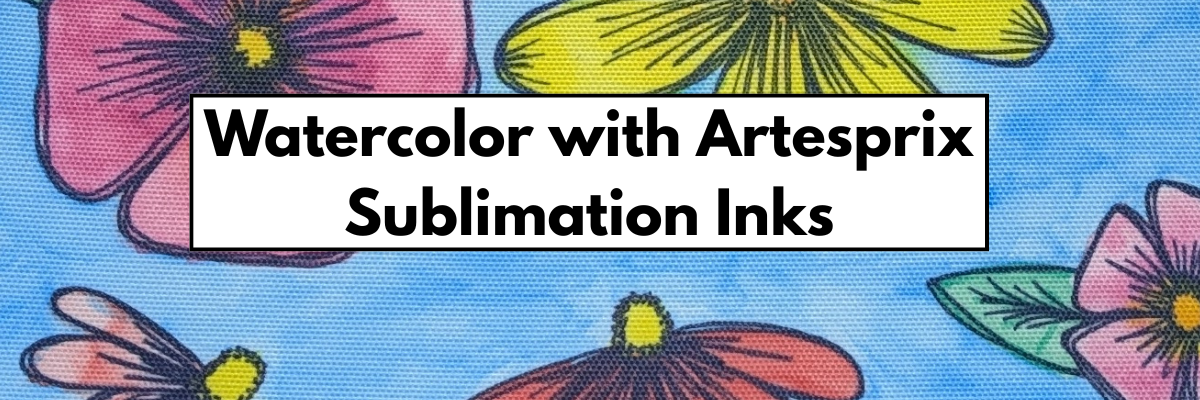
You do not have to be an artist to do this! All you need is the ability to let yourself go and see what you can create. I share tips in the new video that help me create this and allow myself the freedom to just let it go.

Here is a look at watercolor image before I added in the black outlines with the Artesprix black sublimation marker.

The black sketched outline really makes it all pop and come together. Keep in mind that sublimation inks do not show their true colors until they are heat pressed for the full time and temperature. Once pressed, you will see those colors brighten and become vibrant.

Supplies for Custom DIY Watercolor Design Sublimation Tote:

Watch this tutorial HERE on the Artesprix YouTube channel.

I’m completely hooked on crafting with Artesprix products—every time I use them, my creativity sparks and fresh project ideas start flowing! Combine using Artesprix with your cutting machines or just allow yourself to play all on your own. There are so many possibilities.

I would highly recommend just playing around and see what you create, but if you just don’t feel comfortable drawing freehand, you can always set up your cutting machine to sketch with a pencil too.

Here is a sample I did using a mechanical pencil using a Flower Sketch design.

A Silhouette cutting machine set up on a table with a pencil in one of its slots, ready for sketching a design on paper.

Since it is pencil, it is harder to see. Here is a close up of this sketch flower design.

Close-up of a silhouette cutting machine, with a faint outline of a flower design on the paper below.

Since pencil does not transfer to the sublimation blank, I’m not worried about the drag marks, but you could adjust and play with settings to get it just right if you wanted. When using pencil, keep in mind that it will dull quickly, but you can always send it back through again as long as you do not unload the cutting mat.

Sketching with your machine can be done with any pen, marker, pencil that can fit in the pen adapters. Find more resources on sketching with Silhouette HERE and all about sketching supplies HERE.

A vibrant watercolor illustration featuring colorful flowers, including pink, red, and yellow blooms against a light blue background, created on a sublimation tote bag.

This hand drawn design was inspired by Tracy Weinzapfel and her amazing talent as an instructor. I am so glad I signed up for her Fresh Start in Art 5 Day challenge when I saw it.

Check out more of my Artesprix sublimation creations HERE.

I’ll be sharing more so make sure to follow Artesprix on social media to see more projects!
YouTube channel
Blog
Facebook Page
Iron-on-Ink Inspirational Facebook Group

Save this for future reference by pinning the image below.

A custom sublimation tote bag featuring a colorful watercolor design with various flowers, alongside Artesprix sublimation inks and a pen on a wooden surface.

Grab some Artesprix sublimation products and get to creating today!

Enjoy !

THANK YOU for your support! How can you help? Click HERE & buy a coffee.
Every little bit helps with the cost of running the site.

Silhouette Classes

Never stop learning! Let me help you take the anxiety out of learning with Silhouette and get to creating faster! My Silhouette classes are heavily focused on software, so you can take the skills & techniques taught and apply them to many future projects!

Silhouette step-by-step Classes by Silhouette Secrets+

Silhouette Secrets+ with EllyMae
**This post may contain affiliate links. What that means is that I may receive compensation if you purchase through the links I have provided. The price you pay for the product or service is not higher but I may get compensated for sharing.
Posted on Leave a comment

Create a Bright & Fun Custom Apron with Artesprix Sublimation Inks

Custom Apron with Artesprix Inks
Silhouette Secrets+ with EllyMae

Get ready to unleash your creativity with a one-of-a-kind project—no sublimation printer needed! In this tutorial, I’ll show you how I used Artesprix Sublimation Acrylic Paints, a Black Artesprix Sublimation Marker, and stencils to transform a plain apron into a bright, bold, and unique piece of wearable art. The best part? No two aprons will ever be the same, making this a truly custom creation. Whether you’re crafting for yourself or gifting it to a fellow maker, this vibrant apron is sure to make a statement in any creative space. Let’s explore the colorful world of sublimation painting and bring your artistic vision to life!

Affiliate links may be present in the following blog post and as an Amazon Associate I earn from qualifying purchases.

Artesprix Sublimation Acrylic Paints, Markers, and Stencils to Create a Custom Apron

I really wanted to go all in on this project and create a design across the entire white apron. And why not? Let yourself go and have some fun just creating and see what’s possible.

I’ll even admit that I messed up during the process and it wasn’t quite the same vision I has original started with, but it still worked out.

I used the Artesprix Heat Transfer Resist Mask, which has a lot of different ways it could be used. Each time I use it, I think of something new, but that usually is because I did it “wrong” and realize it too late. In this case, my goal was to have the area white underneath the Heat Resists Mask. However, I painted on top of the mask and then did not remove it before pressing, so the paint showed through. It was one of those moments that should have had a camera on my face when I realized what I did, but I just went with the flow and it’s unique.

However, it gave it an interesting and custom look in the end. It’s a good thing I added the sketched outline around it with the Artesprix Sublimation Marker or it wouldn’t have shown at all. That was another idea I was testing out to see how it would look.

Working with the Artesprix Sublimation products has been a great source of enjoyment & experimentation for me. I have learned to just go with the flow and not try to control things as much when creating. See what can happen and you never know… you might like the outcome better than you thought you would.

Here is a look at the full apron design

Artesprix Sublimation Apron Design by EllyMae

A bright colored, artistic art apron that is perfect to protect your clothes when making any mess. Oh wait – that might just be me that needs an apron full time.

Supplies for Custom Art Sublimation Apron:

Full Look at the Artesprix Custom Apron Design

And don’t throw away any extras!!! Save those and you can use that for future projects. Here is a look at my pages I picked up extra paint on and some of the extra stencil designs I had after making my apron.

Artesprix Sublimation Pages for Future Projects

Watch this tutorial HERE on the Artesprix YouTube channel.

I absolutely love crafting with Artesprix products—they never fail to ignite my creativity and inspire new project ideas! Check out more of my Artesprix sublimation creations HERE.

I’ll be sharing more so make sure to follow Artesprix on social media to see more projects!
YouTube channel
Blog
Facebook Page
Iron-on-Ink Inspirational Facebook Group

Save this for future reference by pinning the image below.

Sublimation Apron with Artesprix Sublimation Paints, Markers, and Stencils

Grab some Artesprix sublimation products and get to creating today!

Enjoy !

THANK YOU for your support! How can you help? Click HERE & buy a coffee.
Every little bit helps with the cost of running the site.

Silhouette Classes

Never stop learning! Let me help you take the anxiety out of learning with Silhouette and get to creating faster! My Silhouette classes are heavily focused on software, so you can take the skills & techniques taught and apply them to many future projects!
Silhouette step-by-step Classes by Silhouette Secrets+

Silhouette Secrets+ with EllyMae
**This post may contain affiliate links. What that means is that I may receive compensation if you purchase through the links I have provided. The price you pay for the product or service is not higher but I may get compensated for sharing.
Posted on Leave a comment

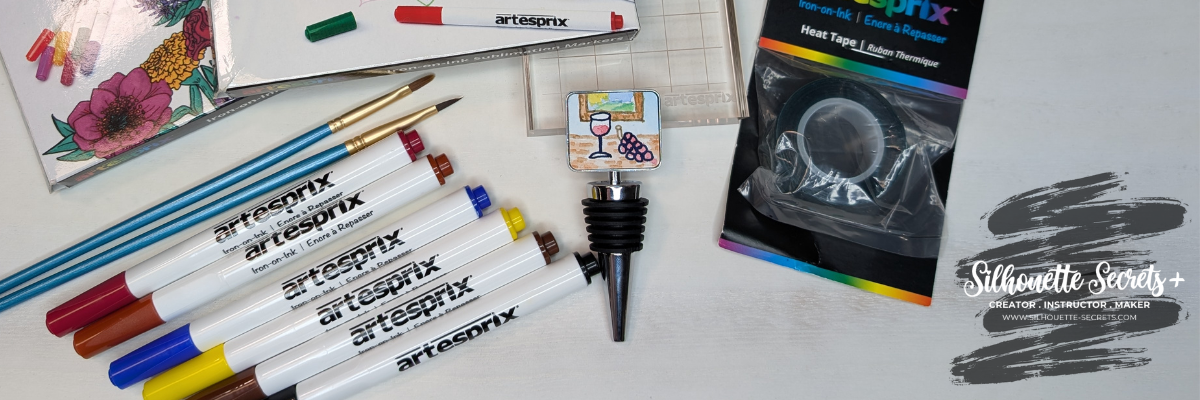
DIY Wine Stopper with Artesprix – Custom Design

DIY Sublimation Wine Stopper with Artesprix
Silhouette Secrets+ with EllyMae

Looking for a fun and easy way to create a custom DIY wine stopper? 🍷✨ In this project, I’m using Artesprix Sublimation Markers to design a one-of-a-kind personalized wine stopper with the Artesprix Sublimation Wine Stopper Blank! Whether you’re making a unique gift or adding a personal touch to your kitchen accessories, this shows you how easy it can be to create your own design.

Affiliate links may be present in the following blog post and as an Amazon Associate I earn from qualifying purchases.

DIY Wine Stopper with Custom Design using Artesprix Sublimation Markers

I recently took a 5 day challenge for a watercolor class held by Tracey Weinzapfel and it was so inspiring. Each night we had a 1 hour live class and she would show us some techniques to just play with. I loved it and sometimes my brain just would not stop thinking of new ideas. This one hit me in the middle of the night and I knew I wanted to try it out.

I can say that there is not another one like this in the world as it was custom drawn by me. But, you do not have to hand draw a design like I did. You can also use small stamps, add textures, paint a design, and more!

DIY Wine Stopper with Artesprix Sublimation Markers

Supplies for DIY Wine Stopper:

Watch this tutorial HERE on the Artesprix YouTube channel.

I absolutely love crafting with Artesprix products—they never fail to ignite my creativity and inspire new project ideas! Check out more of my Artesprix sublimation creations HERE.

I’ll be sharing more so make sure to follow Artesprix on social media to see more projects!
YouTube channel
Blog
Facebook Page
Iron-on-Ink Inspirational Facebook Group

Save this for future reference by pinning the image below.

DIY Sublimation Wine Stopper with Artesprix Markers

Grab some Artesprix sublimation products and get to creating today!

Enjoy !

THANK YOU for your support! How can you help? Click HERE & buy a coffee.
Every little bit helps with the cost of running the site.

Silhouette Classes

Never stop learning! Let me help you take the anxiety out of learning with Silhouette and get to creating faster! My Silhouette classes are heavily focused on software, so you can take the skills & techniques taught and apply them to many future projects!

Silhouette step-by-step Classes by Silhouette Secrets+

Silhouette Secrets+ with EllyMae
**This post may contain affiliate links. What that means is that I may receive compensation if you purchase through the links I have provided. The price you pay for the product or service is not higher but I may get compensated for sharing.
Posted on 3 Comments

DIY Jewelry Pendants with Artesprix Sublimation Inks

DIY Jewelry Pendant with Artesprix Sublimation Inks
Silhouette Secrets+ with EllyMae

Have you ever wanted to create your own custom jewelry with vibrant, professional-looking designs? With Artesprix Sublimation Inks, you can turn your creative ideas into stunning custom jewelry pendant that is truly a one-of-a-kind piece. In this blog post, I’m sharing the simple process of designing and sublimating your own jewelry pieces, perfect for gifts, personal accessories, or even to sell. No matter your experience level, this fun and easy project is sure to inspire your creativity!

Affiliate links may be present in the following blog post and as an Amazon Associate I earn from qualifying purchases.

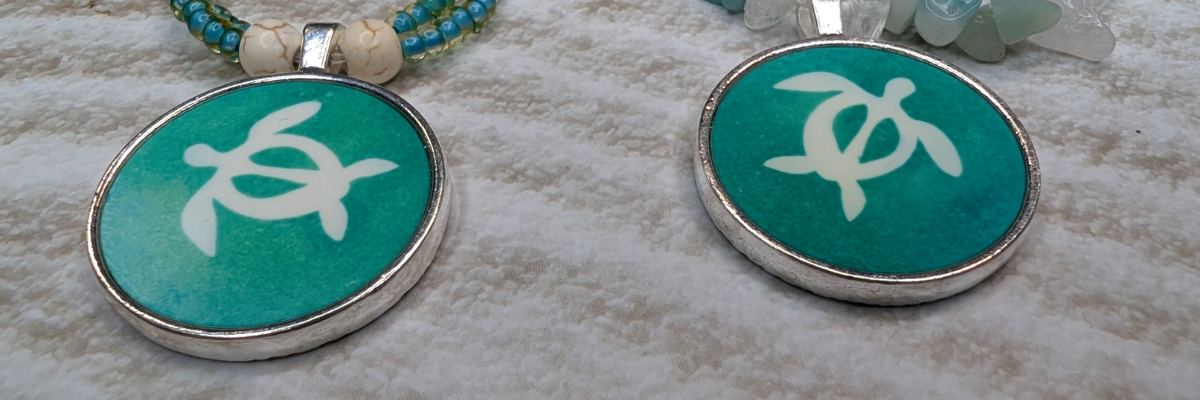
Artesprix Jewelry Pendant with Beaded Necklace by EllyMae at Silhouette Secrets+

The white part of the design is the white of the sublimation blank and is created by using the Artesprix Heat Transfer Resist Mask. Basically it’s a stencil in reverse. The Heat Transfer Mask blocks any of the ink from binding to the sublimation blank and leaves it a bright white.

Silhouette Cameo 5 cutting Artesprix Heat Transfer Resist Mask

I cut the Heat Transfer Resist Mask with the Silhouette Cameo 5 using a Blade depth – 2, Force – 14, and speed 5 cut this design beautifully. I would highly recommend test cutting to get the best cut settings for use with your machine and blade. My blade is older and well used, so it did use more force than a brand new blade would.

Here is a close up look at the finished custom jewelry pendant.

Artesprix Jewelry Pendants by EllyMae

I LOVE them! Love the colors that turned out and I also combined my new hobby of beading to complete these projects.

Supplies for DIY Custom Jewelry Pendant:

Watch this tutorial HERE on the Artesprix YouTube channel.

I absolutely love working with Artesprix products—they always spark my creativity and inspire endless ideas for future projects. You can explore more of the projects I’ve created with Artesprix sublimation products HERE.

I’ll be sharing more so make sure to follow Artesprix on social media to see more projects!
YouTube channel
Blog
Facebook Page
Iron-on-Ink Inspirational Facebook Group

Save this for future reference by pinning the image below.

Sublimation Jewelry Pendant by Artesprix

Grab some Artesprix sublimation products and get to creating today!

Enjoy !

THANK YOU for your support! How can you help? Click HERE & buy a coffee.
Every little bit helps with the cost of running the site.

Silhouette Classes

Never stop learning! Let me help you take the anxiety out of learning with Silhouette and get to creating faster! My Silhouette classes are heavily focused on software, so you can take the skills & techniques taught and apply them to many future projects!

Silhouette step-by-step Classes by Silhouette Secrets+

Silhouette Secrets+ with EllyMae
**This post may contain affiliate links. What that means is that I may receive compensation if you purchase through the links I have provided. The price you pay for the product or service is not higher but I may get compensated for sharing.
Posted on Leave a comment

How to Sublimate a Baby Bodysuit Using Artesprix Markers, Stencils, and Inks

Artesprix Sublimation Inks Custom Baby Bodysuit
Silhouette Secrets+ with EllyMae

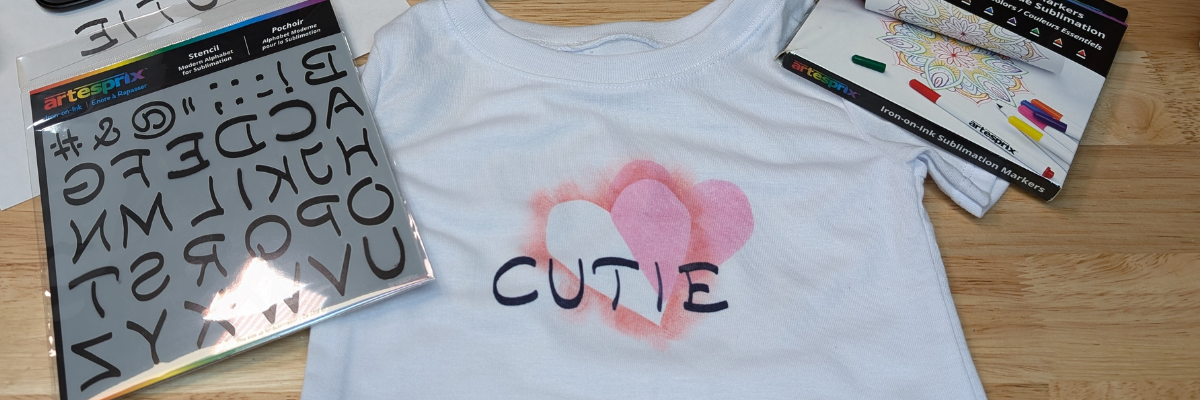
Looking for a fun and creative way to make a personalized baby bodysuit with sublimation? In the latest project video on the Artesprix channel, I’m showing you step-by-step how to sublimate an adorable baby bodysuit using Artesprix Sublimation Markers, Stencils, and Inks. Whether you’re crafting a unique gift for a baby shower, making something special for your little one, or just exploring sublimation techniques, this project is easy, beginner-friendly, and oh-so-cute! I’ll also share all the supplies you need to create your own, so you can get started right away.

Custom Baby Bodysuit with Artesprix Sublimation Inks & Stencil

Affiliate links may be present in the following blog post and as an Amazon Associate I earn from qualifying purchases.

Supplies for Custom Sublimation Baby Bodysuit:

Watch this tutorial HERE on the Artesprix YouTube channel.

I absolutely love working with Artesprix products—they never fail to ignite my creativity and inspire countless ideas for future projects. Find more projects I’ve created using the Artesprix sublimation products HERE.

I’ll be sharing more so make sure to follow Artesprix on social media to see more projects!
YouTube channel
Blog
Facebook Page
Iron-on-Ink Inspirational Facebook Group

Save this for future reference by pinning the image below.

Sublimation Bodysuit with Artesprix Sublimation Inks, Stencil & Marker Pinterest

Grab some Artesprix sublimation products and get to creating today!

Enjoy !

THANK YOU for your support! How can you help? Click HERE & buy a coffee.
Every little bit helps with the cost of running the site.

Silhouette Classes

Never stop learning! Let me help you take the anxiety out of learning with Silhouette and get to creating faster! My Silhouette classes are heavily focused on software, so you can take the skills & techniques taught and apply them to many future projects!

Silhouette step-by-step Classes by Silhouette Secrets+

Silhouette Secrets+ with EllyMae
**This post may contain affiliate links. What that means is that I may receive compensation if you purchase through the links I have provided. The price you pay for the product or service is not higher but I may get compensated for sharing.
Posted on 1 Comment

DIY Custom Apron Project: Using Artesprix Sublimation Markers, Paints, and a Silhouette

Artesprix DIY Apron with Sublimation
Silhouette Secrets+ with EllyMae

If you’re looking to add a personal touch to your kitchen or craft space, creating a custom apron is a fun and creative way to do so! In this DIY project, I’m sharing how I designed and create a one-of-a-kind apron using Artesprix Sublimation Markers, Sublimation Paints, and a Silhouette Machine. Whether you want to add a quirky quote, a custom graphic, or a colorful design, this technique allows you to create vibrant, long-lasting prints on fabric. Follow along for a step-by-step guide on how to use these amazing tools to bring your unique design vision to life, all while learning some fun sublimation techniques along the way!

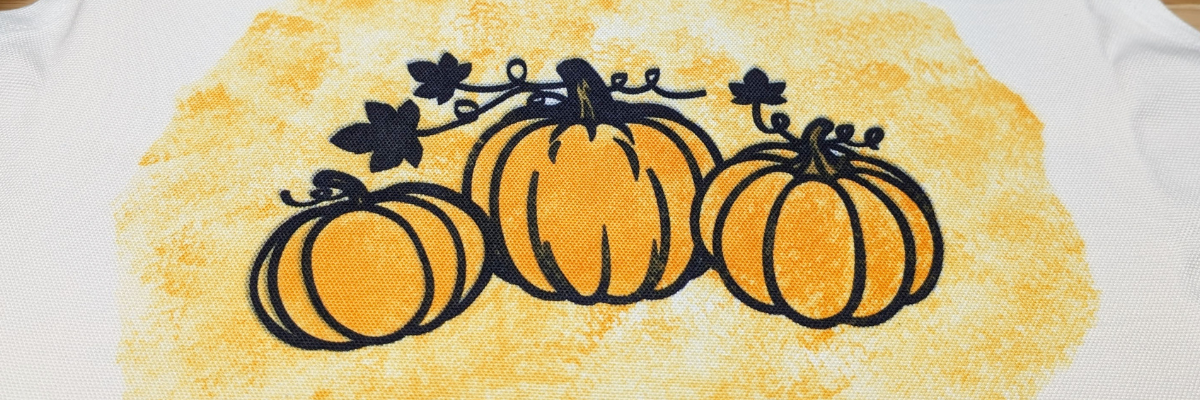
Artesprix Sublimation Apron with Pumpkin Design

Affiliate links may be present in the following blog post and as an Amazon Associate I earn from qualifying purchases.

For this design, I first had the Silhouette machine sketch out the pumpkin design using an Artesprix Black Fine Tip Sublimation Marker.

Silhouette Sketch by Fill Color with Artesprix Sublimation Markers

I had a lot of fun experimenting with the different sketch fills and designs, so I created several extras too!

Check out a quick video of this in action on the Silhouette Secrets+ YouTube channel HERE.

Additional Resources for Sketching with Silhouette

Supplies for DIY Sublimation Apron:

Watch this tutorial HERE on the Artesprix YouTube channel.

Find additional DIY sublimation ideas created with the Artesprix Apron HERE.

I absolutely love working with Artesprix products—they always spark my creativity and leave me inspired with even more ideas for future projects. Find more projects I’ve created using the Artesprix sublimation products HERE.

I’ll be sharing more so make sure to follow Artesprix on social media to see more projects!
YouTube channel
Blog
Facebook Page
Iron-on-Ink Inspirational Facebook Group

Save this for future reference by pinning the image below.

Sublimation Apron with Artesprix Markers & Paint

Grab some Artesprix sublimation products and get to creating today!

Enjoy !

THANK YOU for your support! How can you help? Click HERE & buy a coffee.
Every little bit helps with the cost of running the site.

Silhouette Classes

Never stop learning! Let me help you take the anxiety out of learning with Silhouette and get to creating faster! My Silhouette classes are heavily focused on software, so you can take the skills & techniques taught and apply them to many future projects!

Silhouette step-by-step Classes by Silhouette Secrets+

Silhouette Secrets+ with EllyMae
**This post may contain affiliate links. What that means is that I may receive compensation if you purchase through the links I have provided. The price you pay for the product or service is not higher but I may get compensated for sharing.
Posted on Leave a comment

Create a Custom Sublimation Zip Case with Artesprix Sublimation Markers & Stamp Techniques: Step-by-Step Tutorial

Artesprix Sublimation Stamping Techniques Blog Post
Silhouette Secrets+ with EllyMae

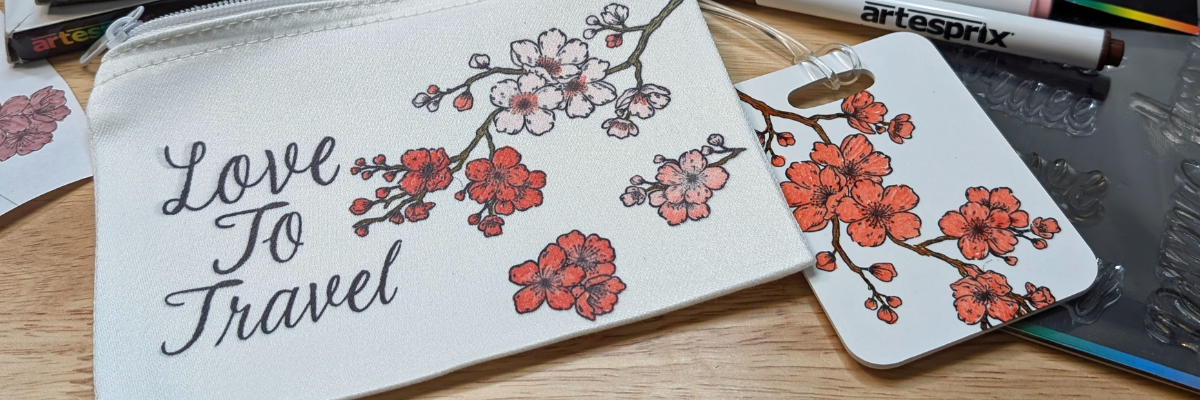
Want to learn a few stamping techniques that can be fun in creating custom designs? I’m sharing several tips in the latest Artesprix YouTube video tutorial that can work whether you are making cards, using sublimation supplies, or other stamping projects.

Artesprix Sublimation Markers & Stamping Techniques

Affiliate links may be present in the following blog post and as an Amazon Associate I earn from qualifying purchases.

I did not have a stamp to make up the word “To”, so I shared some tips in using a stamping technique called “masking” in order to make up the word I needed with the stamps I did have. I wanted the text to match. Find out what went right and what did not along the way in the new video tutorial. I’ve included a list of the supplies I used below.

Supplies:

Watch this tutorial featuring stamping techniques HERE on the Artesprix YouTube channel.

Check out additional ideas created with the Artesprix Canvas Zipper Bag HERE.

I absolutely love working with Artesprix products—they always spark my creativity and leave me inspired with even more ideas for future projects. Find more projects I’ve created using the Artesprix sublimation products HERE.

I’ll be sharing more so make sure to follow Artesprix on social media to see more projects!
YouTube channel
Blog
Facebook Page
Iron-on-Ink Inspirational Facebook Group

Save this for future reference by pinning the image below.

Sublimation with Artesprix using stamping techniques

Grab some Artesprix sublimation products and get to creating today!

Enjoy !

THANK YOU for your support! How can you help? Click HERE & buy a coffee.
Every little bit helps with the cost of running the site.

Silhouette Classes

Never stop learning! Let me help you take the anxiety out of learning with Silhouette and get to creating faster! My Silhouette classes are heavily focused on software, so you can take the skills & techniques taught and apply them to many future projects!

Silhouette step-by-step Classes by Silhouette Secrets+

Silhouette Secrets+ with EllyMae
**This post may contain affiliate links. What that means is that I may receive compensation if you purchase through the links I have provided. The price you pay for the product or service is not higher but I may get compensated for sharing.
Posted on Leave a comment

Alcohol Ink Backgrounds with Grafix Dura-Bright White

Grafix Dura-Bright Alcohol Ink Backgrounds
Silhouette Secrets+ with EllyMae

I had so much fun playing with alcohol inks and the Grafix Dura-Bright White creating a background that I used for several different projects!

Affiliate links may be present in the following blog post and as an Amazon Associate, I earn from qualifying purchases.

This project took on a life of it’s own as I went. I started with the idea to create a card and a bookmark, but ended up letting the art talk to me and see where it went. I love it!!!!

Alcohol Ink Backgrounds for cards, bookmarks, and framed decor with Grafix Dura-Bright.

Anyone can do this! I used alcohol ink and dropped it onto the Dura-Bright White and moved it around with an air blower. While the background was drying, I cut some designs out of Oracal 651 white adhesive vinyl. After the Dura-Bright was fully dry, I cut it up into several sizes for the projects, then added a laminate overlay on top to protect the alcohol ink design. Finished off the designs with the adhesive vinyl decal on top.

Alcohol Ink Background Framed Design with Grafix Dura-Bright White

While creating the intended designs, another idea was born, and I just rolled with it. Now I have a framed piece of art for my desk. I love it!!!!

Additional Resources:

Check out the video on the Grafix Arts YouTube channel where I share how I did this HERE and I’ve included a supply list below too!

Supplies used for Alcohol Ink Backgrounds with Grafix Dura-Bright:

Designs I used in the video:

Save this for future reference by pinning the image below.

Grafix Dura-Bright Alcohol Ink Backgrounds

Enjoy !

THANK YOU for your support! How can you help? Click HERE & buy a coffee.
Every little bit helps with the cost of running the site.

Silhouette Classes

Never stop learning! Let me help you take the anxiety out of learning with Silhouette and get to creating faster! My Silhouette classes are heavily focused on software, so you can take the skills & techniques taught and apply them to many future projects!

Silhouette step-by-step Classes by Silhouette Secrets+

Silhouette Secrets+ with EllyMae
**This post may contain affiliate links. What that means is that I may receive compensation if you purchase through the links I have provided. The price you pay for the product or service is not higher but I may get compensated for sharing.