Posted on Leave a comment

Simple Santa Ornament

Here is another simple ornament made using basic shapes within the Silhouette Studio program.
I created a long rectangle belt after measuring the circumference of my square ornament, which I then cut out of black 651 vinyl.
Then I made 2 squares and used the Subtract all feature to make the belt, which I cut out of silver 651 vinyl. santa-ornament-copy

I then used transfer tape to place the images onto my ornament.

img_4059-1

And added a few clear rhinestones with some E6000 glue and you have a simple Santa belt ornament.

img_4062-2

Hope you are able to create something today1


Enjoy !

THANK YOU for your support! How can you help? Click HERE & buy a coffee.
Every little bit helps with the cost of running the site.

Looking for more in-depth, step-by-step classes, check out all of my online Silhouette classes on my Teachable site HERE.

SS Logo snip it
**This post may contain affiliate links. What that means is that I may receive compensation if you purchase through the links I have provided. The price you pay for the product or servic
Posted on 3 Comments

Personalizing items

As I approached my first instruction class, I wanted to create a Demo book to show interested Silhouette customers projects that I had completed with my Silhouette Cameo.

img_4033

I took the new Sea Glass photo album from Close to My Heart and decided to add some vinyl to the front cover to personalize it a bit.

img_4043

I took some Oracal 631 Black vinyl, even though it’s temporary, I have great luck with it sticking and if I want to re-design it, I can just peel it off and stick a new one on.
I used the hinge method to apply it to get it positioned where I wanted on the album.
By doing this, you apply a piece of painter’s tape across the center to secure it on the album. Then, lift one half of the vinyl up & peel the backing off and cut the extra backing off.
Then you can lay the vinyl down on the album and burnish to your album.

img_4045

Then you can remove the painter’s tape and are able to work with the other half of the design.

img_4047

Remove the rest of the backing and you can smooth down the vinyl to your album.

img_4048

Burnish it down really well and slowly peel back the transfer tape. This one did take a little bit of finesse to get it off the transfer tape.

img_4049

I ended up applying this design in two pieces as my first cut of my logo was a bit too delicate and didn’t cut correctly. I just changed the font style and cut it again.

img_4050

The finished project turned out great and it shows customers…. the Possibilities really are endless!!!

img_4051

What can you create with a little bit of vinyl?

ss_signature-copy

Posted on 1 Comment

Stencils with the Silhouette

I knew you could do it… but I’d never done it…. then I opened my mouth & volunteered to make stencils for my son’s preschool class fundraiser…..
After my offer was confirmed, I started researching…. usually I would recommend doing it the other way around and volunteering for something that you already know for sure you can do….. But, that’s another story.
My first idea was to use my Cameo machine & cut stencils from chipboard…. we were applying them to flower pots and it was for preschool & younger children.
Then I started looking into it and thought there would be better materials to use….
Amazon Prime to my rescue… I ordered some Silhouette Stencil material and a box of laminating pouches.

After my supplies were delivered, I broke out my laminating machine I picked up many, many years ago…. Had to blow some dust off that box!
Once heated up, I ran the laminating sheets through the machine and it became a hard plastic “stencil” material. This was still flexible enough to apply to a round surface, like the pots we were using.
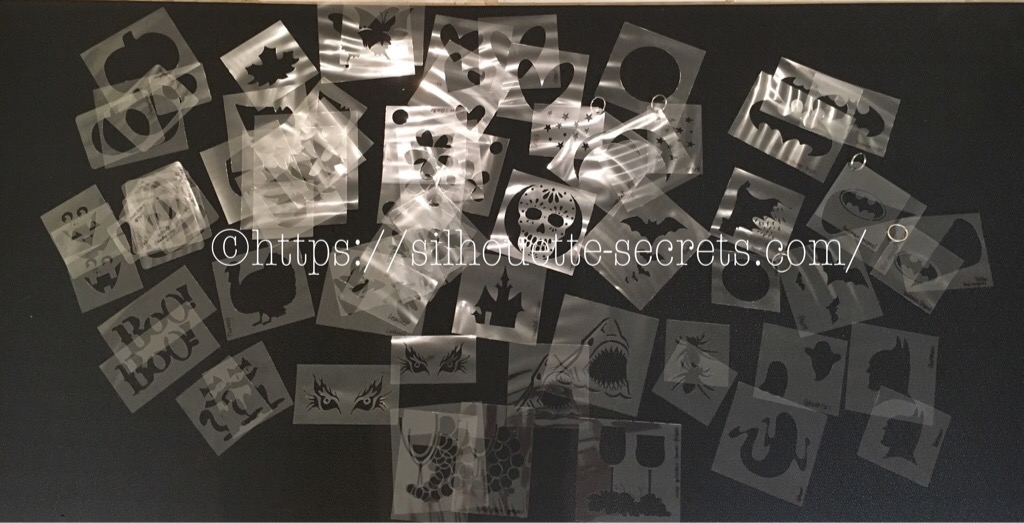
Then I got to work cutting lots & lots of designs from my Silhouette library and other things I traced or drew myself.

img_3692-2

img_3695-2

I had to make a demo pot to make sure the stencils would work…. There was some bleed through… but less paint is better!!

And I may have gone a bit crazy with the stencils I made… at least I thought I might have.
I was so worried the day of the event that these wouldn’t work & no one would want to use them…. but, I was wrong… everyone LOVED them!
It turned out wonderful and so many  pots were painted with unique designs….

It was great seeing people take the stencils and make their own designs and have a keepsake to take home with them.

img_3729

There are so many possibilities to create using your Silhouette Cameo and this machine amazes me at what materials it can cut… I am forever testing it out!

ss_signature-copy