Welcome back! Today we are talking something that I love to do – Print & Cut.
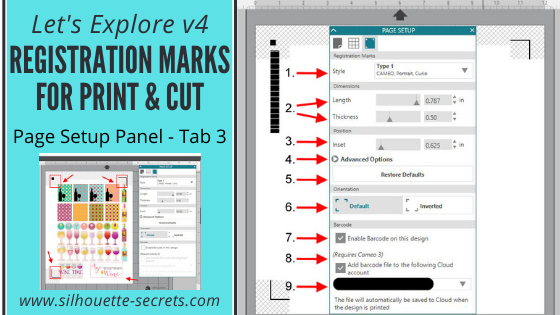
We have explored Tab 1 – Page Setting and Tab 2 – Grid setting the last two weeks and now it’s time to talk Tab 3 – Registration Marks. On the Page Setting Panel, the 3rd tab over is your Registration marks tab and you only use these when doing a Print and Cut project.
Tutorial written in v4.1.206
For software version v4.3+ check out this post HERE for updated information.
Registration Marks
Affiliate links may be present in the following blog post and as an Amazon Associate I earn from qualifying purchases.
First you will need to set your page size. If you have a printer that will only print Letter Size, then you need to change your Page Size to “Current Printer” (check out the Page Settings post on changing Page Size). This will adjust your page size down to the exact area that you can print. Turn your Orientation to the Portrait Orientation and it also helps to check the box next to ‘Show Print border’ and ‘Show Cut Border’.

Now, we are ready to click on the 3rd tab on the Page Setup Panel.

I first want to start out with a warning. While you can change a lot of the options on the Print and Cut, I highly recommend that you try cutting at the Default settings first and get to know the Print and Cut features before you go changing too many things.
I have great success with just the default settings and find I don’t have to change them, even though it is possible.
1 – Style – Under Style you have 3 options: Off, Type 1 & Type 2. Almost all users will choose the Type 1 option. Type 2 is only used for the Original or SD machines which are rare, they do still exist and are still going strong, but only a few users.
Choose Type 1 – Cameo, Portrait, Curio.
2 – Length & Thickness – You can change the length and thickness of the Registration marks. Below I have shown 2 examples of changing the measurements and you can see the marks in the bottom left & top right change.


3 – Inset – Here you can change the placement of the Registration marks. The higher the number, the closer it moves to the Center of your page.
4 – Advanced Options – If you click on this, it will open up more options for you to change the Inset dimensions.
5 – Restore Defaults – This is probably my favorite. This will reset anything you have changed to the Defaults of the original Print and Cut. Length at 0.787 in, Thickness at 0.50 in and Inset at 0.625 in. So if you get a wild hair to change things, you can always go back to basics and click on ‘Restore Defaults’ to change it back.
6 – Default vs Inverted – This will change the direction of where the Print and Cut is placed on your mat. Notice the direction of the arrow on the cutting mat, Inverted places it on the opposite corner of the mat & moves the registration marks on the page.


7 – Enable Barcode on this Design – This adds a barcode to the side of your page and it stores all of the cut settings data in the bar code that the Cameo 3 will read.
This is a Business Edition upgrade feature only.
8 – Add Barcode file to the following Cloud account – Check this and the information will be saved to your Cloud account.
9 – Email address – this is the cloud account email address that the file will be saved to when you print it.
Some tips for Print and Cut:
Start with the default settings and print the file from there first.
The design cannot be in any of the cross hatched areas of the Print and Cut screen. This is the area that the Optical scanner needs to read on the paper and if the design is in that area, then you may get a registration error.
You only need the Registration marks on if you are doing a true Print and Cut project, by printing first through your printer and then cutting the image with your Cameo.
The ‘M’ key on the keyboard toggles the Registration marks on and off. You can turn them on very easily without realizing it.
Feed the paper into the printer one sheet at a time.
If you have a tray or feed multiple sheets into the printer and print multiple copies of the page at once, the printer can pull it in too early or too late compared to the first print and this can affect where the print is on the page. This can give you a registration mark error.
So let’s check out my example. This is a design I purchased from the Silhouette store called Wine Themed Planner Stickers by Sandi Idleman Design #205613.
I can tell right away that if I sent this to print there will be issues.

I opened the file and know that I have to turn my registration marks on.
As you can see the alignment is off. There are areas of the design that are in the cross-hatched areas of my print and cut and the entire design is a bit too large for my print and cut area. So I will need to Select All and resize everything.

I have some Silhouette Clear Sticker paper so I’m going to load that in my printer and then click on the Printer icon in the top left tool bar.

Here is my printed page.

And I am ready to place my design on my mat and click on the Send tab. When you place your printed image on the cutting mat, you want to make sure that you place it in the exact same location that you have it on your Design screen, in the top left corner.
Choose Sticker paper – Clear in my Cut settings & double check that all my cut lines are how I want them. And then load my mat, do a test cut to make sure my settings are correct and then click Send.

And it cut beautifully!

Now I have some wine sticker for my planner.
Have you used the Print and Cut feature?
Tell me what you have used it for below in the comments.
Hope you enjoyed today’s overview of the Page Settings – Registration Marks tab!
Check out the entire “Let’s Explore v4” series HERE.
I would love to see what you are creating! Feel free to post on my Facebook group at Silhouette Secrets with EllyMae.
Save this for future reference by pinning the image below.

Enjoy !

THANK YOU for your support! How can you help? Click HERE & buy a coffee.
Every little bit helps with the cost of running the site.
Looking for more in-depth, step-by-step classes, check out all of my online Silhouette classes on my Teachable site HERE.


 Now in the photo below, I have chosen Cutting Mat ‘None’ and I want to point out a few differences. You will see that the Cut border (red line) starts immediately at the top of the page. If your design is right at the top of the design mat, when you load your vinyl, it will begin cutting exactly where you have placed it on your screen.
Also note, the Cut border on the left & right side. You lose about 1/4″ of cuttable space on both sides of your vinyl when you cut with no mat. This is the allowance that the machine needs to grip the vinyl in the machine. And you will see the Cut border end approximately 1″ from the back end of the page size, this is again cuttable space that is lost so the machine can hold that vinyl in the machine to finish the cut.
Now in the photo below, I have chosen Cutting Mat ‘None’ and I want to point out a few differences. You will see that the Cut border (red line) starts immediately at the top of the page. If your design is right at the top of the design mat, when you load your vinyl, it will begin cutting exactly where you have placed it on your screen.
Also note, the Cut border on the left & right side. You lose about 1/4″ of cuttable space on both sides of your vinyl when you cut with no mat. This is the allowance that the machine needs to grip the vinyl in the machine. And you will see the Cut border end approximately 1″ from the back end of the page size, this is again cuttable space that is lost so the machine can hold that vinyl in the machine to finish the cut. While you can cut without a mat, I personally prefer to use my mat any time that my material will fit on it. It provides stability and there is less that can go wrong, such as your vinyl sliding.Now, if you do decide to cut without a mat, I would strongly suggest investing in a roll feeder. I just used this for a large cut job and it worked beautifully and I did not have to babysit it as much as without.
Here is what that looks like:
While you can cut without a mat, I personally prefer to use my mat any time that my material will fit on it. It provides stability and there is less that can go wrong, such as your vinyl sliding.Now, if you do decide to cut without a mat, I would strongly suggest investing in a roll feeder. I just used this for a large cut job and it worked beautifully and I did not have to babysit it as much as without.
Here is what that looks like:
 You can find the Silhouette roll feeder